30 cHAPTER 4: Operation
Model 425 Gaussmeter
4.2.2 General Keypad
Operation
The Model 425 uses three basic keypad operations for the majority of operator inter-
face: direct operation, press and hold, and setting selection.
D Direct operation: the key feature occurs immediately when the key is pressed.
DC/RMS, Max Hold, and Relative are examples of keys that operate this way.
D Press and hold: the key feature occurs when the key is pressed and held for approx-
imately 3 s. It is used to modify less frequently changed features. This operation is
described in the individual sections for keys with secondary functions available.
D Setting selection: allows you to select from a finite list of values. During setting
selection the
s and t keys are used to select a value. Enter is used to accept the
change and advance to the next setting. Escape will cancel the change to that
setting and return to the normal display. Setting selection screens always include
the message: Select with
st.
D Numeric data entry: allows you to enter numeric data using the
s and t keys. Low
and high alarm setpoints are examples of parameters that require numeric data
entry. Press
s or t to cycle through the available ranges, the +/- sign, and the
numerals 0 through 9, depending on what is being entered. Press Enter to
advance the cursor to the next position or to save the number and return from
numeric data entry mode if it is in the last position. Press Escape to restart the
number entry or cancel all changes and return from numeric data entry mode if it
is at the first position.
When using numeric entry, the first parameter to be entered is the range. Choose
a range that is appropriate for the number being entered. This affects both the
decimal point location as well as the units multiplier. The next item to be entered
is the sign of the number if the alarm function is set with the algebraic setting
(section 5.2.2). The final item to be entered is the number with five digits of reso-
lution.
Related setting selection and data entry sequences are often chained together under
a single key. To bypass a feature without changing it, press Enter before pressing an
arrow key. To return to the normal display in the middle of a setting sequence, press
Escape before pressing an arrow key. Changes entered before Escape is pressed are
kept.
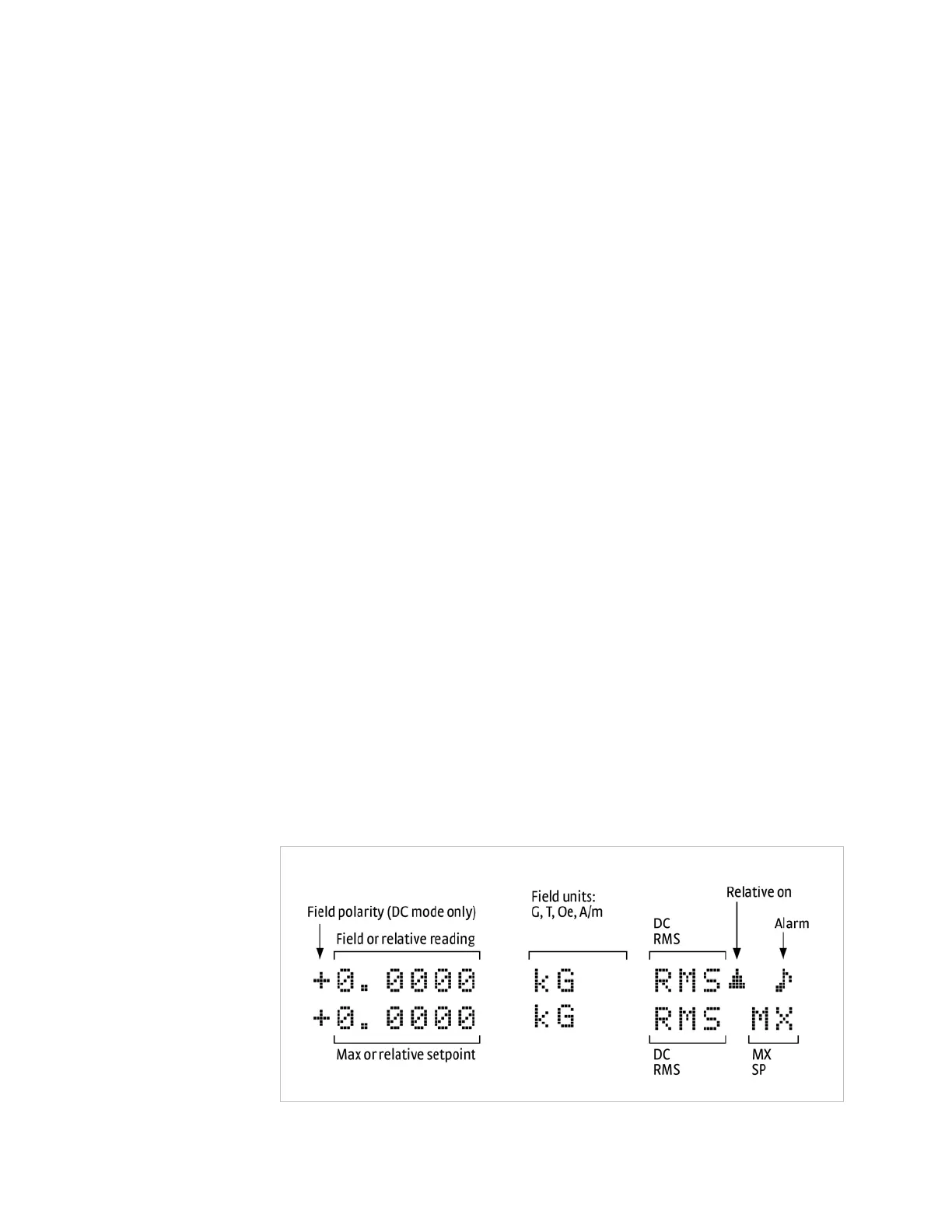
4.3 Display
Definition
This section describes features of the display that appear during normal operation. In
normal operation, the two row by twenty character liquid crystal display (LCD) pro-
vides readings defined by the selected measurement features on the top row and spe-
cial information or readings on the bottom row. Other information displays when
using the various features on the keypad. The computer interface provides readings
at a rate of 30 rdg/s, and the display will update at 3 rdg/s independent of the filter.
FIGURE 4-2 Front panel display definition



 To Next Page