Controls
6
Leica HM500/Ref. 10 715 697/Version B
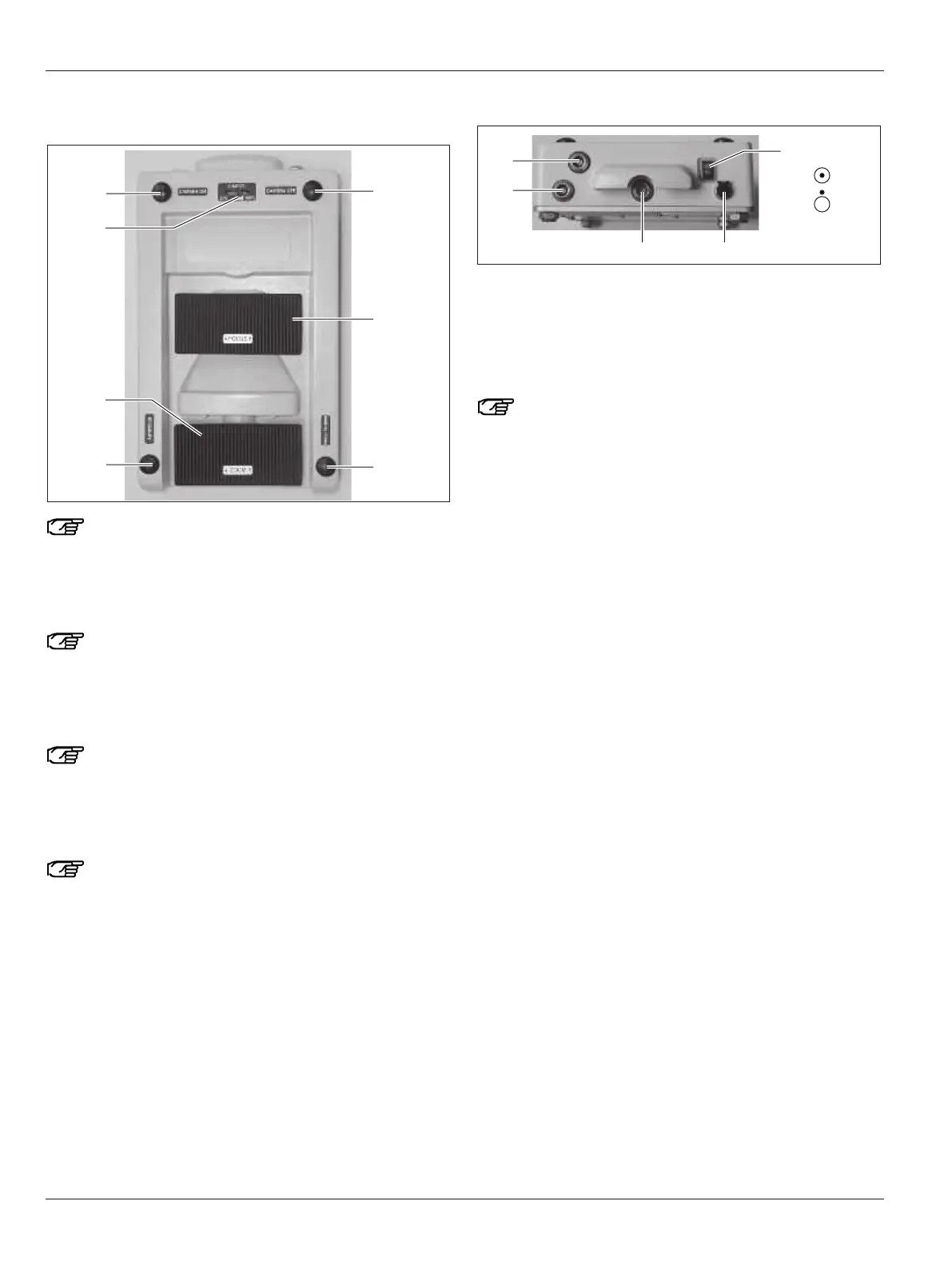
Leica HM500 footswitch
An acoustic signal is given when any button, switch or
rocker switch is operated.
29 Button for camera off
30 Rocker switch for manual focus (+/-)
31 Button for manual focus/speed focus
Holding this down will activate the autofocus
(speed focus function) (see page 27).
32 Button for autofocus
33 Rocker switch for variable zoom (+/-)
34 Charge level indicator
The charge level indicator (34) shows the charge level
of the battery in 20 % steps between 0 % and 100 %. All
5 yellow lights flashing means the battery is fully
charged and is ready again for use.
35 Button for camera on
Holding this down will activate the white balancing
function (see page 16)
Leica HM500 footswitch connections
36 On/Off switch
37 Socket for power pack cable
38 RS232 connection (for default settings)
39 Socket for camera output for example, to the moni-
tor(optional)
40 Socket for microscope-footswitch data cable
Color coding:
green = RS232 connection (38)
blue = camera output socket (39)
black = data cable socket (40)
On
Off


 To Next Page