Video Camera
44 M320 Ref. 10734261 / Version 03 M320 Ref. 10734261 / Version 03 45
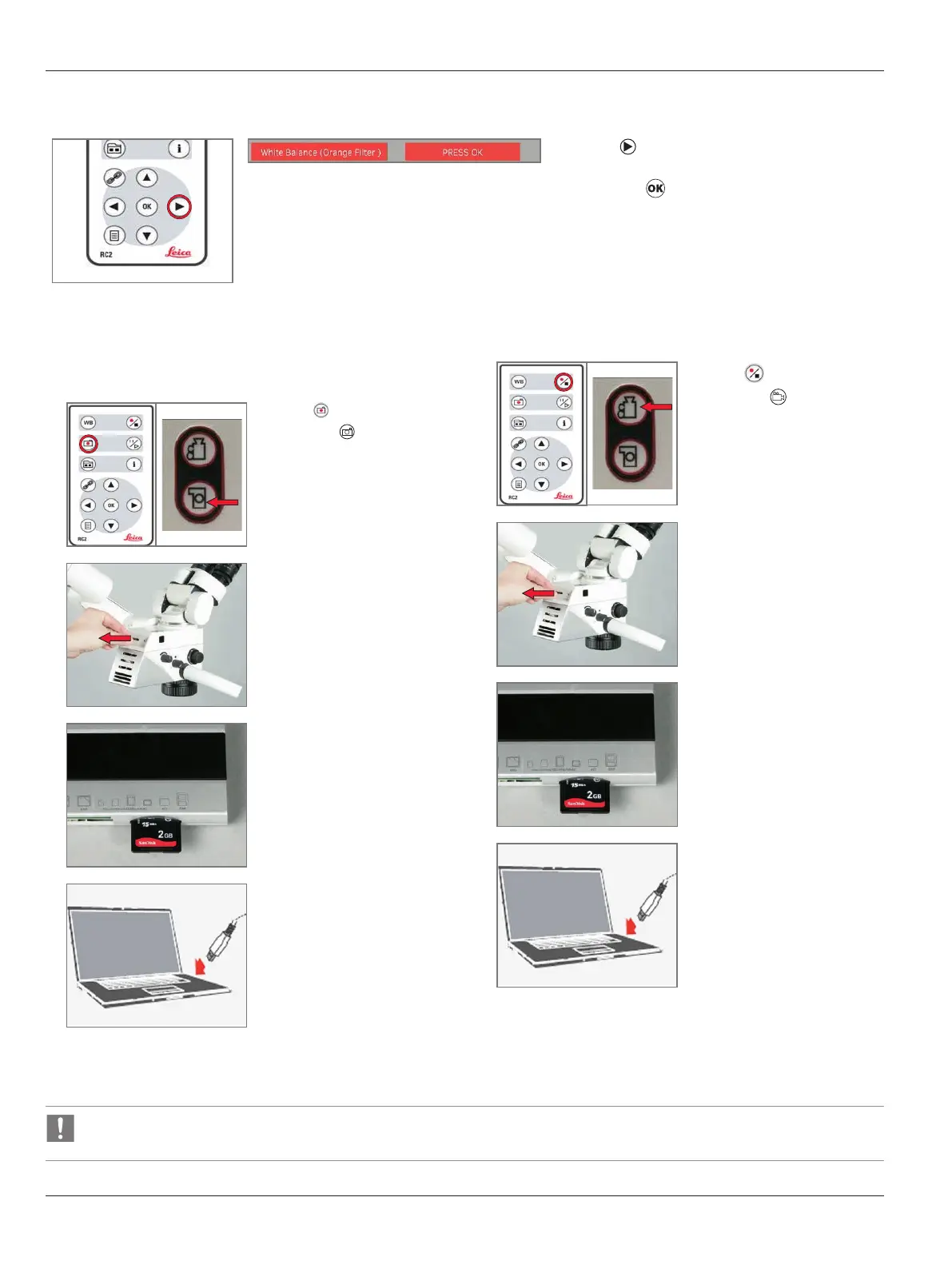
White balance (orange filter)
X
Press to apply the pre-set color profile for
white-balance correction of the Orange Filter
and press
9.4.7 Acquisition
Images
1
X
Press on the remote
control or on the video
camera to capture still
images.
A signal tone sounds.
2
Files can be transferred to PC by:
X
1. Removing the SD card
from the camera and insert
the SD card into the SD card
reader on the computer.
3
X
Entering “FILE TRANSFER
MODE” and the SD card will
appear as “Removable Disk”
on the computer.
Videos
1
X
Press on the remote
control or
on the video
camera to initiate video
recording.
A signal tone sounds.
2
Files can be transferred to PC
by:
X
1. Removing the SD card
from the camera and insert
the SD card into the SD card
reader on the computer.
3
X
Entering “FILE TRANSFER
MODE” and the SD card will
appear as “Removable Disk”
on the computer.
The camera cannot do still capture or recording to SD card while Wifi streaming is enabled.


 To Next Page