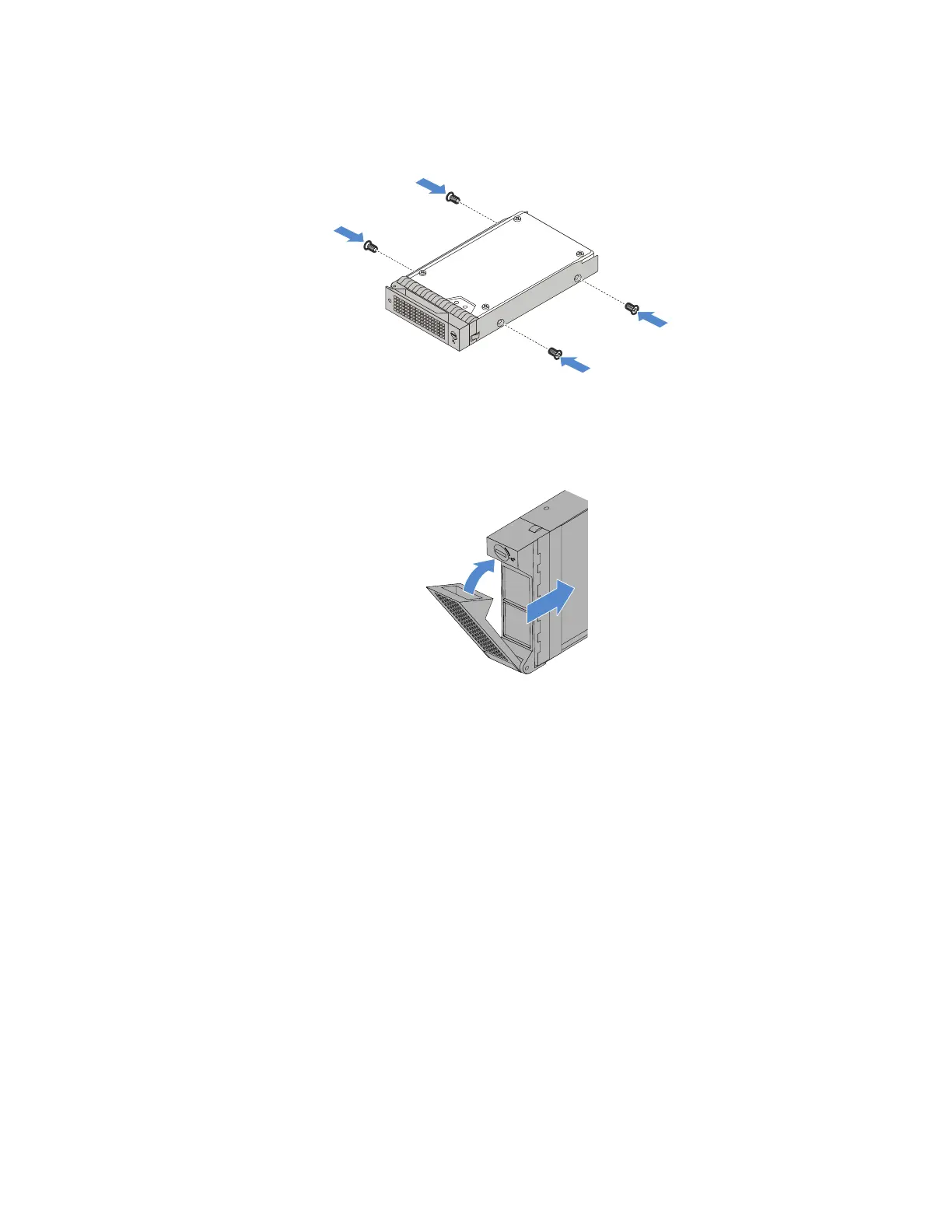
5.Aligntheholesinthedrivetraywiththecorrespondingonesinthenewdrive.Then,installthefour
screwstosecurethedrivetothedrivetray.
Figure36.Installingthedrivetothedrivetray
6.Slidethenewnon-hot-swapdriveintothedrivebayuntilitsnapsintoposition.
Figure37.Installingthedrive
7.ConnecttheSATAsignalcableandpowercabletothenewnon-hot-swapdrive.See“Connecting
cablesforthenon-hot-swapdrives”onpage117.
Tapedrive
YourserversupportsRDXandLTOtapedrives.
•“Removingatapedrive”onpage71
•“Installingatapedrive”onpage72
Removingatapedrive
Toremoveatapedrive,dothefollowing:
1.Prepareyourserverandremovetheservercover.See“Preparingyourserverinadvanceandremoving
theservercover”onpage57.
2.Openthefrontdoor(availableonsomemodels).
3.Then,disconnectthecablesfromtherearofthetapedrive.
Chapter5.Replacinghardware71












 To Next Page