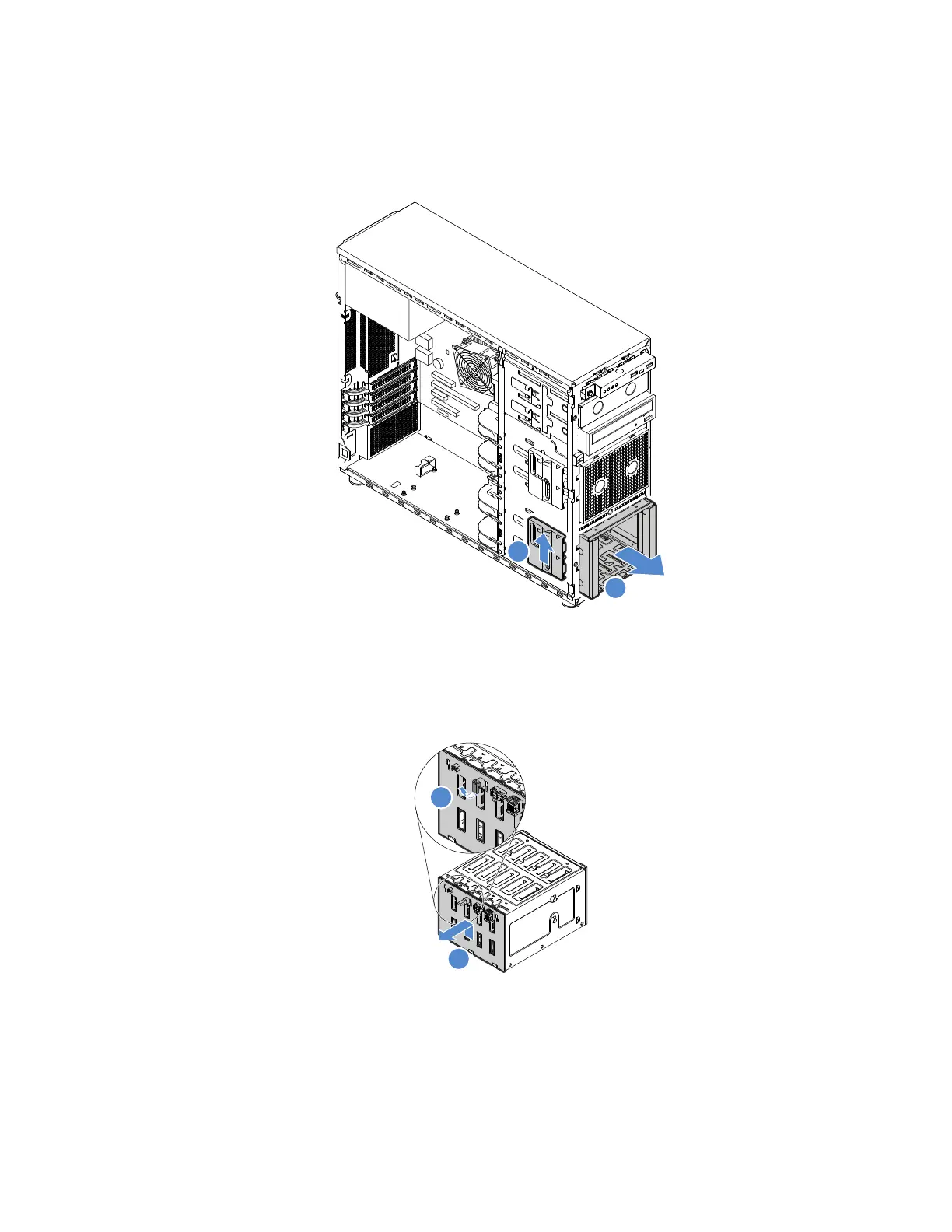
4.Removealltheinstalledhot-swapHDDsanddummytrays(ifany)fromtheHDDcage,thendisconnect
allthecablesfromthebackplane.See“Removingahot-swapdrive”onpage77
.
5.LiftthereleaselatchandslidetheHDDcageoutofthechassis.
Figure52.RemovingtheHDDcage
6.Openthepluggerthatsecuresthebackplane,carefullyliftthebackplanealittlebituptoreleaseitfrom
theHDDcage,andthenremovethebackplane.
Figure53.Removingthebackplane
7.Ifyouareinstructedtoreturntheoldbackplane,followallpackaginginstructionsanduseanypackaging
materialsthataresuppliedtoyouforshipping.
Installingthebackplane
Toinstallthebackplane,dothefollowing:
Chapter5.Replacinghardware83












 To Next Page