Chapter 2. System components
This section provides information to help you locate your DG5000 components.
Front view
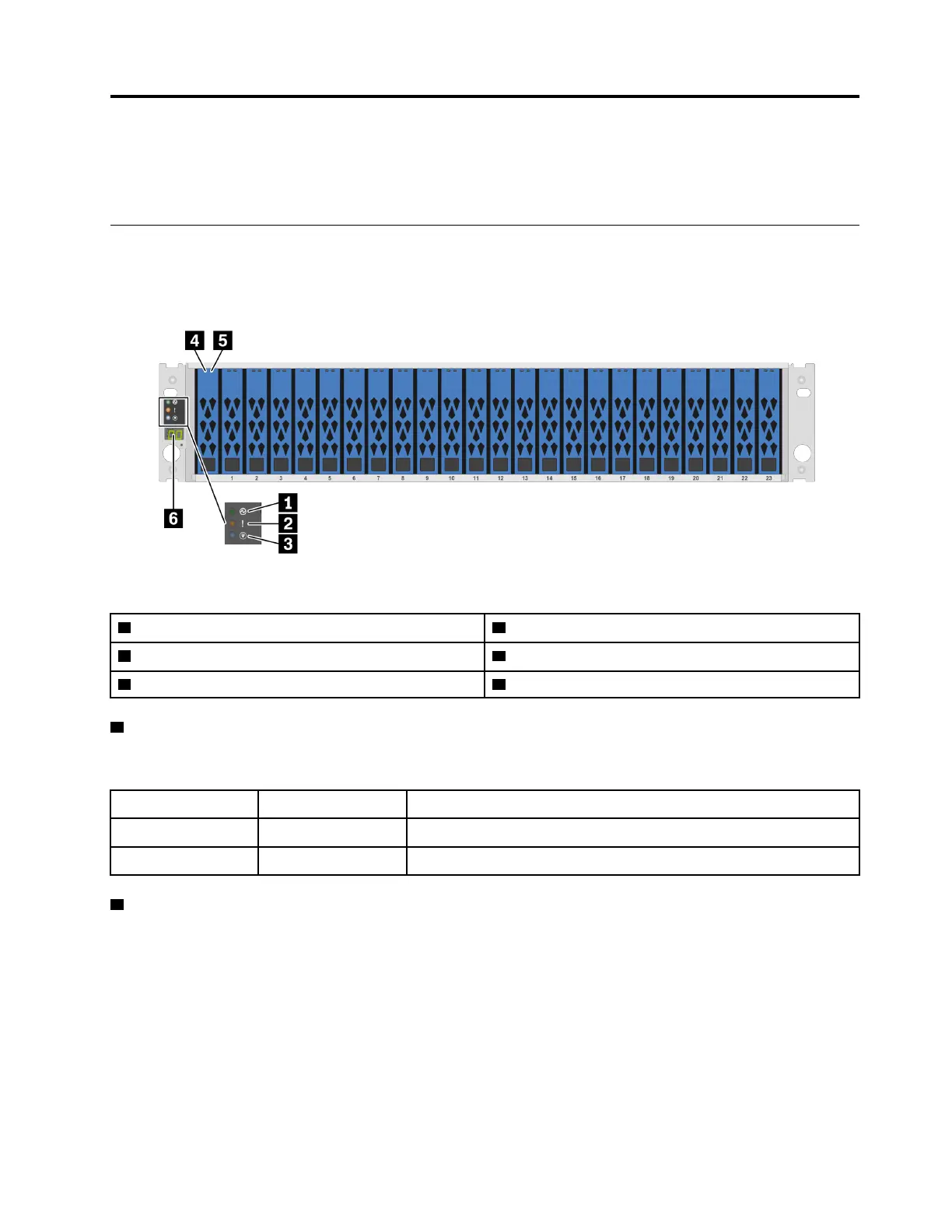
The following illustration shows the front view of the DG5000 with the front bezel removed.
Front view without bezel
Figure 1. Front view without bezel
1 Chassis power LED 2 System attention LED
3 Location LED 4 Drive activity LED
5 Drive fault LED
6 Shelf ID
1 Chassis power LED
The power status LED helps you to determine the current power status.
Status Color
Description
Solid on Green
The system is on and running.
Off
None No power supply is delivering power to the system.
2 System attention LED
The system attention LED provides basic diagnostic functions for your storage system. If the system
attention LED is lit, one or more LEDs elsewhere in the system might also be lit to direct you to the source of
the error.
© Copyright Lenovo 2023 5




 To Next Page