Test system
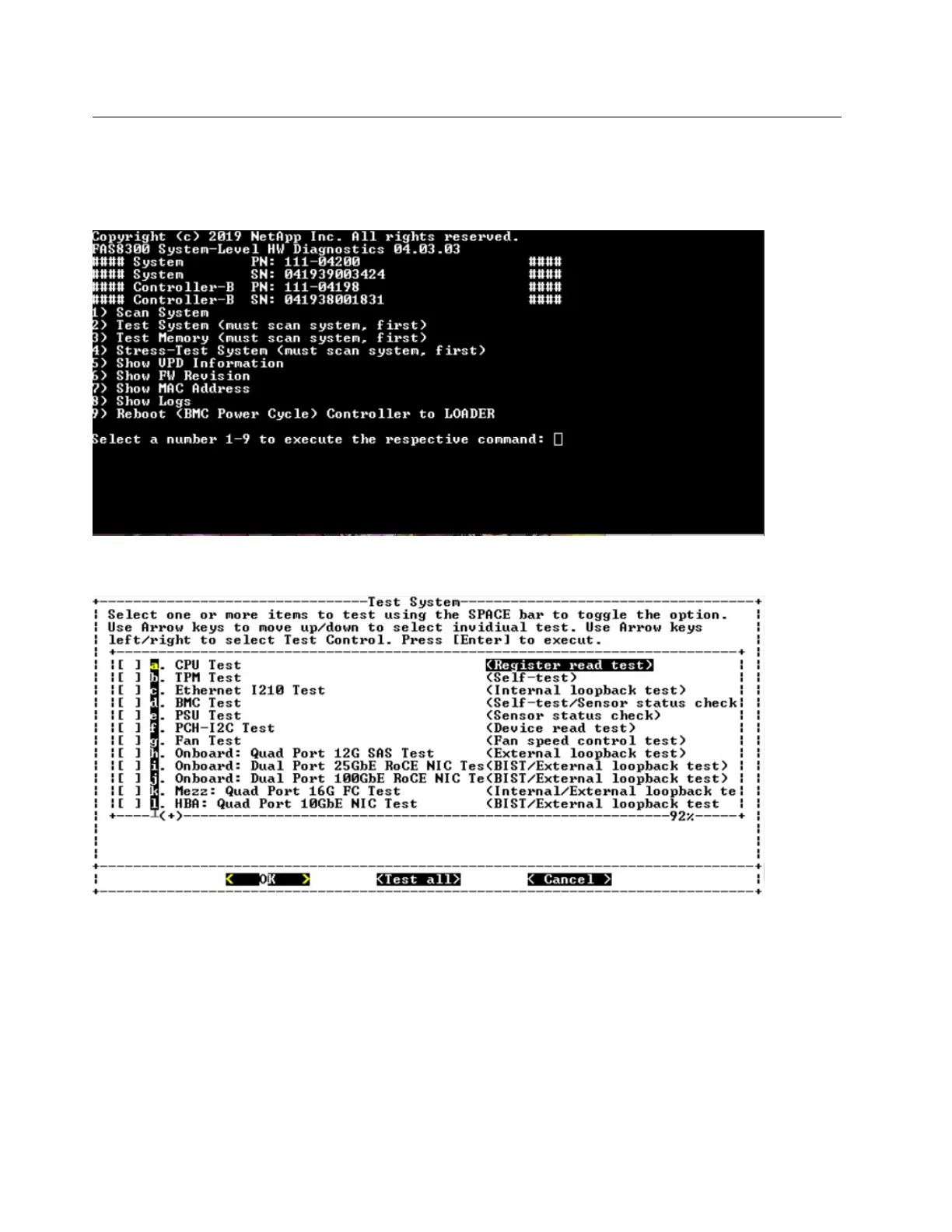
The "Test system" command allows you to specify component-level or system-level testing of the system.
One or more iterations or "loops" can be specified, as well. To execute the "Test System" operation, type "2"
and then press "Enter" to go to the Test System option page.
The Test System page is shown, below:
• Use the "up" and "down" arrow keys to selecttest options (fromoption "a" to option "m").
Note: Scroll down to see all available tests
• Use the left and right arrow keys to select "Run", "Test All" or "Cancel":
• Use the "space" bar to toggle an option on or off.
– Run– Run the selected tests from the Test System page
– Test All– Run all available system tests
– Cancel– Cancel system test and return to the main menu.
• Press "Enter" to execute your choice.
84
ThinkSystem DG5000 Hardware Installation and Maintenance Guide










 To Next Page