If the impaired node is displaying...
Then...
The LOADER prompt Go to the next step.
Waiting for giveback...
Press Ctrl-C, and then respond y.
System prompt or password prompt (enter
system password)
Take over or halt the impaired node:
storage
failover takeover -ofnode impaired_node_name
When the impaired node shows Waiting for
giveback..., press Ctrl-C, and then respond
y.
Removing the controller module
You must remove the controller module from the chassis when you replace a component inside the controller
module.
Make sure that you label the cables so that you know where they came from.
A video for this task is available at:
• YouTube:
https://www.youtube.com/playlist?list=PLYV5R7hVcs-C8THdP1nmPF25RWwGRta3v
Step 1. If you are not already grounded, properly ground yourself.
Step 2. Unplug the controller module power supplies from the source.
Step 3. Release the power cable retainers, and then unplug the cables from the power supplies.
Step 4. Remove the storage and networking cables.
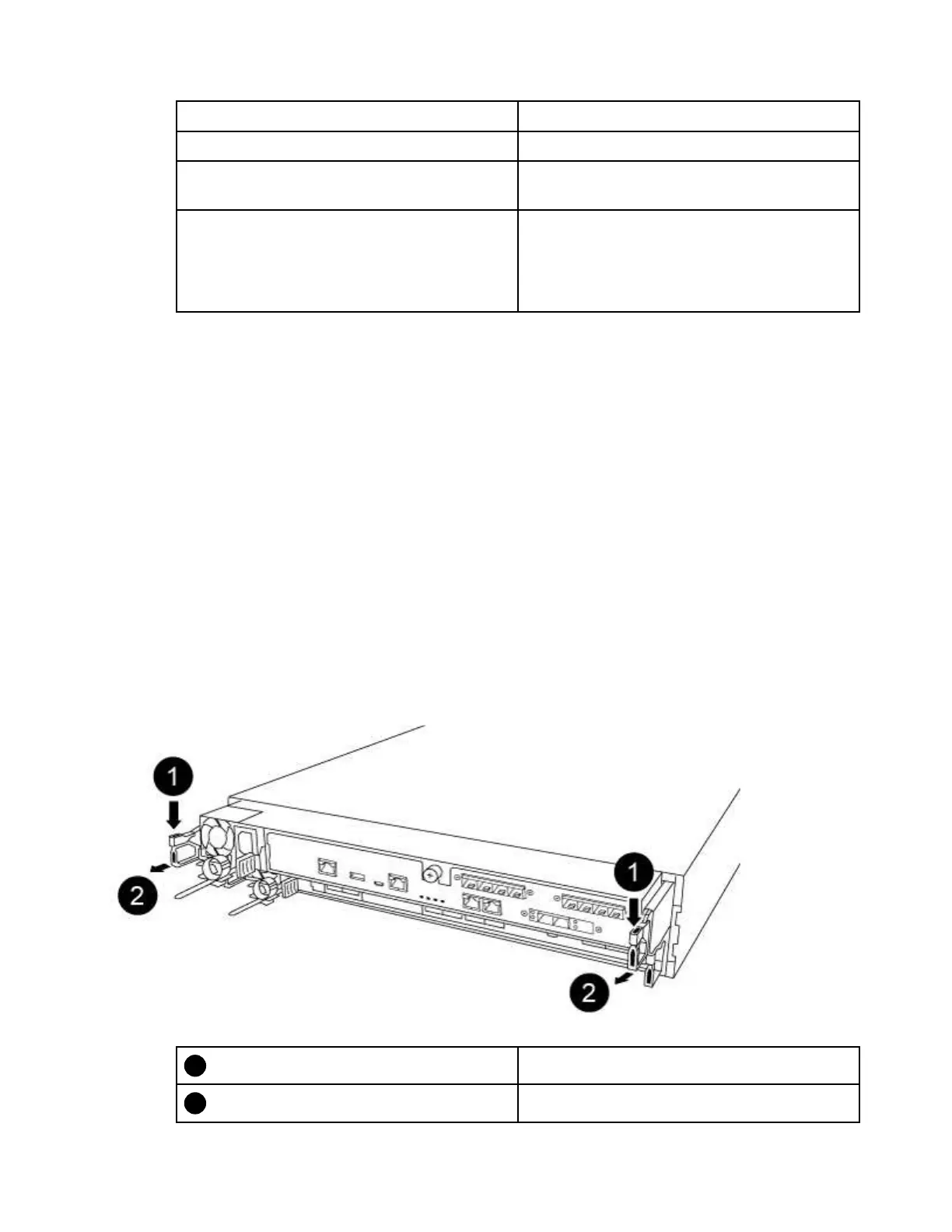
Step 5. Insert your forefinger into the latching mechanism on either side of the controller module, press the
lever with your thumb, and gently pull the controller a few inches out of the chassis.
Note: If you have difficulty removing the controller module, place your index fingers through the
finger holes from the inside (by crossing your arms)
Lever
Latching mechanism
Chapter 4. Hardware replacement procedures 67










 To Next Page