A video for this task is available at:
• YouTube:
https://www.youtube.com/playlist?list=PLYV5R7hVcs-C8THdP1nmPF25RWwGRta3v
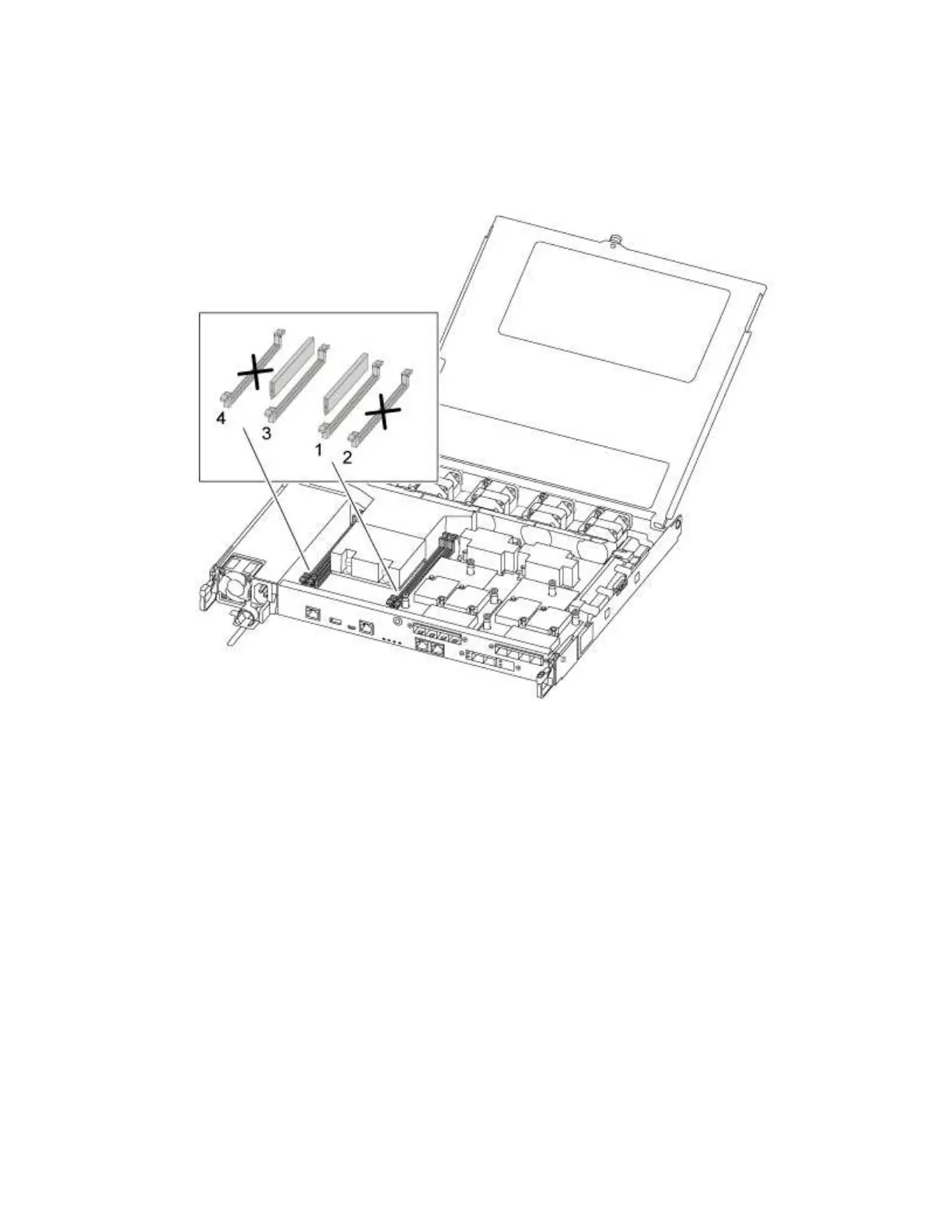
Step 1. Move the DIMMs from the impaired controller module to the replacement controller module:
Important: Install each DIMM into the same slot it occupied in the impaired controller module.
a. Slowly push apart the DIMM ejector tabs on either side of the DIMM, and slide the DIMM out of
the slot.
Attention: Hold the DIMM by the edges to avoid pressure on the components on the DIMM
circuit board.
b. Locate the corresponding DIMM slot on the replacement controller module.
c. Make sure that the DIMM ejector tabs on the DIMM socket are in the open position, and then
insert the DIMM squarely into the socket.The DIMMs fit tightly in the socket. If not, reinsert the
DIMM to realign it with the socket.
d. Visually inspect the DIMM to verify that it is evenly aligned and fully inserted into the socket.
e. Repeat these substeps for the remaining DIMM.
Moving a mezzanine card
To move a mezzanine card, which is also referred to as a host interface card (HIC), you must remove the
cabling and any QSFPs and SFPs from the ports, move the mezzanine card to the replacement controller,
reinstall any QSFPs and SFPs onto the ports, and cable the ports.
A video for this task is available at:
Chapter 4. Hardware replacement procedures 35










 To Next Page