525
6-5. Using the other interior features
6
Interior features
RX350_U_OM48E90U
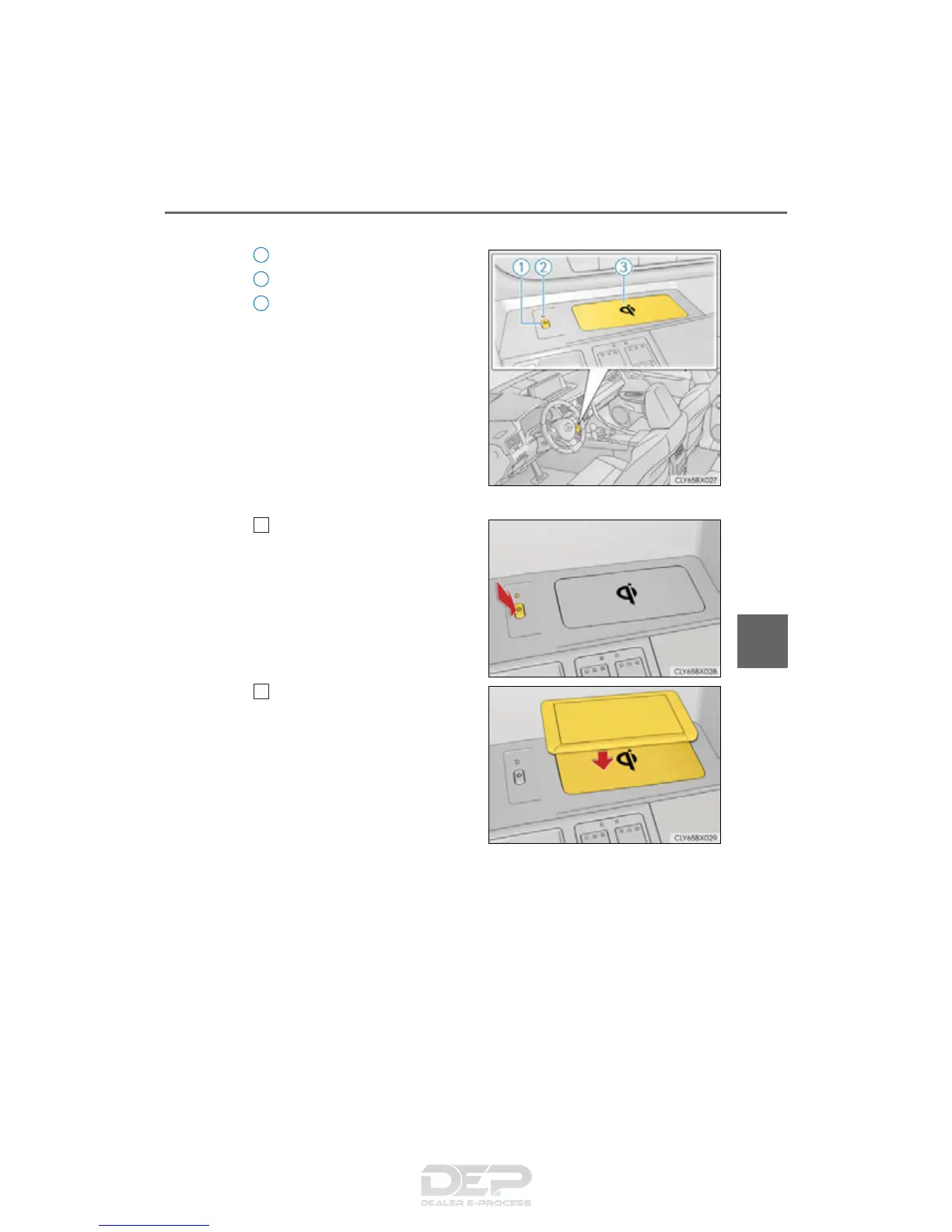
■ Name for all parts
Power supply switch
Operation indicator light
Charge area
■ Using the wireless charger
Press the power supply switch of
the wireless charger.
Pressing the switch again turns the
wireless charger off.
When turned on, the operation indi-
cator light (green) comes on.
When the engine switch is turned off,
the on/off state of the wireless
charger will be memorized.
Place a portable device on the
charging area with its charging
surface facing down.
While charging, the operation indi-
cator light (orange) will be illumi-
nated.
If charging does not begin, move the
portable device as close to the cen-
ter of the charging area as possible.
When charging is complete, the operation indicator light (green) will illuminate.
● Recharging function
• If a certain amount of time has elapsed since charging completed and
the portable device has not been moved, the wireless charger will
restart charging.
• If the portable device is moved within the charging area, charging will
stop temporarily then restart.
1
2
3
1
2



 To Next Page