EasyManua.ls Logo

LG 42PG20D - Page 31

LG 42PG20D
130 pages
Print Icon
To Next Page IconTo Next Page
To Previous Page IconTo Previous Page
Loading...
29
EXTERNAL EQUIPMENT SETUP
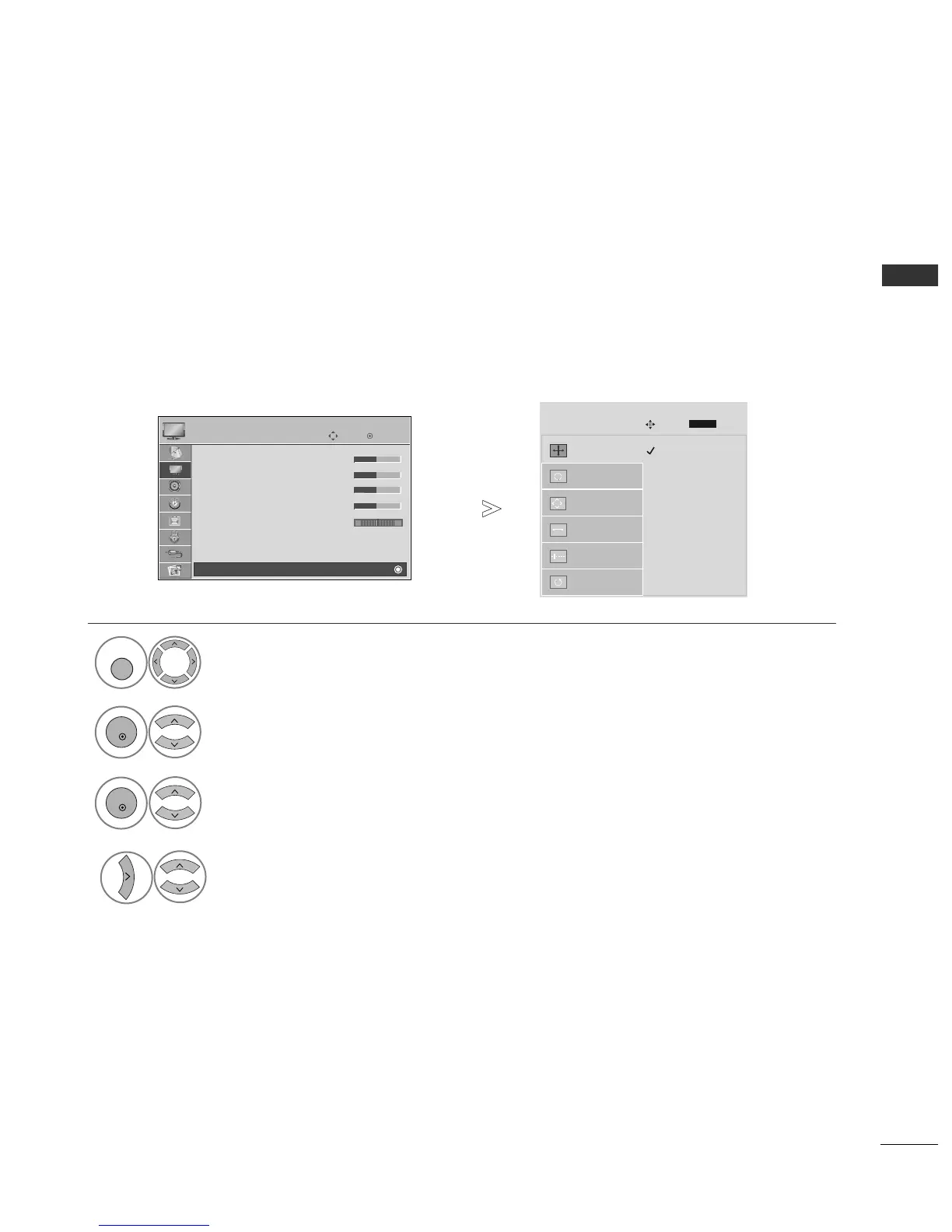
To view a normal picture, match the resolution of RGB mode and selection of PC mode.
This function works in the following mode: RGB[PC]
Selecting Resolution
Select
PPIICCTTUURREE
.
Select
SSCCRREEEENN
.
Select
RReessoolluuttiioonn
.
Select the desired resolution.
1024 x 768
1280 x 768
1360 x 768
Auto Config.
Resolution
G
Position
Size
Phase
Reset
OK
Move
• Contrast 50
• Brightness 50
• Sharpness 50
• Colour 50
• Tint 0
• Advanced Control
• Picture Reset
Screen
PICTURE
E
Screen
SCREEN
Move
Prev.
1
MENU
3
4
2
OK
OK
RG
Press the
MMEENNUU
button to return to normal TV viewing.
Press the
RREETTUURRNN
button to move to the previous menu screen.
RETURN

Table of Contents

Other manuals for LG 42PG20D

Related product manuals