22
OWNER’S INSTRUCTION
ENGLISH
OWNER’S INSTRUCTION
23
ENGLISH
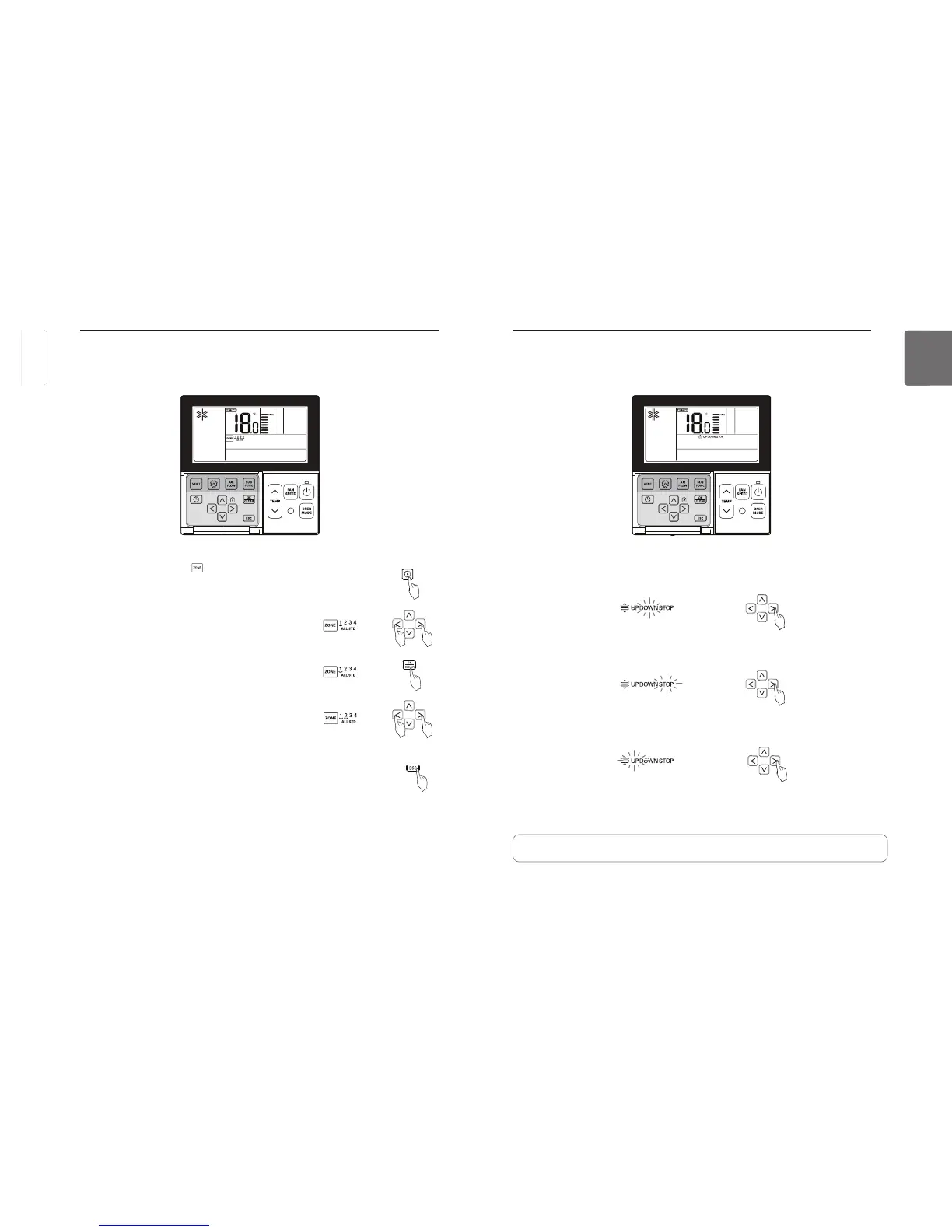
Function setting - Elevation Grill
This function is to run the elevation grill to clean the filter of indoor unit.
icon is blinking.
Move to DOWN using
button. DOWN icon displays and the elevation
grill will descend.
When the elevation grill descends to the desired point, move to ‘Stop’ icon using
button to stop the elevation grill.
When filter cleaning is finished, fix the filter to the gill, and move to UP icon using
button to ascent the elevation grill.
Press
button to exit after setup.
If no button is selected for about 60 seconds after setup, it exits the elevation grill mode automatically.
If Set button is not selected before you exit, the changes will not apply.
• The elevation grill function is available only in the indoor unit with a built-in elevation grill.
Function setting - Zone Control
You can turn on/off the zones by used of it.
button repeatedly until icon flash.
Press
button to select the zone that which one you want to
turn on/off.
Press
button to turn on/off zone.
Press
button to select other zones if you want.
Then, Press
button to turn on/off that zone as mentioned
above.
Press
button to exit or system will automatically release
without any input after 60 seconds.
When exiting without pressing set button, the manipulated
value is not reflected.
ENGLISH



 To Next Page