6
PART DESCRIPTION
ENGLISH
INSTALLATION INSTRUCTION
7
ENGLISH
PART DESCRIPTION
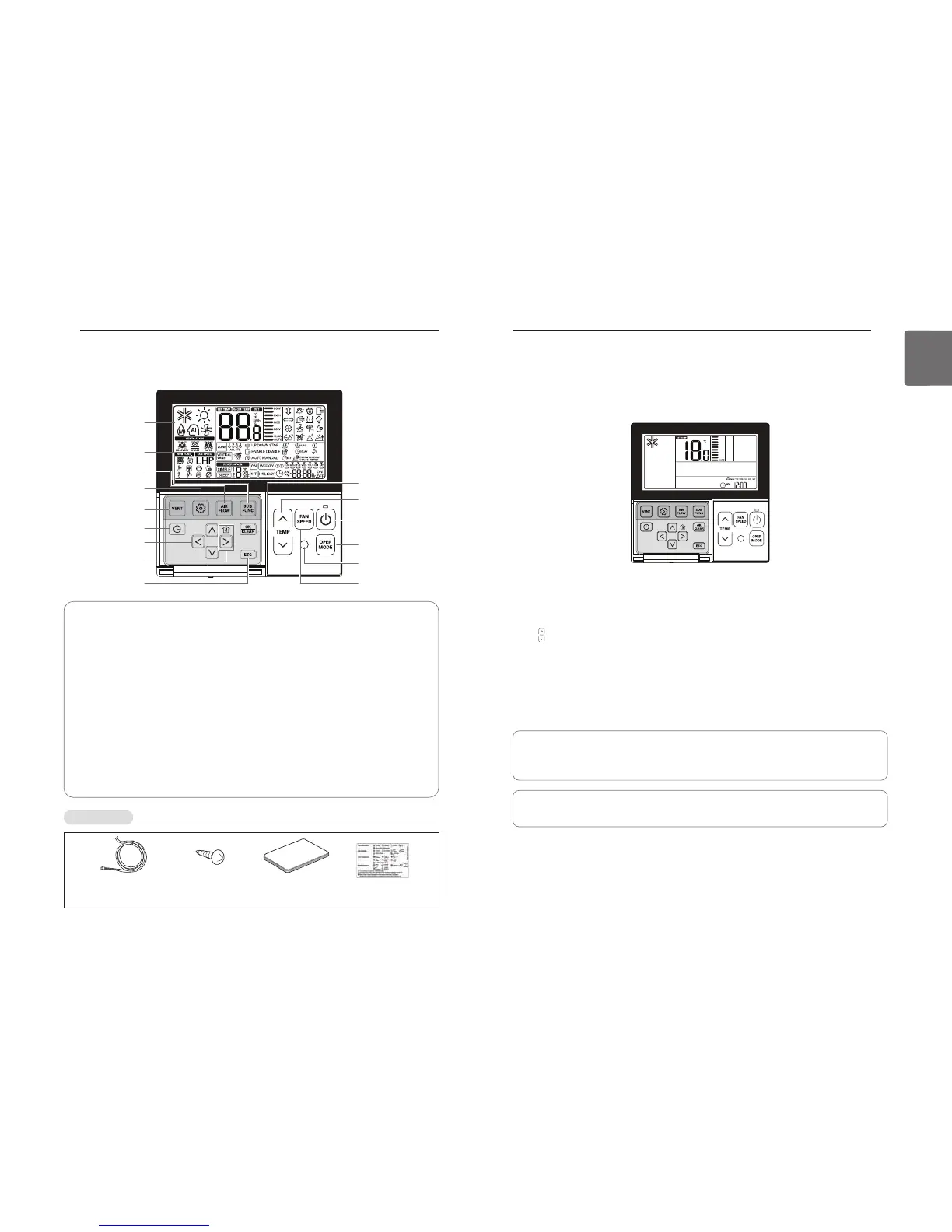
Operation Display
Windows
Sub function Button
Airflow Button
Function Setting Button
Ventilation Button
Set/Cancel Button
Temperature
Control Button
On/Off Button
Operation Mode
Selection Button
Wireless Remote
Controller Receiver
Fan Speed Button
Reservation Button
Up/Down/Left/Right
Button
Room temperature
Button
ESC Button
Operation Display Windows :
Displays the status of operation and settings
For interlocking operations of air-conditioner and ventilator
Function Setting Button :
To select the additional operations function
To select the additional operations function
Up/Down/Left/Right Button :
To change the settings in the menu
: To check the indoor temperature
To save the settings in the menu
Temperature Control Button :
To change the desired temperature
To turn on/off with a remote controller
To select the operating mode
Wireless Remote Controller Receiver
Accessories
Connecting Cable
1 EA, 10m
Screw (4 EA) Owner's /
Installation manual
Inform label
(8EA-8Languages)
Standard Operation – Standard Cooling
A pleasant and fresh breeze cools off the room.
button in the remote controller to begin cooling.
- The initial temperature for cooling is set at 18°C by default.
- The desired temperature can be reached by 1°C or 0.5°C depending on the type of Indoor Unit.
Press button to set the desired temperature below the indoor temperature.
- Press J button to see the indoor temperature.
If the desired temperature is set above the indoor temperature, cool air will not blow out but
only fan will work instead.
button during operation to stop cooling.
What is a 3-minute delay function?
A cool air will not blow out immediately after stopping cooling in order to protect a compres-
sor. After 3 minutes, the cool air will blow out as the compressor runs.
• The range of the desired temperature is 18°C~30°C for cooling.
• 5°C is recommended for the difference between indoor and outdoor temperature.
OWNER’S INSTRUCTION
ENGLISH



 To Next Page