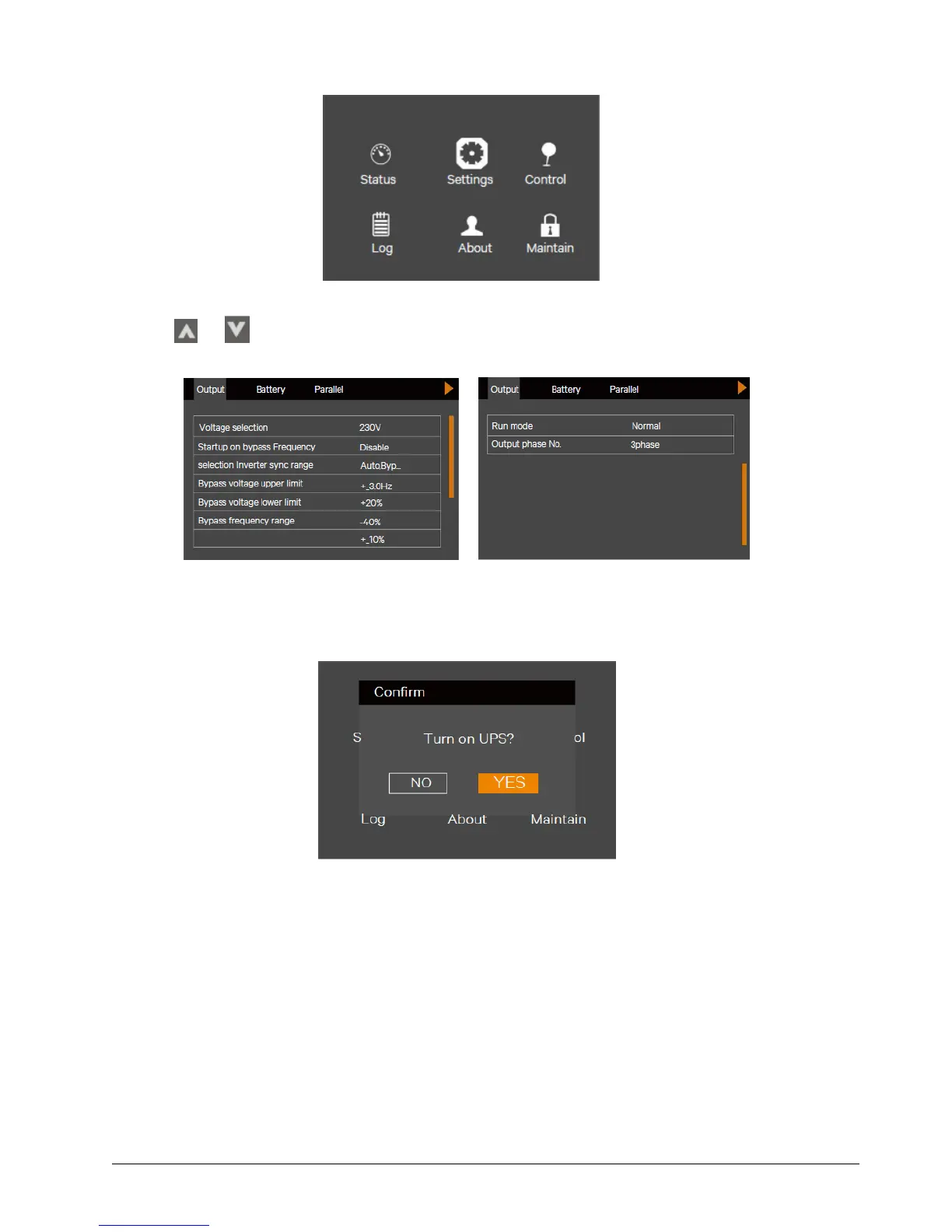
Figure 2-4 Main menu screen
b) Press the or key to select and set corresponding parameters (taking 'Output' as an example). As shown in
Figure 2-5.
Figure 2-5 Output interface screen
4. After setting corresponding parameters, press the power button for two seconds, and the LCD prompts a dialogue
box shown in Figure 2-6.
Figure 2-6 Turning on UPS
After selecting 'YES', the run indicator (green) blinks, the inverter starts, and the run indicator turns on.
5. Measure whether the inverter output voltage is normal.
6. If the battery is not connected, the alarm indicator is yellow. If the battery is connected, the alarm indicator turns
off.
2.6.3 Battery Mode Start-Up
1. Close the battery MCB and press the power button on the UPS front panel for two seconds, the LCD displays the
startup screen. The alarm indicator will be yellow, and the buzzer will beep continuously after the rectifier finishes
the startup.
2. Press the power button for two seconds, the LCD prompts a dialogue box shown in Figure 2-7.


 To Next Page