Vertiv|Liebert® S600 10kVA ~ 20kVA UPS | User Manual 71
RS232 card
The RS232 card should be used together with the Liebert® S600 series UPS of Vertiv. It only supports RS232 protocol
communication, and the maximum length of the communication cable cannot exceed 15 meters.
6.2 Connection Cables for Dry Contact Port
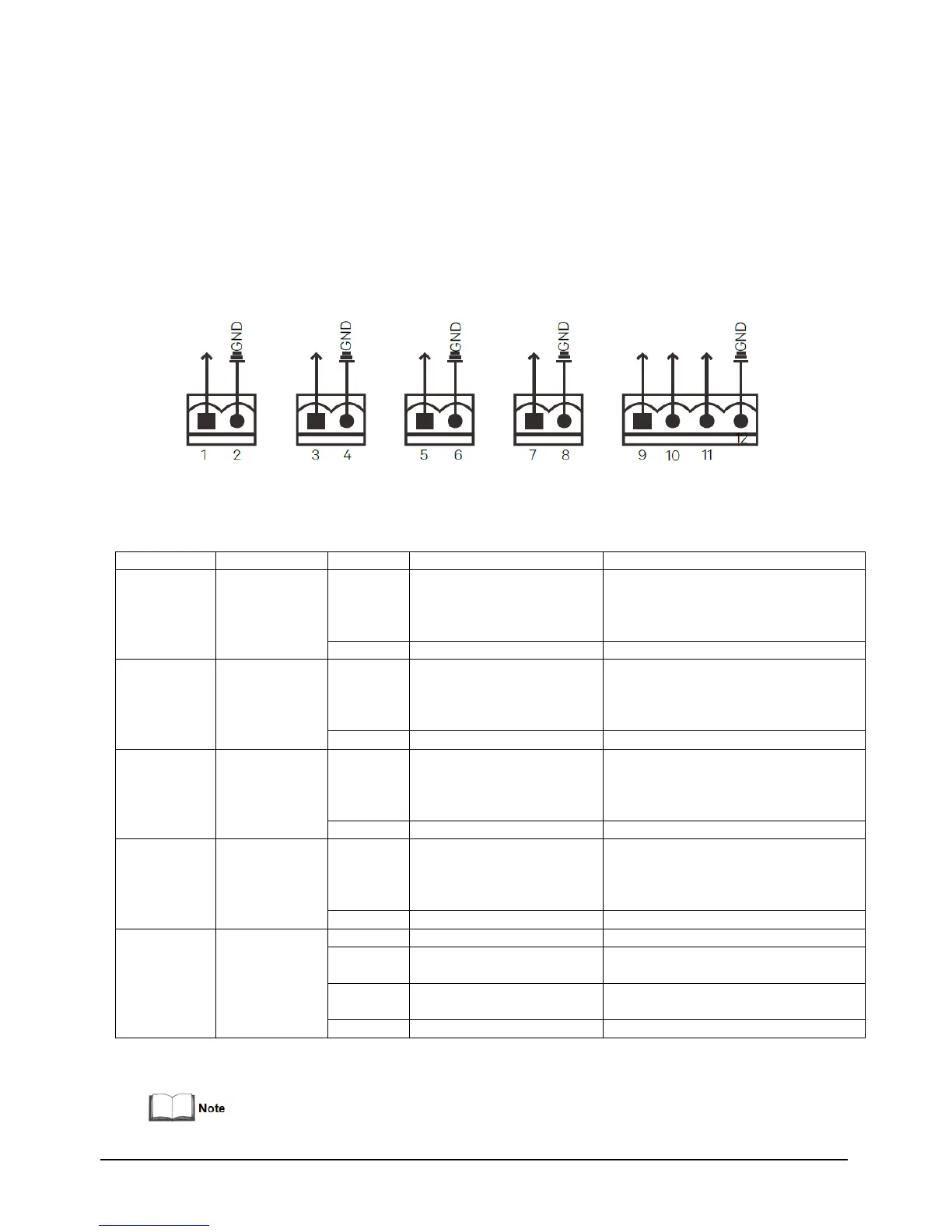
The UPS provides five dry contact ports. The silkprints of the five dry contact ports are 1 ~ 12. The pin layout of each
dry contact port is shown in Figure 6-2, and the port description is shown in Table 6-1.
Figure 6-2 Pin layout of dry contact ports
Table 6-1 Description of the dry contact ports
LOW-BATTERY/
ON_BATTERY /
ON_BYPASS/UPS_FAULT
Default: LOW-BATTERY can be set
via the LCD settings page. When
the system has as alarm, short Pin
1 and Pin 2
LOW-BATTERY/
ON_BATTERY /
ON_BYPASS/UPS_FAULT
Default: UPS_FAULT, can be set
via the LCD settings page. When
the system has as alarm, short
Pin 3 and Pin 4
Battery mode shutdown/Any
mode shutdown (Remote
Comms Shutdown)/maintain
mode
Default: Maintain mode, can be
set via the LCD settings page.
When Pin 5 and Pin 6 are shorted,
the function is valid
Battery mode shutdown/Any
mode shutdown (Remote
Comms Shutdown)/
Maintain mode
Default: Maintain mode, can be
set via the LCD settings page.
When Pin 7 and Pin 8 are shorted,
the function is valid
REPO power supply, 5Vdc 100mA
NC, ECO activated when Pin 9
and Pin 10 opened
Trigger REPO when Pin 11 and
Pin 12 closed


 To Next Page