Operating manual and inspection booklet
Camping
134 3435216
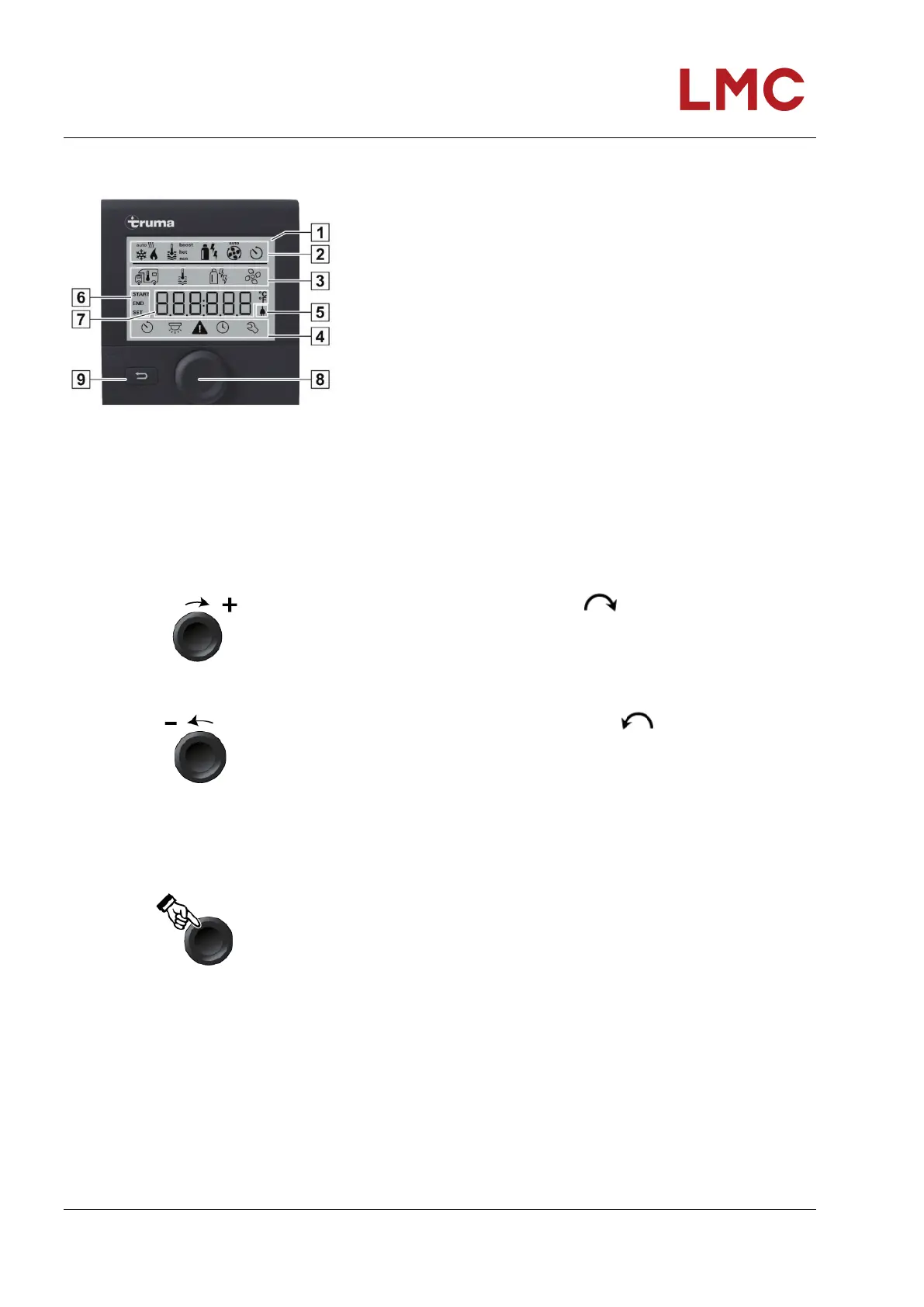
Display/operating elements
Fig. 122: Digital TRUMA control unit
CP Plus
2 Status line
3 Menu line (top)
4 Menu line (bottom)
5 Indicator mains voltage 230V (utility power)
6 Timer display
7 Settings/values
8 Rotary/push-button
9 Back key
Menus in lines (3+4) can be selected with the rotary/push-button
(8) and settings made. Output is via a display (1) with illuminated
background. The back key (9) is used to jump back from a menu.
Rotary/push-button
The rotary/push-button (Fig. 122, Pos. 8) is used to select and
change target values and then save them by tapping.
Selected menu items flash.
Rotate in a clockwise direction
Menu is run through from left to right.
Increasing of values (+)
Rotate in an anticlockwise direction
Run through menu from right to left
Lowering of values (-).
Fig. 123: Rotary/push-button
Tapping
Apply (save) a selected value.
Selection of a menu item, change to the setting level.
Long press
Main ON/OFF switching function
If an iNet Box has been detected by a device search, then the
function of the rotary/push-button changes (see “APP mode in
conjunction with an iNet Box”)



 To Next Page