Connect ID 32-46 - 25 -
Operating instructions
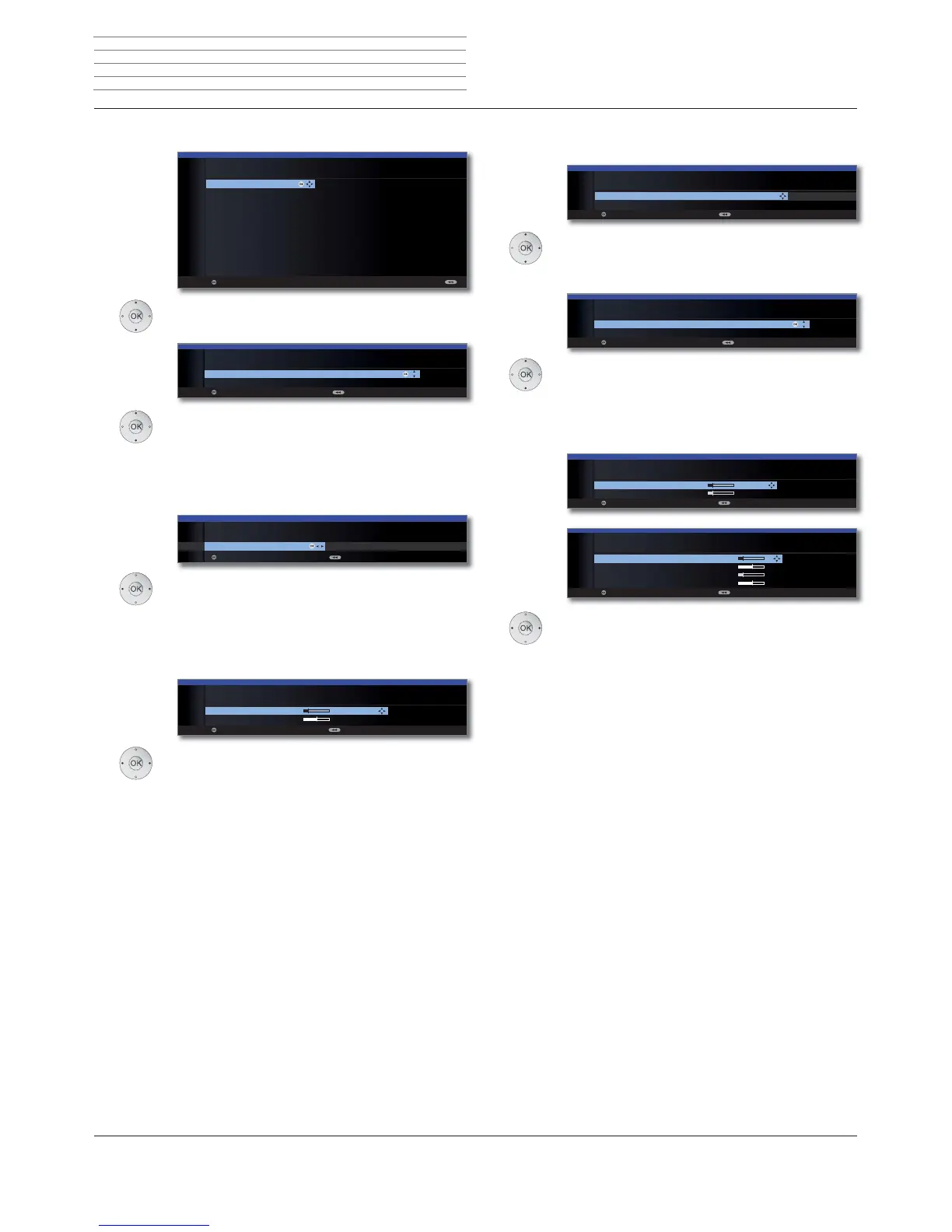
Setting options for the satellite system (single satellite):
Select satellite,
OK Proceed.
Select network.
If several networks are available over DVB-S, you
can decide which network you want to receive
your channels from.
OK Proceed.
High band no / yes.
Specify here whether the high band of the select-
ed satellite is to be searched in addition to the low
band.
OK Proceed.
Set LNB frequencies.
Normally, you do not need to change the values
for high and low band, unless the LNC (LNB) of
your satellite system uses a different oscillator
frequency (important for the frequency display).
OK Proceed.
(with Setting options for DVB-S reception (contin-
ued) on page 27).
OK
OK
INITIAL INSTALLATION (DVB-S)
Select single satellite
Astra1 19,2°E Hellas Sat2 39°E
Hot Bird 13°E Hispasat 30°W
Astra2 28,2°E Intelsat10 02 1°W
Astra3 23,5°E Intelsat901 18°W
Atlantic Bird1 12,5 °W Nilesat 7°W
Atlantic Bird2 8°W Pan Am Sat 43°W
Atlantic Bird3 5°W Sirius2/3 5°E
Eurobird1 28,5°E
Telekom2C 5°W
Eurobird 9A 9°E
Telekom2D 8°W
Eutelsat W2 16°E Telestar12 12,5°W
Eutelsat W3A 7°E Thor2/3 0,8°W
Eutelsat W4 36°E Türksat 42°E
Proceed
OK
Proceed Back
INITIAL INSTALLATION
Network selection
other network
CanalDigitaal
OK
OK
no
INITIAL INSTALLATION (DVB-S)
High band
yes (with 0/22 kHz)
Proceed Back
OK
OK
Proceed Back
INITIAL INSTALLATION (DVB-S)
LNB frequencies
Low band 9750 MHz
High band 10600 MHz
Satellite
selection
Network
selection
LNB
frequencies
(22 kHz
switchbox)
LNB
frequencies
(toneburst
switch)
Select single
satellite
Network
selection
High band
LNB
frequencies
Setting options for the satellite system (2 satellites on 22 kHz
switchbox / 2 satellites on toneburst switch):
Select Satellite 1 / Satellite 2,
select satellites from list,
OK Proceed.
Select network.
If several networks are available over DVB-S, you
can decide which network you want to receive
your channels from.
OK Proceed.
Set LNB frequencies.
Normally, you do not need to change the values
for high and low band, unless the LNC (LNB) of
your satellite system uses a different oscillator
frequency (important for the frequency display).
OK Proceed.
(with Setting options for DVB-S reception (contin-
ued) on page 27).
OK
INITIAL INSTALLATION (DVB-S)
Satellite selection
Satellite 1 Astra1 19,2°E ...
Satellite 2 Hot Bird 13°E
Proceed Back
OK
Proceed Back
INITIAL INSTALLATION
Network selection
other network
CanalDigitaal
OK
OK
INITIAL INSTALLATION (DVB-S)
LNB frequencies
ASTRA1 19,2°E 9750 MHz
Hot Bird 13°E 9750 MHz
Proceed Back
OK
INITIAL INSTALLATION (DVB-S)
LNB frequencies
ASTRA1 19,2°E Low band 9750 MHz
ASTRA1 19,2°E High band 10600 MHz
Hot Bird 13°E Low band 9750 MHz
Hot Bird 13°E High band 10600 MHz
Proceed Back
Initial installation



 To Next Page