Connect ID 32-46 - 29 -
Operating instructions
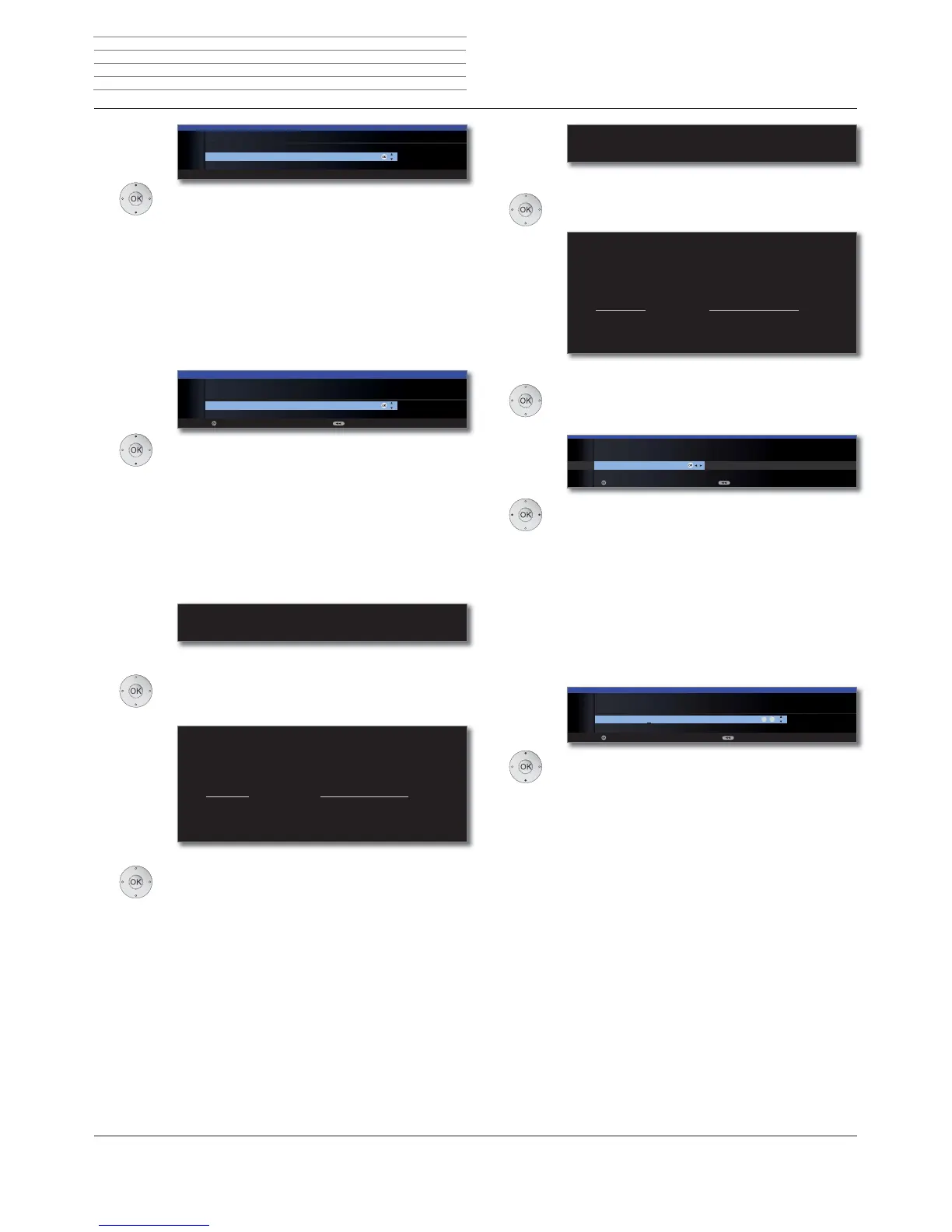
The number of found radio stations is displayed.
OK Proceed.
The structure of the radio station list is displayed.
OK Proceed.
Select Age-related lock.
You can specify an age limit for your TV set here.
DVB broadcasts which have an appropriate age
identification are locked and can only be watched
after entering the access code (see page 60).
In some countries, the yes/no choice is not present
for some channels, and a compulsory age check
must be entered.
OK Proceed.
Select time / date.
If no values or no correct values have been entered
for the data and time, enter the correct values with
the numeric buttons here.
OK Proceed.
FIRST INSTALLATION WIZARD
The automatic radio station search and sorting has ended.
336 new radio station(s) has (have) been found.
FIRST INSTALLATION WIZARD:
STRUCTURE OF RADIO STATION LIST
The radio stations found in the automatic search were divided into appropriate
station blocks according to the previously selected antenna cables
(signal sources). The stations can only be reorganised later within these blocks.
The block with the stations of your favoured signal source is at the top of the
station list.
Signal source(s) Associated station numbers
ASTRA1 19,2°E 1- 300
DVB-C 301-500
DVB-T 501-700
Antenna/cable (analogue) 701-900
OKOK
INITIAL INSTALLATION
Age-related lock
no yes
Proceed Back
OK
OK
09
-
INITIAL INSTALLATION
Time and date
Time 09:19:14
Date 26.02.2010
Proceed Back
Info
radio stations
Structure radio
station list
Age-related
lock
Time and date
Choose station.
If several channels have the same LCN (Logical
Channel Number), then you can choose here which
channel should be saved into the channel slot.
The channels that were not selected will be sorted
in at the end of the channel list.
➠ It may be that when searching, several channel
slots are affected and this selection process has
to occur several times.
OK Proceed.
Select the order for the TV channels.
If you receive the HD+ range of channels, then you
can sort all these from the standard HD capable
stations to their correct places in the list of chan-
nels, where otherwise their non-HD capable
equivalents would be.
➠ The selection is only available if encrypted
stations ט yes has been chosen (see page 27).
OK Proceed.
The number of found TV stations is displayed.
OK Proceed.
The structure of the TV station list is displayed.
OK Proceed.
OK
INITIAL INSTALLATION
Station selection if same LCN
France 2 HD
BBC TWO
OK
OK
INITIAL INSTALLATION
TV station sorting
Take HD+ reception into account
Don't take HD+ reception into account
Proceed Back
FIRST INSTALLATION WIZARD
The automatic TV station search and sorting has ended.
966 new TV station(s) has (have) been found.
FIRST INSTALLATION WIZARD: STRUCTURE OF TV STATION LIST
The TV stations found in the automatic search were divided into appropriate
station blocks according to the previously selected antenna cables (signal
sources). The stations can only be reorganised later within these blocks. The
block with the stations of your favoured signal source is at the top of the
station list.
Signal source Associated station numbers
ASTRA1 19,2°E 1- 900
DVB-C 901-1300
DVB-T 1301-1400
Antenna/cable (analogue) 1401-1500
Station
selection if
same LCN
TV station
sorting
(only DVB-S)
Info
TV stations
Structure TV
station list
Initial installation



 To Next Page