Connect ID 32-46 - 30 -
Operating instructions
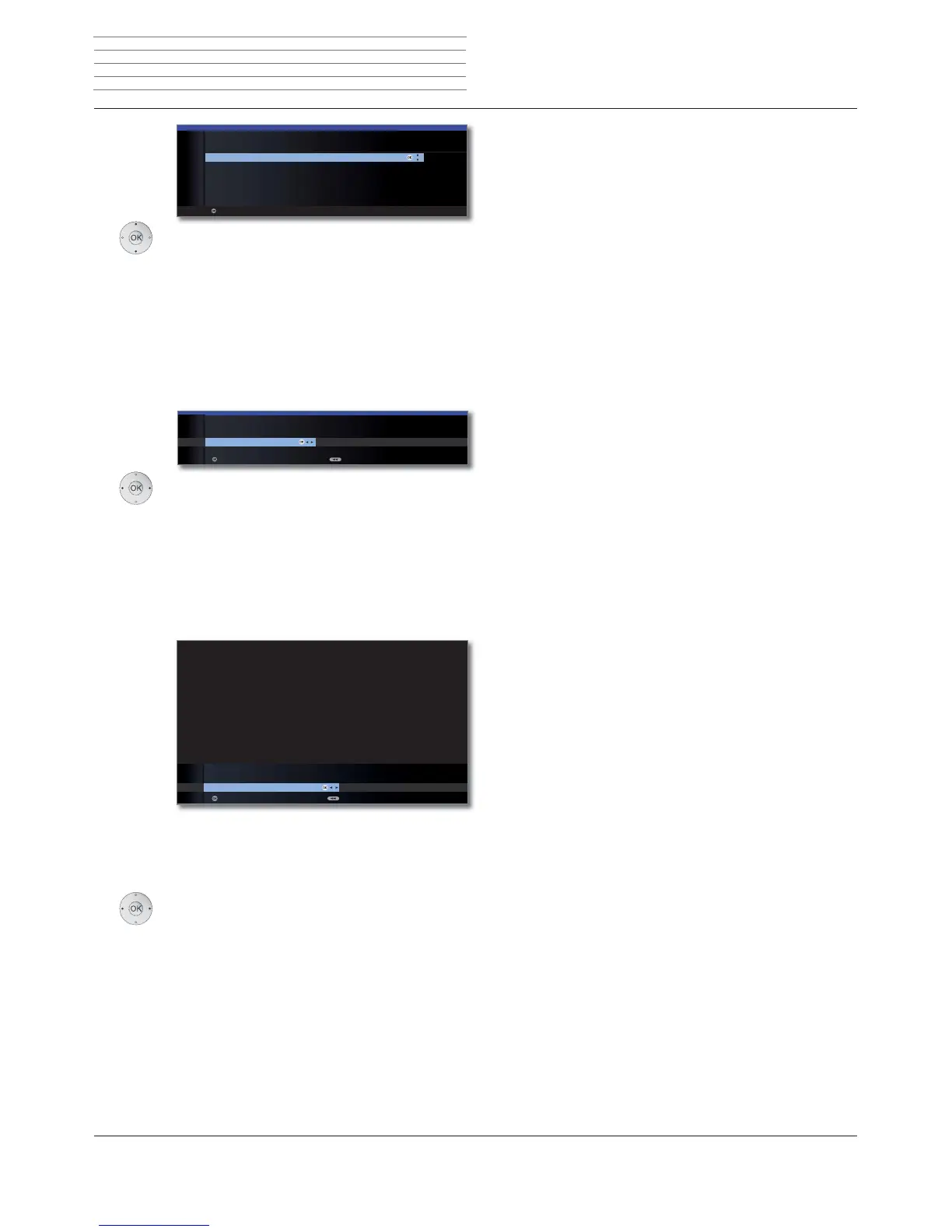
Select sound components.
This selection indicates which sound components
you want to use to hear your TV sound. Depending
on the selection, the sound component wizard
starts with which you can make further settings.
The sound component wizard is described from
page 119 and can also be started at any time
outside of first time operation (TV menu under
Connections ט Sound components).
OK Proceed.
Select the option.
With the selection, specify whether you want to
configure the available network adapter now.
Perform now: Make settings for network adapter
(see page 66) and proxy server (see page 68).
Do not perform or perform later: Skip network
adapter configuration.
OK Proceed.
If you have an existing Internet connection, you can
find out if new software is available for your TV set (see
also page 133).
Please note the information shown concerning data
protection.
Select yes or no.
OK End of wizard.
OK
OK
SOUND COMPONENTS
Sound playback via ...
TV speakers ۪
Speaker system
HiFi/AV amplifier
Sound projector
HiFi/AV amplifier or TV speakers (switchable)
Sound projector or TV speakers (switchable)
Proceed
OK
OK
INITIAL INSTALLATION
Network configuration
Perform now Do not perform or perform later
Proceed Back
OK
OK
no
INITIAL INSTALLATION
Inform about new software
yes
OK
BackEnd of wizard
INITIAL INSTALLATION WIZARD
You have the option of performing a software update via the Internet.
Please specify whether the TV set is to automatically inform you about
newly available software.
In accordance with the local laws and regulations, we would like to point out
that set numbers, the installation location of your TV set, previous updates
and the current software version will be processed and stored by an IT system,
if you wish to perform software updates via the Internet. This data ensures
that we are always able to offer you an optimum service. All data is treated
as confidential.
Note: you can change this setting at any time by selecting the following
options: "TV menu -> Settings -> Miscellaneous -> Software update ->
via Internet".
Sound
playback
via ...
Network
configuration
Inform about
new software
Initial installation




 To Next Page