WSDA
®
-2000 User Manual
3.3 Gateway Operation
NOTE
The default configuration of Ethernet gateways is for DHCP network connectivity. If no
DHCP network is available, the USB port can be used for most operations, including device
configuration, local data acquisition, and to access the network configuration menu (WSDA
Control Panel). SensorConnect detects USB devices automatically and adds them to the
Devices list.
The Ethernet gateway has three primary operating sequences including gateway configuration, node
configuration, and data acquisition, viewing and analysis.
3.4 Gateway Communication
a. Power is applied to the gateway through the power jack on the back of the WSDA-2000. The
Ethernet jack is connected to the network using a CAT5 or better Ethernet cable.
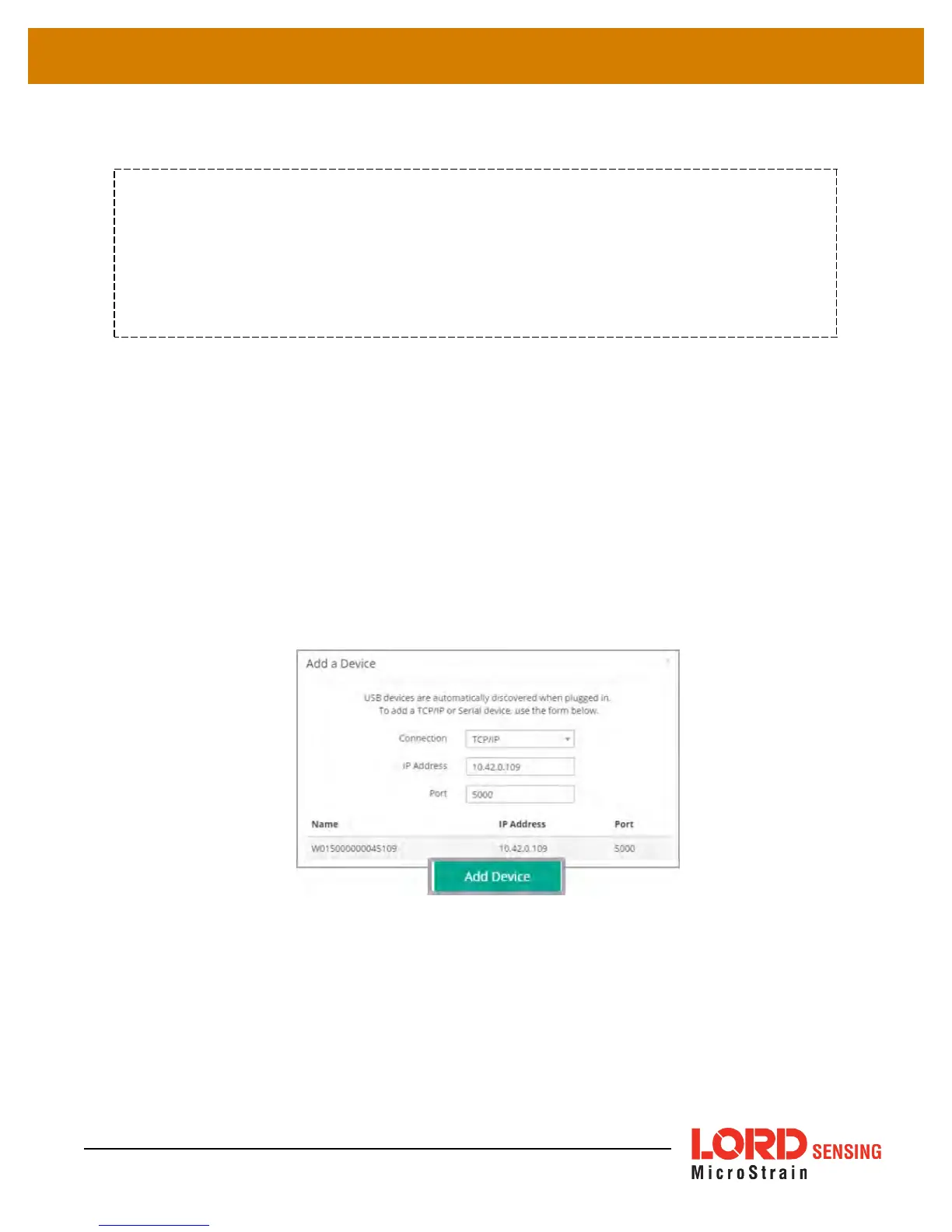
b. Open the SensorConnect™ software and select Add Device
c. Select the gateway and confirm the IP address shows in the IP Address field. The IP address can
be entered manually in the IP Address field above the Discovered Gateways section. If the
gateway does not appear, confirm that the host computer and the gateway are connected to the
same Ethernet network.
Figure 5 - Adding A Device
d. Select the green Add Device button.
e. The gateway will appear in the Controller window.
12



 To Next Page