WSDA
®
-2000 User Manual
4.2.4 WSDA Data Downloader Calibration Coefficients
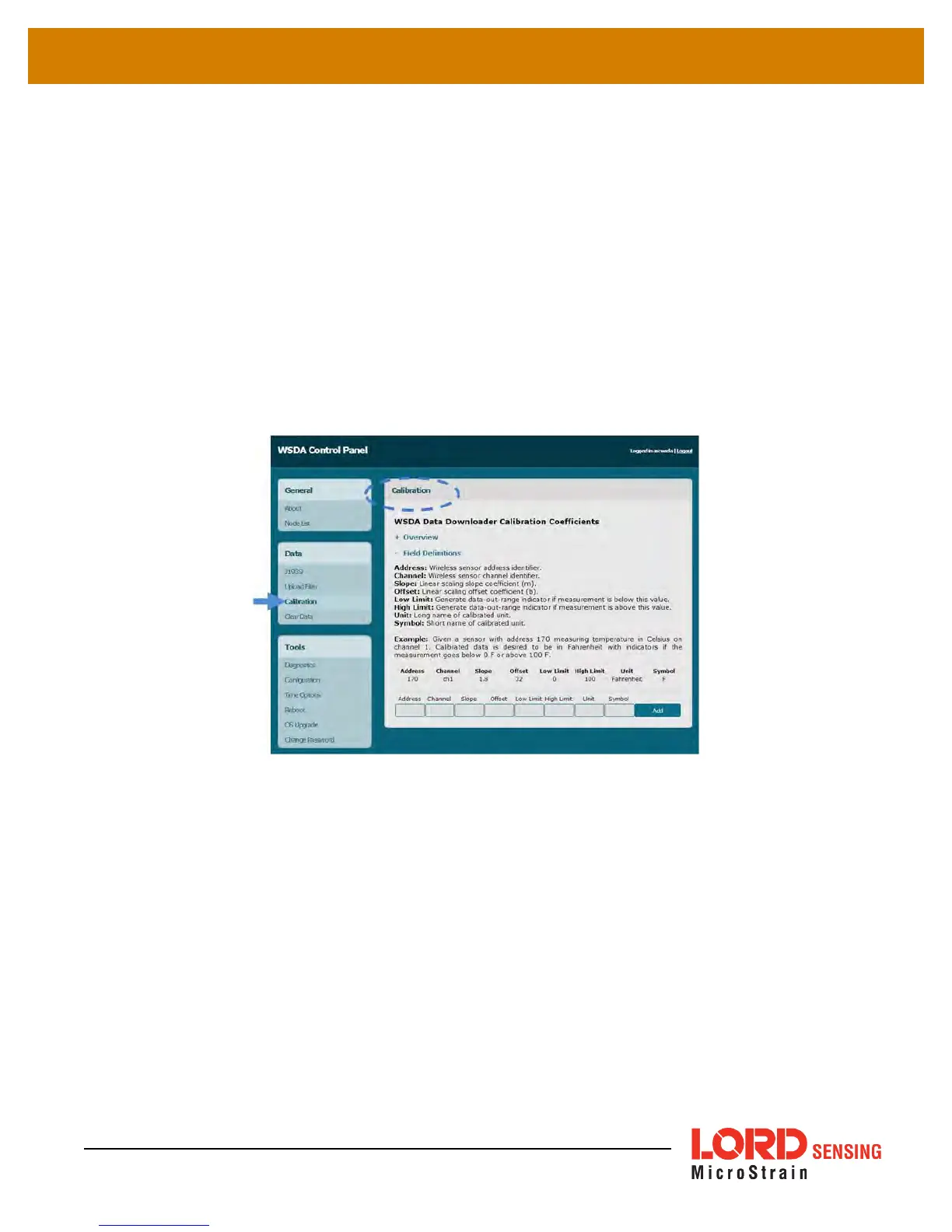
The Calibration feature allows the user to specify coefficients for converting between engineering
units with a linear relationship, and to correct for sensor biases in sensor data saved in the gateway
memory.
The coefficients are applied when data is downloaded from the gateway to a host computer using
the WSDA Data Downloader and are in addition to any conversion values assigned to the sensor
channel during node configuration (
see Channel Configuration on page 1
as well as the applicable
node User Manual). This feature is particularly useful for porting collected data into third party
applications like Microsoft Excel, custom software, or data analytic software when different
coefficients are desired than what was used when the data was acquired.
Figure 18 - Calibration Menu
The data to apply the coefficients to is designated by entering the source node address and channel
numbers. For the nomenclature used for the address and channel
see Data Options Menu on page
21
. The coefficient values are entered for the designated channels. The values for each are
described below and are also available in the calibration help menus accessible by clicking the +
symbol next to Field Definitions (
Figure 18 - Calibration Menu
). To use the Calibration feature, click
the Add button after entering the desired values in each field.
Address: sensor node address
Channel: sensor channel on the designated node
32



 To Next Page