WSDA
®
-2000 User Manual
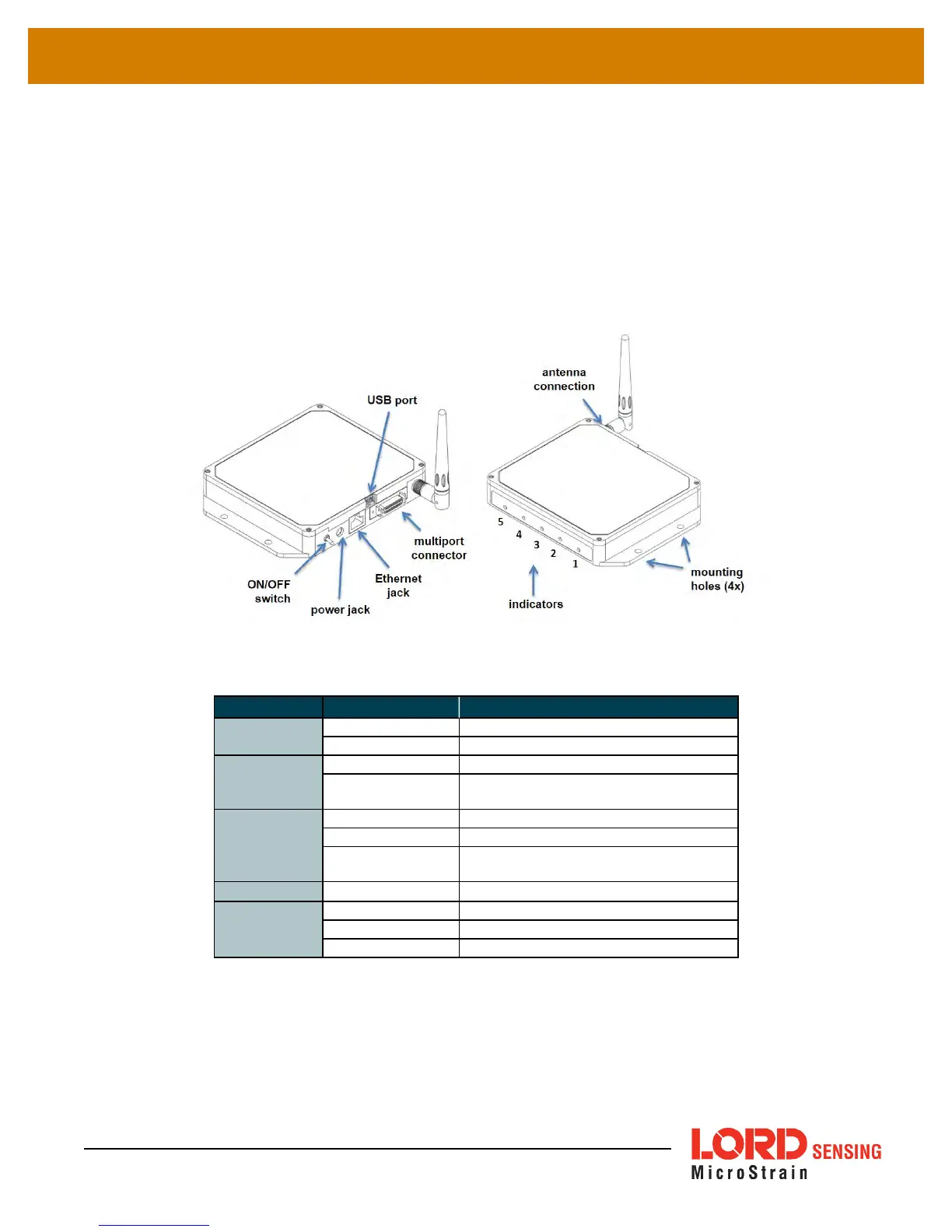
2.2 GatewayInterface
The WSDA-2000 interfaces include a power input jack , a power on/off switch, an antenna connector
for attaching the gateway antenna, an Ethernet jack, a multi-use (multi-port) connector, and a USB
port.The indicators on the WSDA-2000 include several device and data status indicators, and a power
indicator. The following table describes basic indicator behavior.For a complete list of all indicator
behaviors
see Device Status Indicators on page 1
.
Figure 3 - Ports and Indicators
Indicator Behavior Node Status
1. POWER
OFF Gateway is off
ON green Gateway is on
2. WSDA
ON green Fully booted & idle
Flashing blue & green
Sampling and porting data through
SensorConnect™
3. DATA
Flashing green Receiving wireless data
Flashing blue Sync sampling beacon enabled
Flashing red
WARNING: another gateway beacon
is detected on the same frequency
4. ACT
-- (future use)
5. CLOUD
Flashing blue Uploading data to SensorCloud™
ON green Web upload successful
ON red Web upload error
Table 1 - Basic Indicator Behaviors
9



 To Next Page