WSDA
®
-2000 User Manual
Download Data Remotely
1. Download the WSDA Data Downloader from the WSDA-2000 product page at:
http://www.microstrain.com/wireless/WSDA-1500 >Downloads > Software.
2. Connect to the gateway Control Panel as described above.
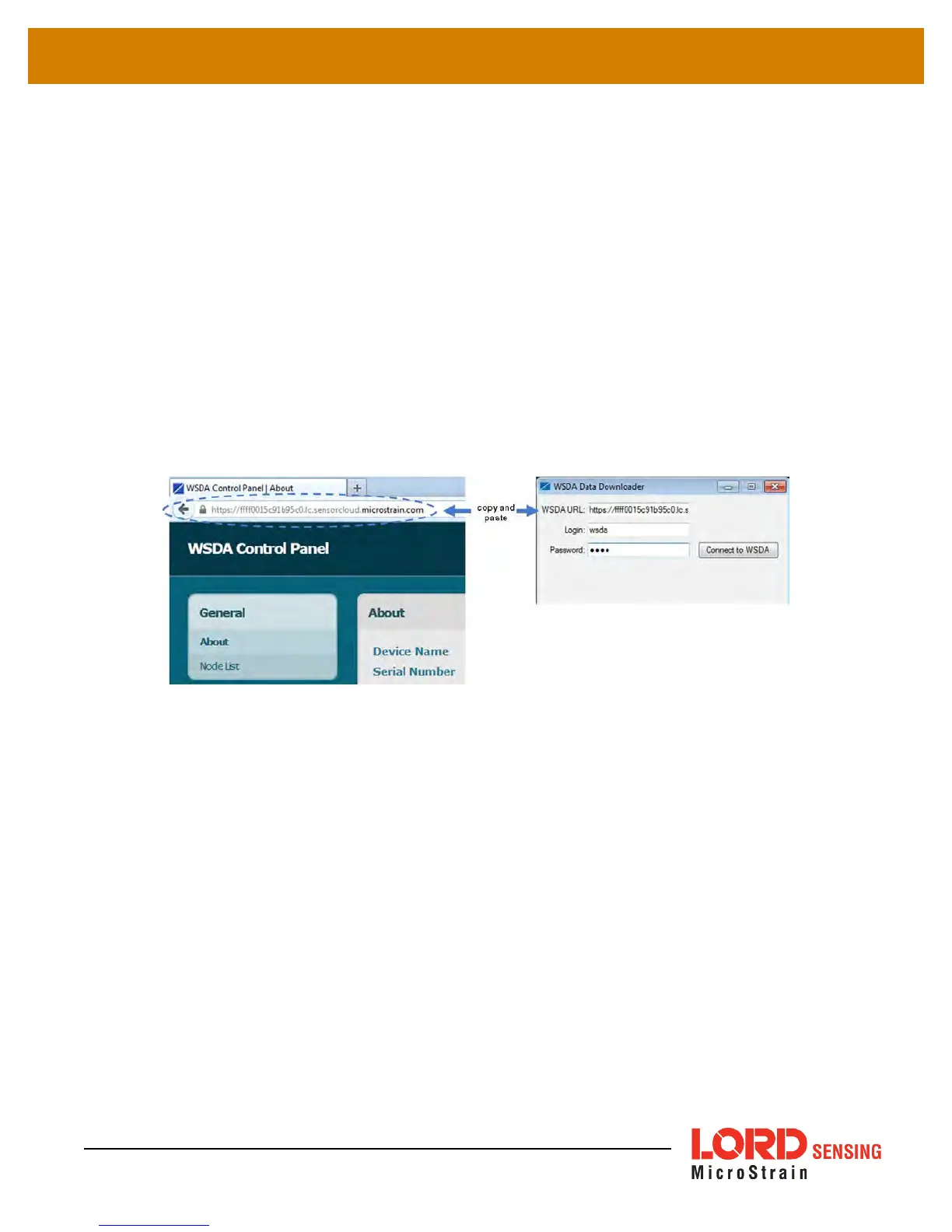
3. Copy the URL from the browser address bar when in Control Panel (
Figure 27 - Control
Panel URL
).
4. Open the WSDA Data Downloader program and paste the address into the WSDA URL
field.
5. Enter the log-in credentials for Control Panel, and select Connect to WSDA.
6. Enter SensorCloud™ credentials when prompted, and use WSDA Data Downloader as nor-
mal (
see on page 1
).
Figure 27 - Control Panel URL
Access Live Connect Remotely
1. In the device configuration menu, select the Live Connect button (
5. Remote
Connectivity
). If the button is not present, the SensorCloud™ account does not include the
feature and must be upgraded.
2. When the button is selected a file download (info.live_connect) will begin. Open the file
when the download is complete, and Live Connect will open automatically. The device will
appear in the Live Connect window under User Defined WSDA's (
Figure 28 - Remote Live
Connect Connection
).
3. Use Live Connect to connect to the gateway control panel (
see Gateway Settings on page
14
) or to SensorConnect (
see Connecting to Nodes and on page 1
) as normal.
45



 To Next Page