Lynx
®
NGT-9000
Pilot’s Guide2-26
Operation
are detailed below:
METAR
METAR is a report of weather conditions at airports represented
graphically and consists of the FAA Flight Rules and Weather
Conditions. The flight rules icons shows the FAA flight rules for each
airport based on the visibility and cloud cover conditions. The weather
conditions icons indicates the weather conditions at each airport based
on precipitation, winds, and visual obstructions. The type and graphic
description are detailed below:
NEXRAD Map Elements
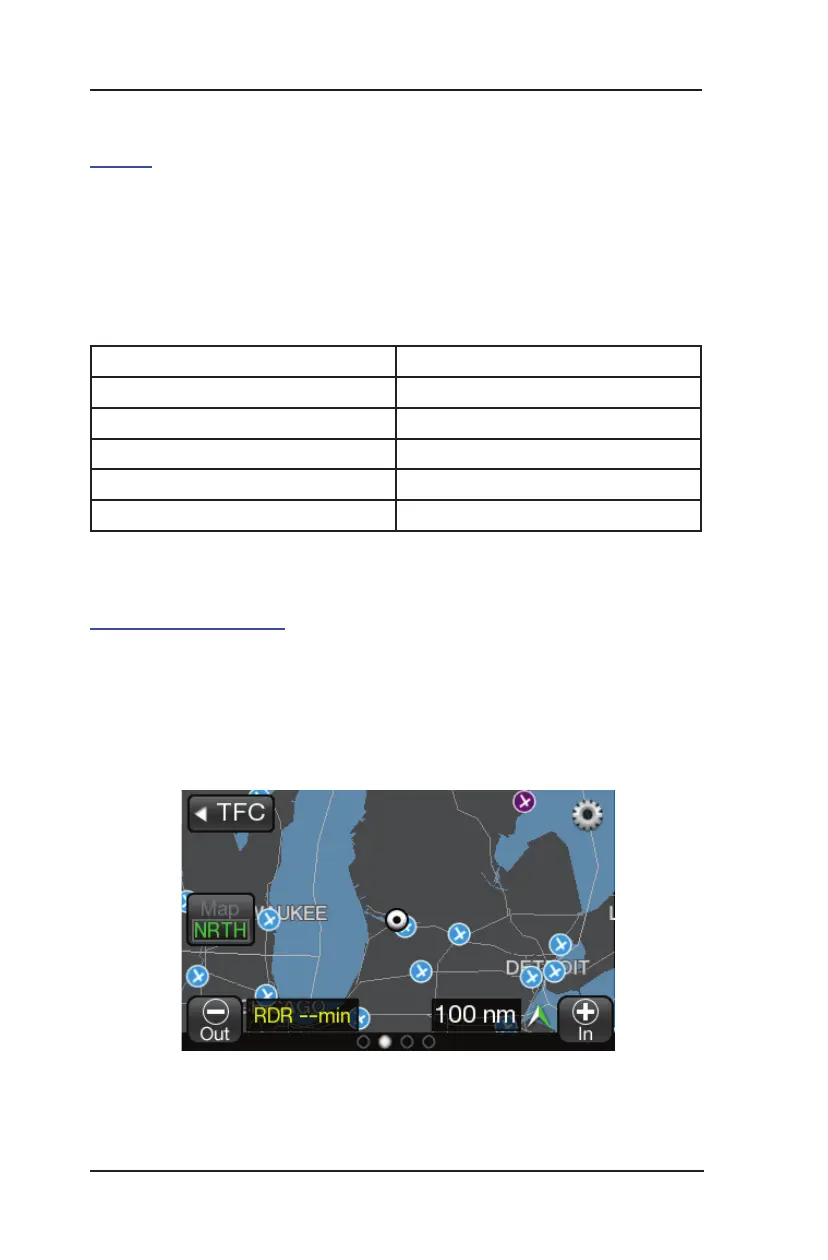
NEXRAD provides data on precipitation and its intensity in the form of
a composite mosaic image. See Figure 2-14.
The age of the NEXRAD data is shown in the lower left corner of the
screen with yellow text. The time stamp is labeled with “RDR” and
“min”. Dashes replace the time stamp when no NEXRAD image data
FliGht ruleS diSPlay ProPertieS
VFR Filled cyan circle
MVFR Filled green circle
IFR Filled yellow circle
LIFR Filled magenta circle
Unknown Filled grey circle
Figure 2-14: Example of NEXRAD Weather Map


 To Next Page
 Loading...