Instruction Manual
Instruction Manual
37
8
USE OF ELECTRONIC UNIT
8.1
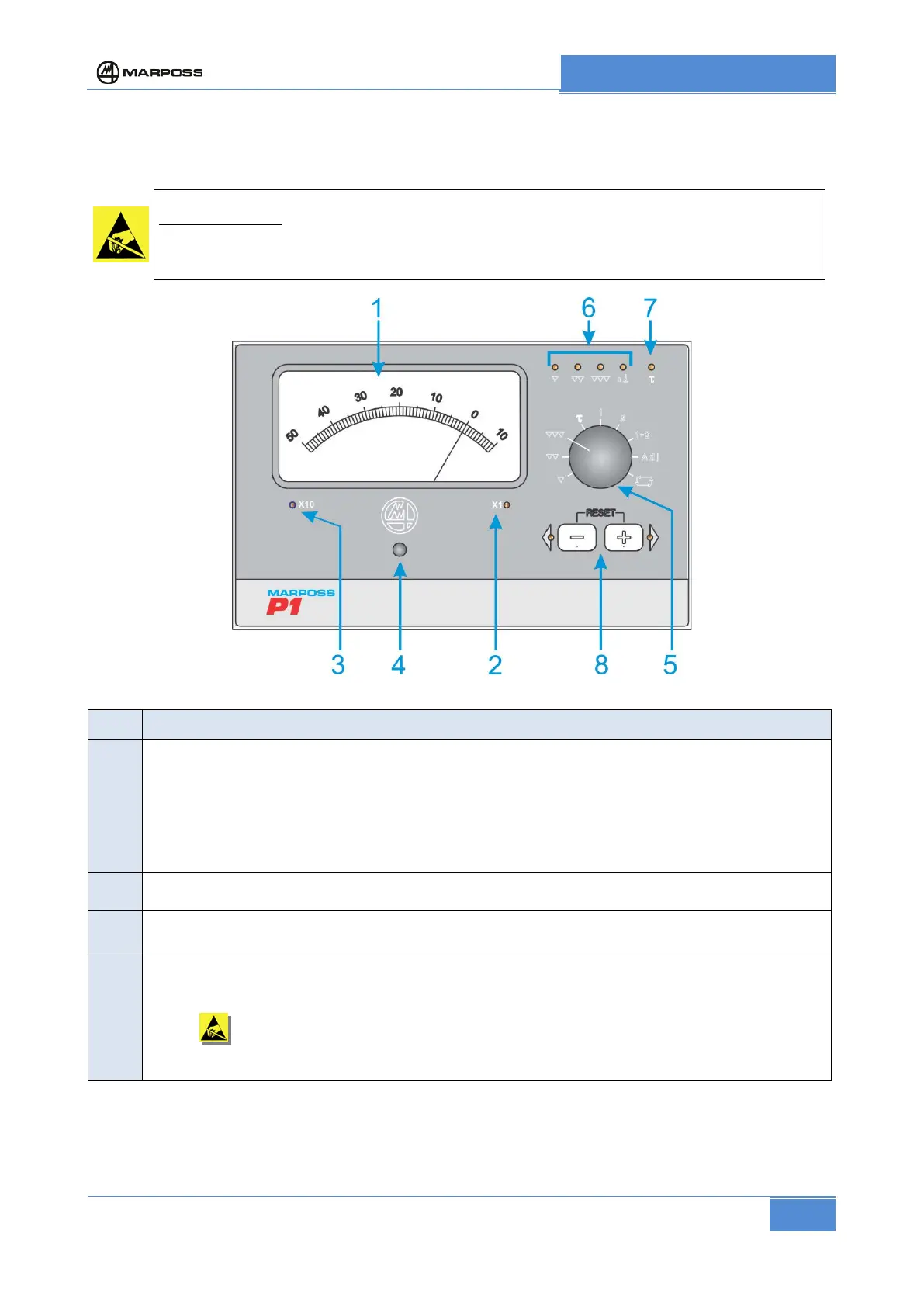
Front Panel
Handle with care: Static sensitive components.
Before accessing the front panel, operators must make sure they have eliminated any
accumulated electrostatic charges by touching a metallic surface that is connected to the
REF. DESCRIPTION
Readout meter with automatic change of centesimal/millesimal scale: it displays the difference
between the actual measurement and the final value you want to obtain.
The scale can be in mm, or inches or double mm/inch:
• scale in mm (centesimal: 500-0-100; millesimal 50-0-10)
• scale in inch (centesimal: 20-0-4; millesimal 2-0-0.4)
• scale in mm/inch (centesimal: 500-0-100/20-0-4; millesimal:50-0-10/2-0-0.4)
2
Led on with millesimal scale (the value read is real)
3
Led on with centesimal scale (the value read must be multiplied by 10).
Adjustment of readout meter mechanical zero.
If the instrument pointer is not positioned exactly at the zero indicator when the unit is switched
off, adjust the screw located under the plug "4", observing the precautions described in the note
above
regarding electrostatic charges. Replace the plug once the desired adjustment has
been completed.
This operation must always be performed with the equipment switched off.
(continue)



 To Next Page