Matrox Extio 3 Series – User Guide 15
Output capabilities
*
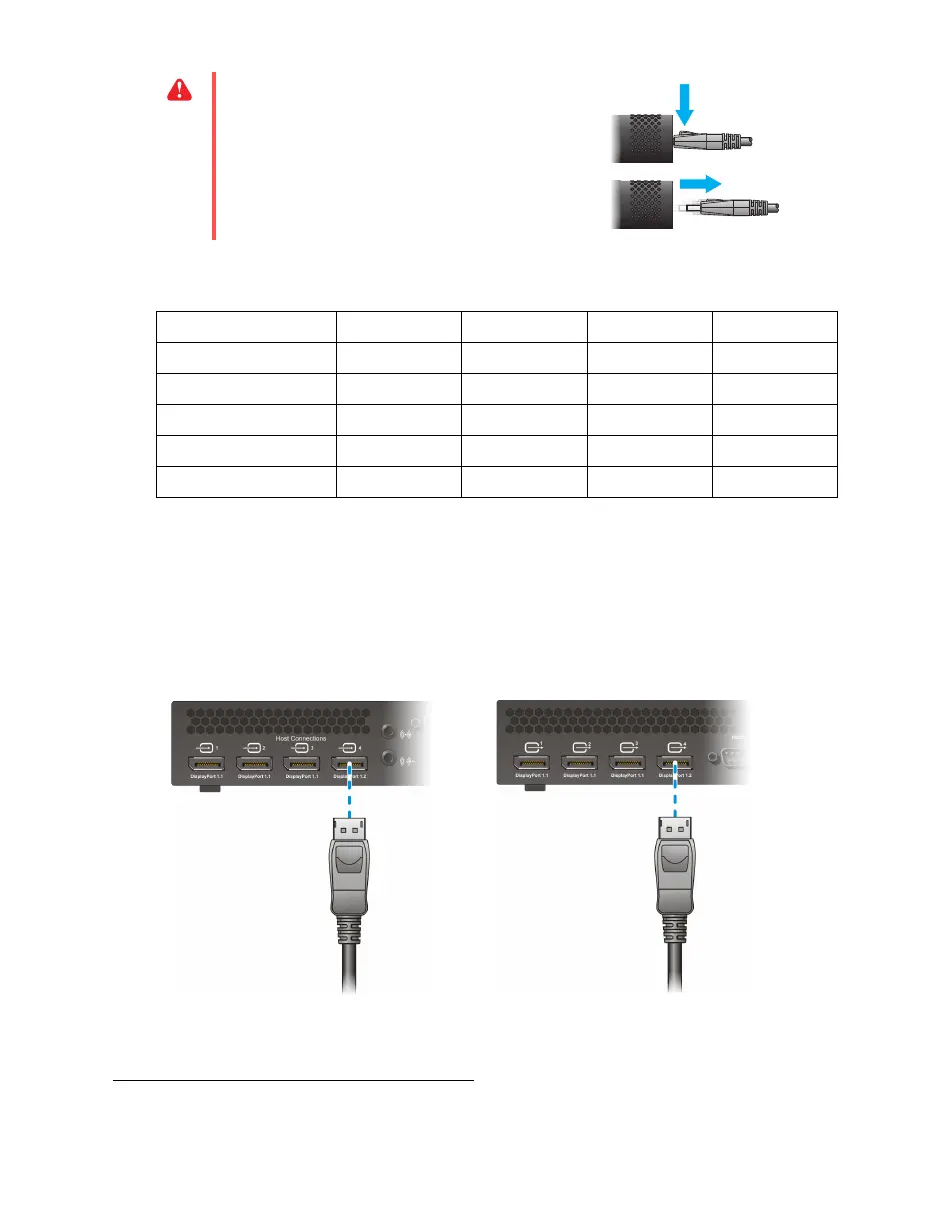
Using 4K60 resolutions
N3408 transmitter/receiver only
– To use 4K resolutions, use your monitor cable to connect your
monitor to the DisplayPort 1.2 connector labeled
4
. You can connect only 1 (one) 4K monitor to your
device.
WA R N I NG :
To avoid damaging the
DisplayPort connector on your DisplayPort
monitor cable or on your Matrox product,
carefully remove the DisplayPort cable by
pressing the latch on the top of the DisplayPort
connector while removing the connector.
Connector 1 Connector 2 Connector 3
*
* Connector 3 and connector 4 are available on Extio N3408 devices only.
Connector 4
*
DisplayPort 1.2 ———9
† Connector 4 supports 3840 × 2160 @ 60 Hz. For more information, see “Using 4K60 resolutions”, page 15.
DisplayPort 1.1 9999
HDMI 1.4 9999
Single link DVI 9999
Dual link DVI 9999
* For more information on supported resolutions and video signals, see “Product information”, page 46.



 To Next Page