McHale Orbital Round Bale Wrapper
46
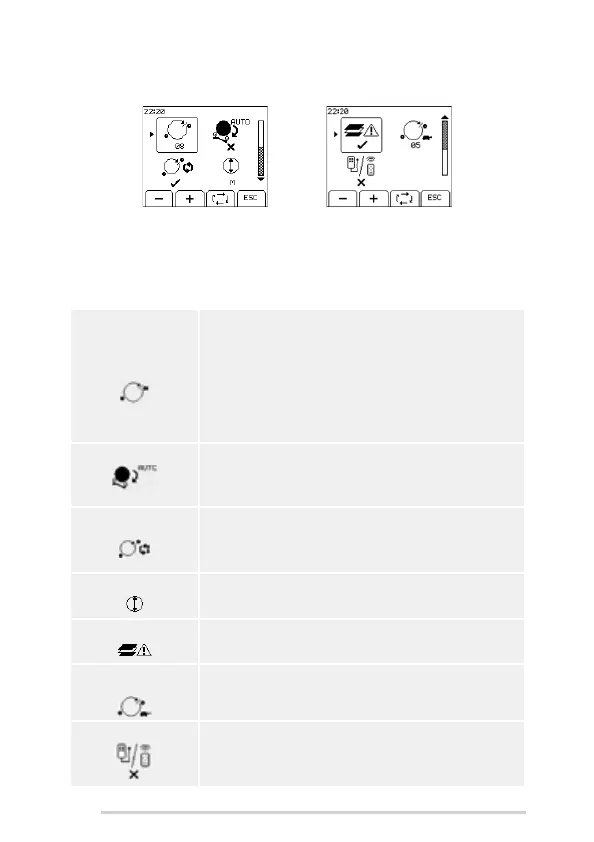
7.4.2 Machine setup 1
Use the following buttons to navigate the Machine setup 1:
Toggle key to move the arrow head to each of the parameters
+ and - keys to change the value of the selected parameter
ESC to return to the Machine Menu
Number of
revolutions
Number of revolutions of the wrapping ring around the bale.
Film layers are set by the number of ring rotations. Using
two rolls of film count the number of rotations required to
cover the bale once and add 0.5 of a rotation, then multiply
this resultant figure by half the number of layers required,
e.g. (3.5 + 0.5) x 2 = 8 rotations for four layers. When using
only one roll of film this figure will then need to be doubled,
e.g. 16 rotations for four layers. Use the + and - soft keys to
adjust this figure.
Auto Tip - / Bale tips off automatically at end of wrapping. Alternatively,
press the tip button during wrapping to enable/cancel the
auto tip of individual bales. The down arrow on the main
screen indicates Auto Tip is on.
Auto Wrap - /
Wrapping begins automatically at end of auto load cycle.
Press the AUTO START button during the loading cycle to
cancel the auto wrap of individual bales. The two rotating
arrows on the main screen indicates auto wrap is on.
Bale Size - M/L/XL Select the bale size. The larger the bale the lower the tip arm
position.
Film Sensor - / Switch film sensors on/off.
Wrapper Slow
Speed
Sets the speed of the wrapping ring at the end of wrapping.
Note: If set too high then the plastic may not cut correctly at
the end of wrapping.
Remote Type Sets the type of remote to use. There are two remote
options, wired or radio. The radio remote must be paired
with the control unit before it will operate. (See ‘Radio
remote’)



 To Next Page