5 Assembly and Installation
27
Meritor Maintenance Manual MM-15103 (Issued 07-17)
C. Use a sleeve or a bearing driver tool and a press to install
the cup. Press the cup into the carrier until the bottom of
the cup touches the bottom of the bore. If a press is not
available, use a sleeve, a brass drift or a bearing driver
tool and a hammer to install the cup. Figure 5.7.
Figure 5.7
Installation
Drive Pinion
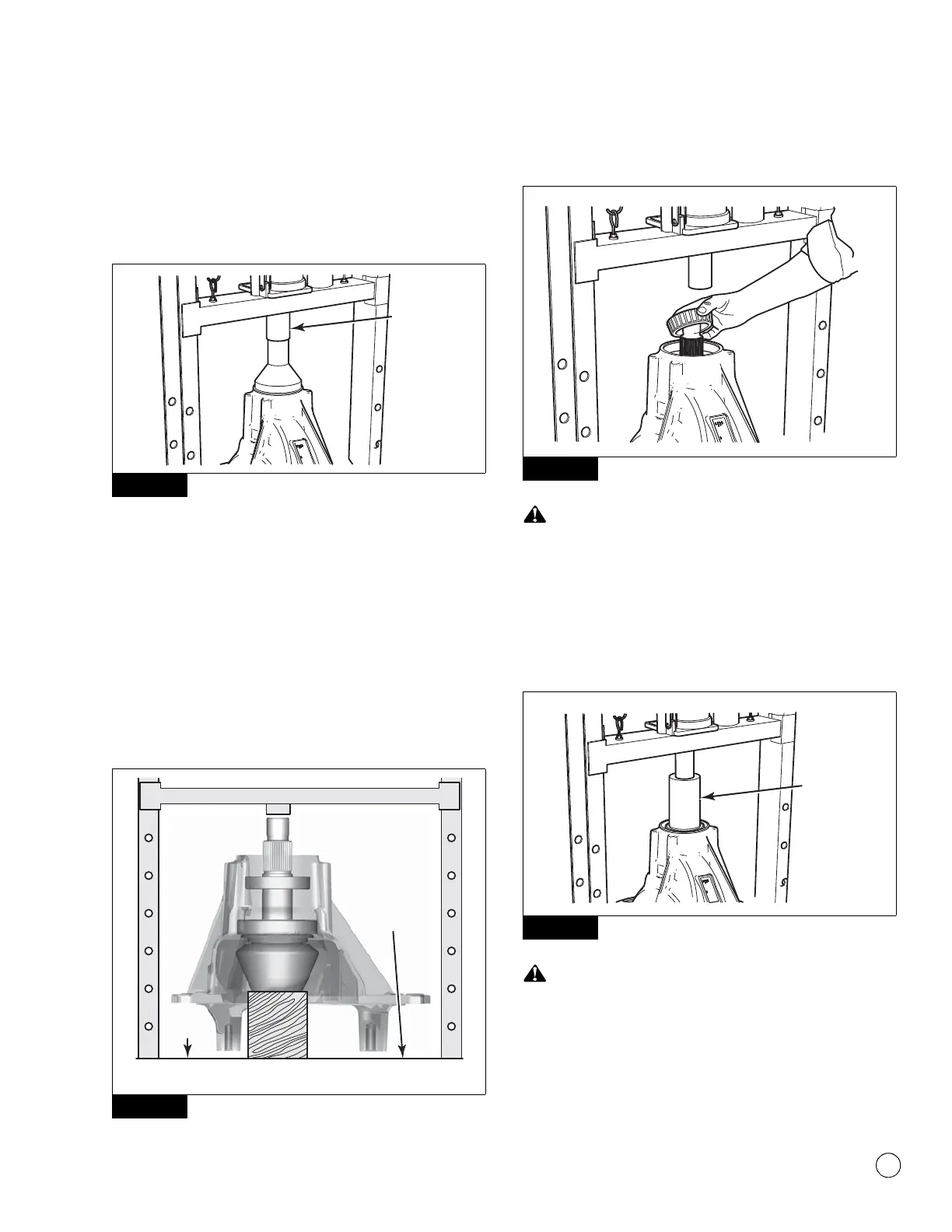
1. Place the drive pinion into the carrier so that the pinion is
through the inner and the outer bearing cups.
2. Place the carrier into a press so that the legs of the carrier are
toward the BOTTOM of the press. Place a support such as a
block of wood under the head of the drive pinion so that the
inner bearing cone on the pinion shaft touches the inner
bearing cup in the carrier. Do not allow the carrier to contact
the surface of the press. Figure 5.8.
Figure 5.8
3. Place the outer bearing cone onto the pinion shaft. Figure 5.9.
Figure 5.9
Do not use excessive press load when you install the outer
pinion cone during the “dry fit” assembly procedure. Damage
to the bearings can result.
4. Use a press and a sleeve to install the outer bearing cone onto
the pinion. Apply no more than two tons (1814 kg) of force to
verify that the bearing cone is correctly installed. Figure 5.10.
Figure 5.10
Do not use excessive pinion nut torque during the “dry fit”
assembly procedure. Damage to the bearings can result.
5. Install the drive pinion nut to contact the bearings while
allowing free movement of the pinion.
Figure 5.7
Figure 5.8
4011978c
Carrier should
not touch
the surface
of the press.
BLOCK OF WOOD
SUPPORTING PINION
PRESS
SURFACE
Figure 5.9
Figure 5.10
4011980a
SLEEVE



 To Next Page