3 Removal and Disassembly
13
Meritor Maintenance Manual MM-15103 (Issued 07-17)
Figure 3.23
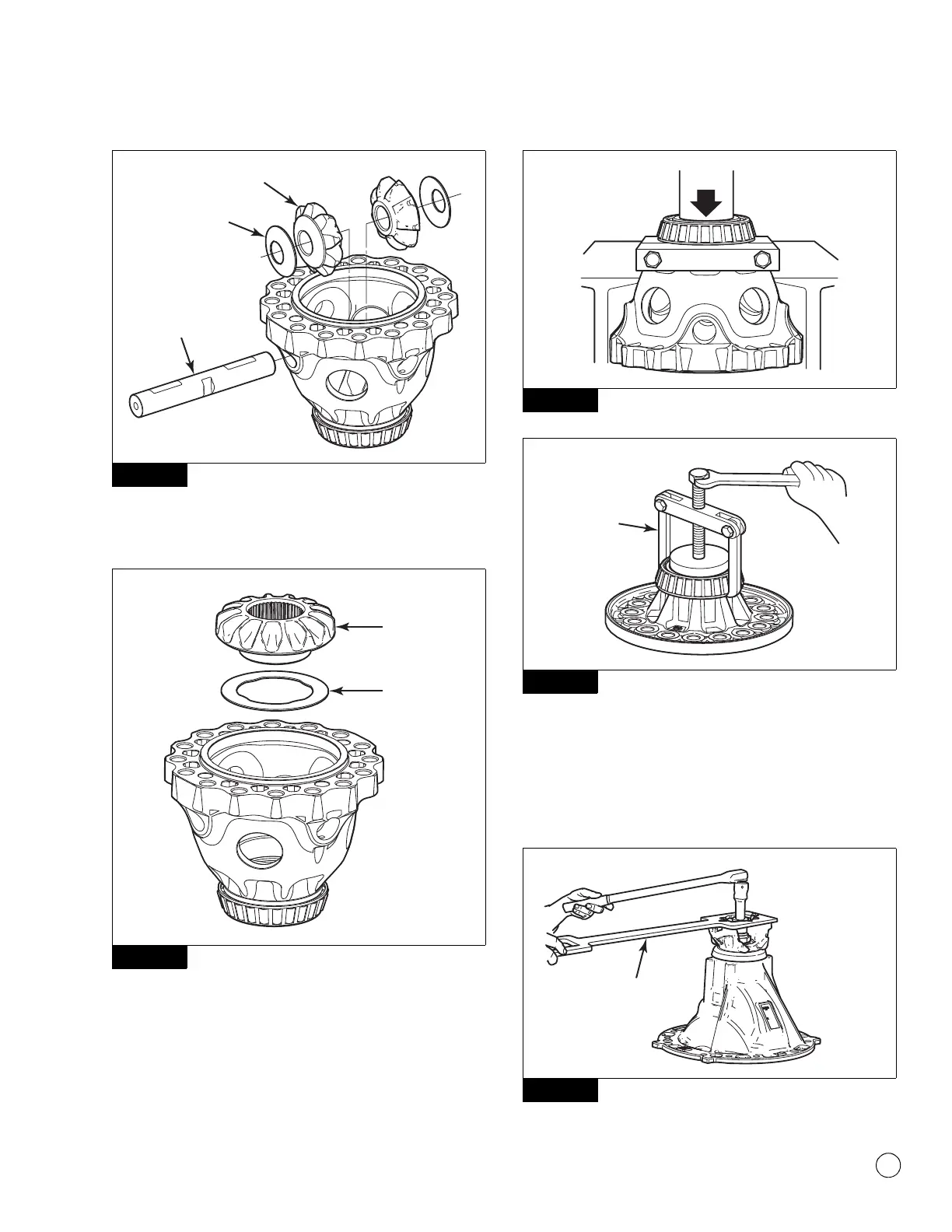
9. Remove the thrust washer and side gear from the plain half
case. Figure 3.24.
Figure 3.24
10. If you need to replace the differential bearings, use a bearing
puller or press to remove the bearing cones from the case
halves. Figure 3.25 and Figure 3.26.
Figure 3.25
Figure 3.26
Drive Pinion from the Carrier
1. Fasten a yoke or flange bar to the input yoke. This will be used
to hold the drive pinion stationary when the nut is removed.
Refer to Section 5 for instructions to make a yoke bar.
Figure 3.27.
Figure 3.27
Figure 3.23
Figure 3.24
4012300a
PINION
THRUST
WASHER
LONG
SPIDER PIN
4012301a
SIDE
GEAR
THRUST
WASHER
Figure 3.25
Figure 3.26
Figure 3.27
4011968b
PRESS
4011968a
PULLER
4011969a
FLANGE/
YOKE BAR



 To Next Page