4.4 Methods
761 Compact IC
123
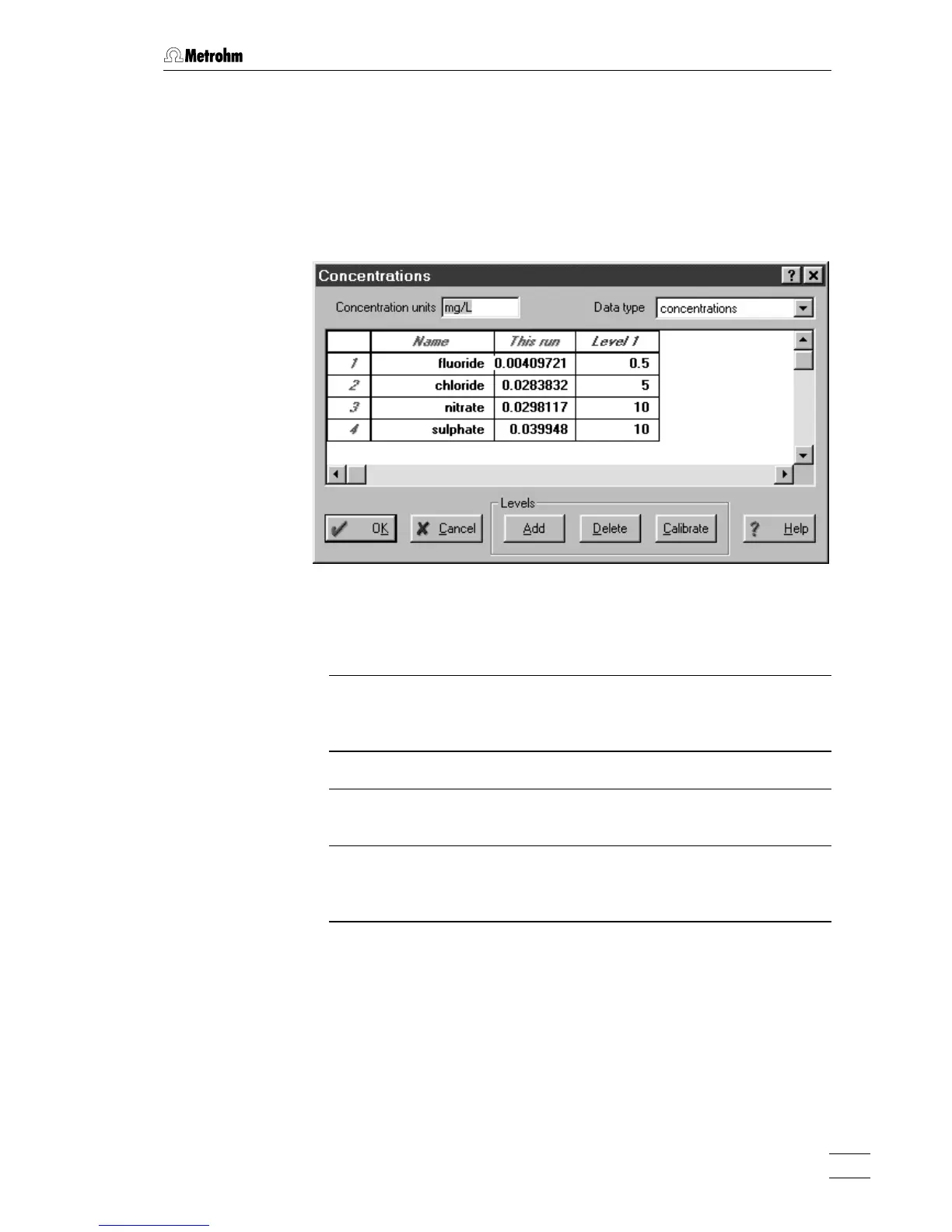
Concentration table
761 COMPACT IC / Method / Calibration / Concentrations
Selecting this menu item or clicking on <Concentrations> in the compo-
nent table opens the
Concentrations window with the concentration table
containing concentrations of all components for all
Calibration levels.
Each calibration level corresponds to a sample used for calibration and
to a point on the calibration curve.
Concentration units User defined units of concentration which will
appear in the report. Nevertheless, entry of new
concentration units does not cause recalcula-
tion of concentrations.
Data type
Choice of the data type that will be shown in the
concentration table: concentrations (default set-
ting), peak
heights, peak areas, volumes.
Number Number of the component (read-only).
Name Name of the component taken from the com-
ponent table (read-only).
This run Contains concentrations (or other chosen val-
ues) obtained in the current run (read-only, ex-
cept for universal component).
Level 1...Level N Contains concentrations (or other chosen val-
ues) of components for corresponding Calibra-
tion level
.





 To Next Page