4.5 Chromatograms
761 Compact IC
145
4.5.3 Graphical representation
Appearance
761 COMPACT IC / View / Appearance
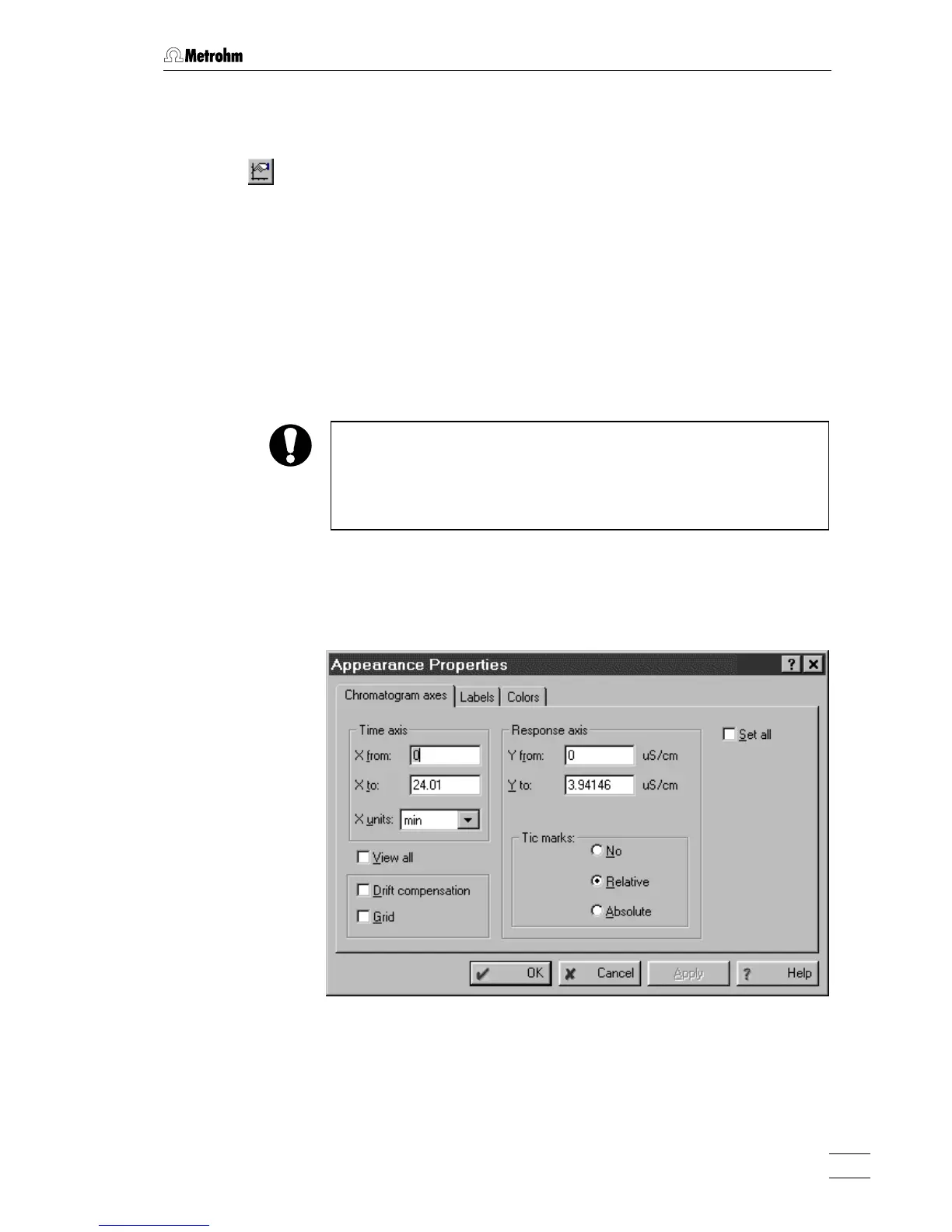
This menu item opens the Appearance window. It determines the ap-
pearance of the chromatogram and consists of four tabs:
Chromatogram axes Scaling of chromatogram axes.
Labels Settings for peak labels and baseline
drawing.
Select channel Select channels to be displayed (only
available for multi-channel chroma-
tograms).
Colors Color settings for chromatogram ele-
ments.
The appearance settings for a chromatogram are not saved automati-
cally on closing the chromatogram. In order to have the same appear-
ance after reopening the chromatogram, it must be saved explicitly
after modification of these parameters with
761 COMPACT IC / File / Save
/ Chromatogram
.
Chromatogram axes
Tab
Chromatogram axes of the Appearance window with parameters for
scaling of the chromatogram axes.
Time axis
X from Beginning of the window on X axis.
X to End of the window on X axis.
X units Selection of unit (Retention unit) for X axis.















 To Next Page