Metrotech Corp. | 25
Metrotech Copyright © 2008 Doc. No.: R12015
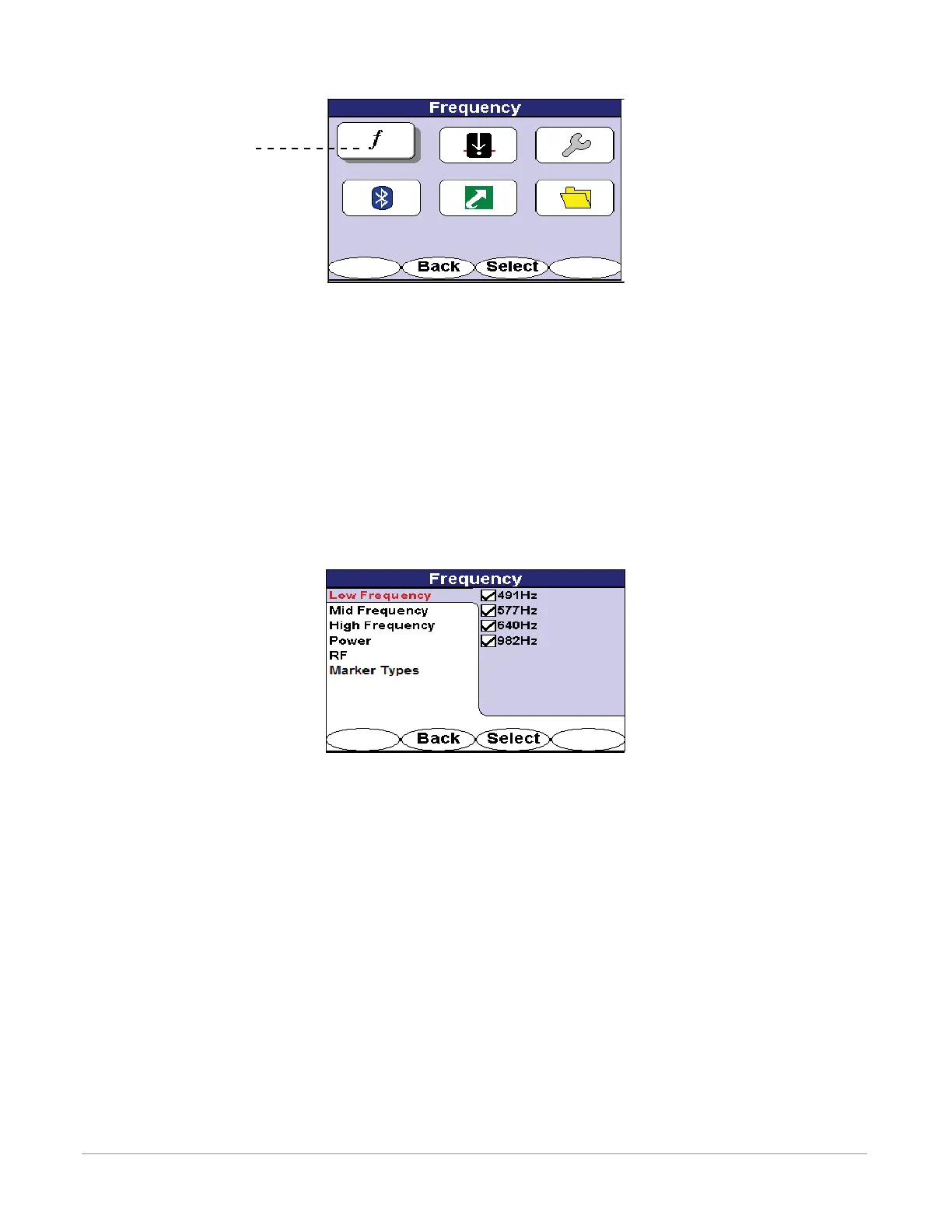
Figure 6-2 Frequency Menu Selection
6.2.1.1 Low Frequency
Low frequencies are interface frequencies below 1kHz.
Use the 4-way navigation button to move up and down the frequency list. Use the 4-way navigation button to
move right to highlight the frequencies. Press the <Select> softkey to activate or deactivate specic or all fre-
quencies.
Deactivating frequencies does not permanently remove these from the i5000 receiver. Access the frequency
menu to reactivate them.
Activated frequencies can be selected from the operational interface by pressing the <Freq> softkey. Deactivated
frequencies will be unavailable for use. Selecting fewer frequencies allows faster toggling between frequencies
from the operational interface.
Figure 6-3 Low Frequency Selection Screen in Frequency Menu
6.2.1.2 Mid Frequency
Mid frequencies are in the range between 1kHz and 10kHz.
Use the 4-way navigation button to move up and down the frequency list. Use the 4-way navigation button to
move right to highlight the frequencies. Press the <Select> softkey to activate or deactivate specic or all fre-
quencies.
Deactivating frequencies does not permanently remove these from the i5000 receiver. Access the frequency
menu to reactivate them.
Activated frequencies can be selected from the operational interface by pressing the <Freq> softkey. Deactivated
frequencies will be unavailable for use. Selecting fewer frequencies allows faster toggling between frequencies
from the operational interface.
Frequncy Menu



 To Next Page
 Loading...