42 Chapter 6: Main Menu
DL431 Mic Splitter
Operator Manual
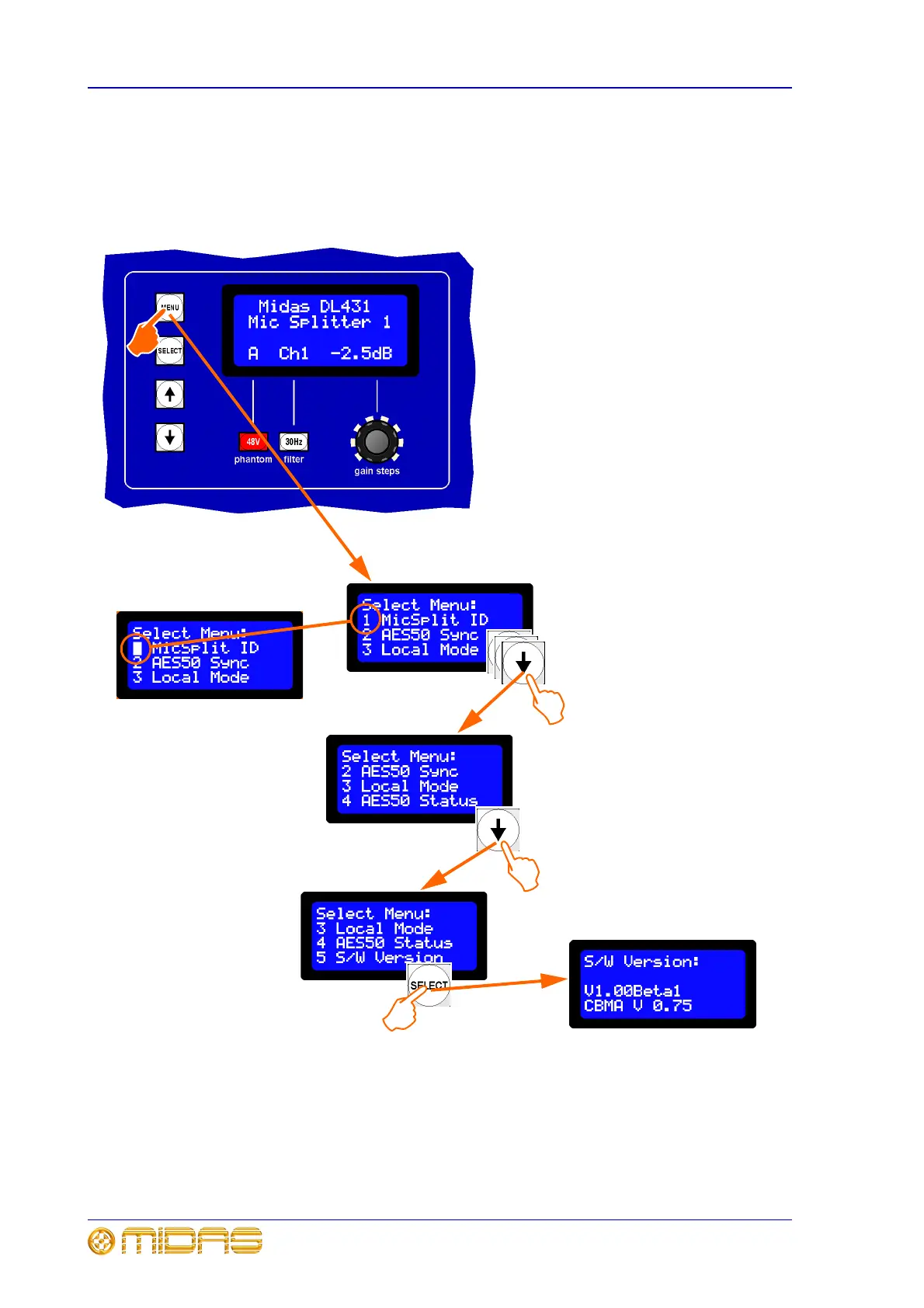
To enter the main menu and select an option
To enter the main menu, press the MENU button and hold down for approximately two
seconds; the default display will change to the main menu. From here you can select
from the five options available. Scroll through the options using the up and down arrow
buttons and press SELECT to select the option you want.
To exit the main menu
Pressing MENU takes you back up the main menu by one level. To exit the main menu,
press the MENU button as many times as necessary until you are back at the default
screen.
The DL431 Mic Splitter will exit the main menu automatically after about 20 seconds of
inactivity, that is, if none of the navigation buttons are pressed within that time.
1 Press MENU and hold down for
approximately two seconds to access the
main menu.
2 Use the up and down arrow buttons to
highlight the option you require, as indicated
by its option number flashing (see diagram
below).
3 Press SELECT to select your chosen
option.
4 Use the MENU button to exit.
1
2b
2a
x3
Option number flashes to
show that it is ready for
selection (option 1 in this
example)
3
In this example, option 5 is
selected. Its option number
must be flashing before it can
be selected by pressing
SELECT



 To Next Page