44 Chapter 6: Main Menu
DL431 Mic Splitter
Operator Manual
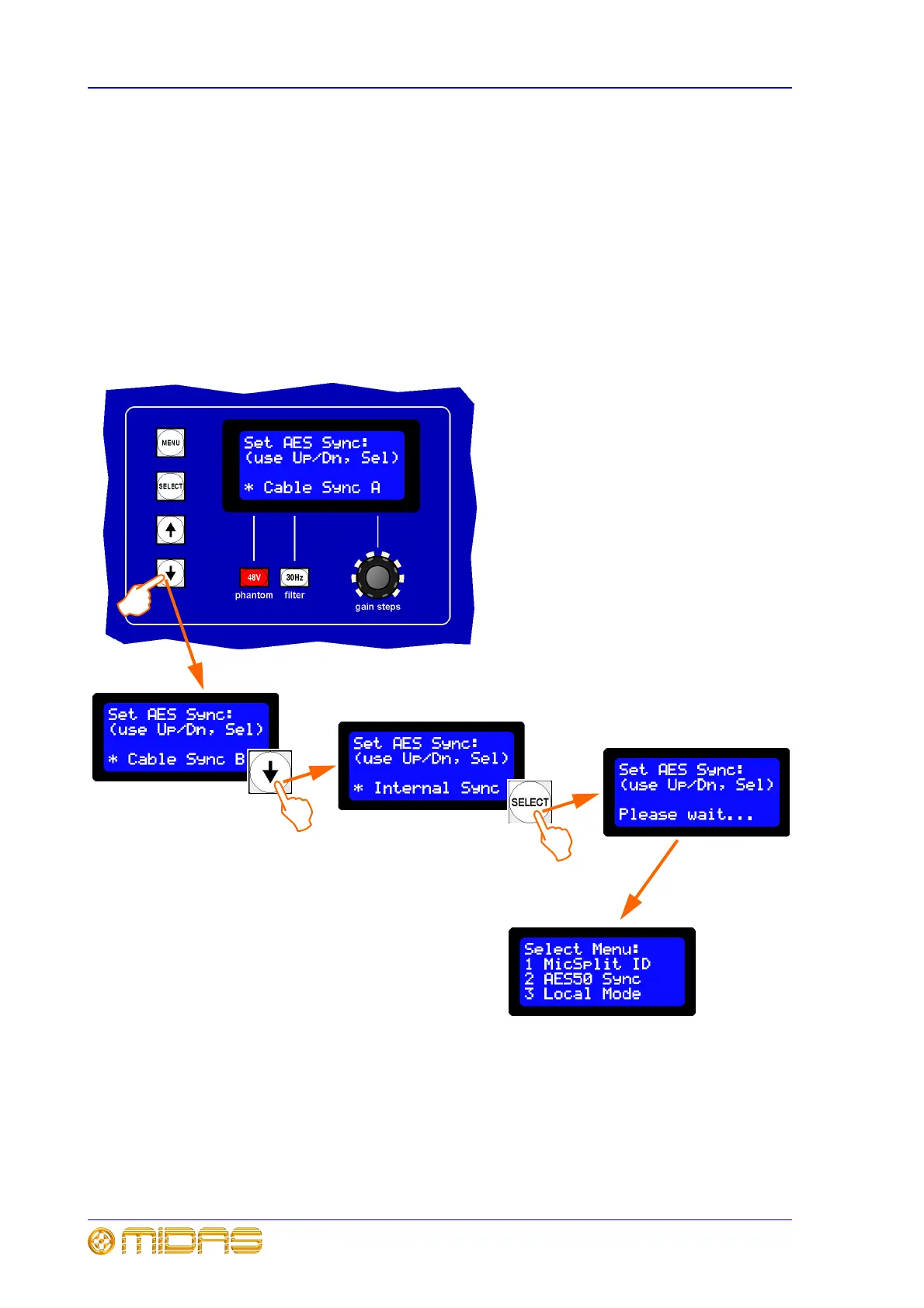
Option 2 AES50 Sync
This option allows you set up the clock source for AES50 synchronisation of the DL431
Mic Splitter.
To set up the unit’s AES50 synchronisation
Enter the main menu, select option 2 and then continue to set the unit’s AES50
synchronisation from the three options available:
• Cable Sync A - if using the FOH console’s clock as the AES50 master.
• Cable Sync B - if using the MON console’s clock as the AES50 master.
• Internal Sync - for stand alone operation and test purposes.
1 Select option 2 from the main menu;
see “To enter the main menu and select an
option” on page 42. You will see a display
similar to the one shown left.
2 Press the down arrow to go to the next
“AES Sync” option. You can scroll through
the options using the up and down buttons.
3 When you have the required “AES
Sync” option displayed, for example,
“Internal Sync”, press SELECT to save and
store the setting.
4 Use the MENU button to exit.
2b
2a
Display reverts to the
main menu
3



 To Next Page