46 Chapter 6: Main Menu
DL431 Mic Splitter
Operator Manual
Option 4 AES50 Status
This option allows you set up the AES50 status of the DL431 Mic Splitter.
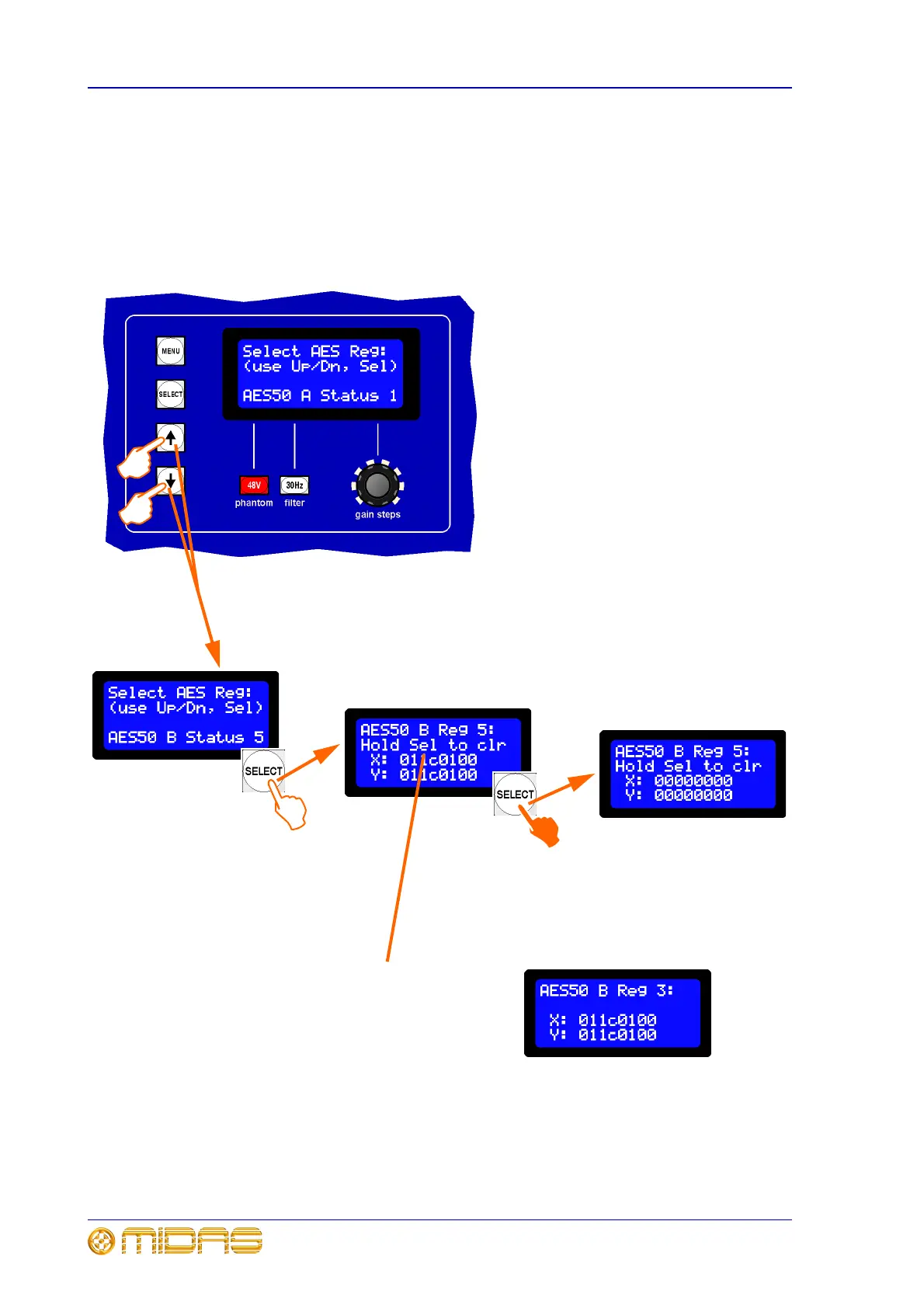
To view/clear the AES50 status
Enter the main menu, select option 4 and then continue to set the unit’s operating
mode.
1 Select option 4 from the main menu;
see “To enter the main menu and select an
option” on page 42. You will see a display
similar to the one shown left.
2 Display the option you require by
pressing the up or down arrow buttons to
scroll through the six status values for A and
then six for B. In this example, “AES50 B
Status 5”.
3 Press SELECT to go to the X and Y
screen.
4 Press SELECT and hold for
approximately two seconds to clear the X
and Y values.
5 You can view and clear more AES50
values from here by pressing the up and
down buttons to scroll through to the ones
you want and then repeating step 4. Or, you
can exit by repeatedly pressing MENU.
3
2b
Only AES50 Regs 1, 2, 5
and 6 for both A and B
can be cleared
2a
4
Note:
You can only clear the X and Y
values if you see the “Hold Sel to
clr” message displayed on line 2.
This message does not appear on
all 3 and 4 Status displays (see
right for example), so you cannot
clear their X and Y values.



 To Next Page