TS571W Installation Instructions 31
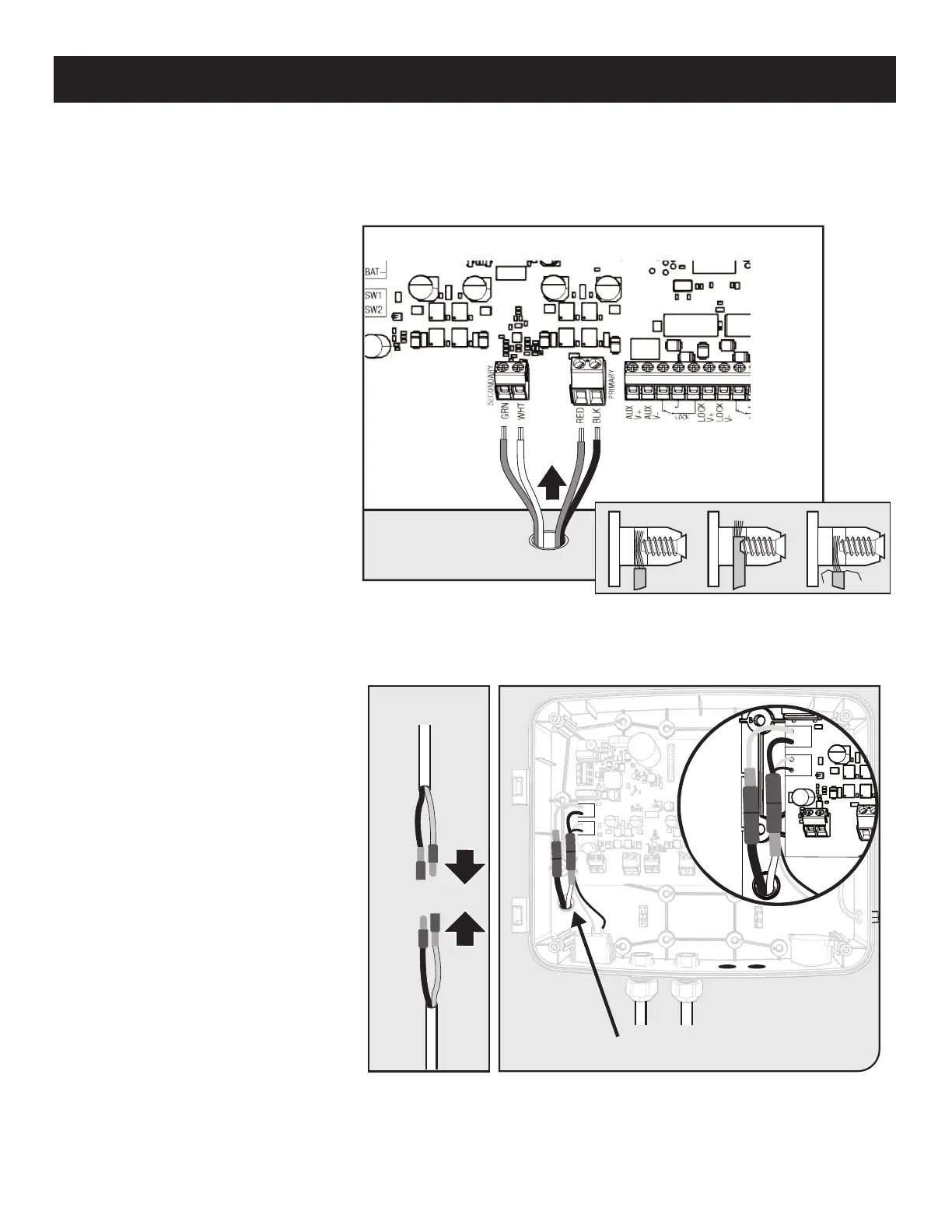
Correct
Wrong Wrong
● Locate the PRIMARY operator wiring
terminals, and insert the wires into
the corresponding color terminals.
● Tighten the screw terminals
ensuring the wires are captured
correctly as shown.
Step 3
Step 4
GRN
WHT
BAT+
AUTO
CLOSE
RESET
PULL
STAGGER
WARNING
BAT–
GRN
WHT
RED
BLK
RED
BLK
COM
COM
CYCL
SAFE
EXIT
SHDW
AUX
V+
AUX
V-
LOCK
V+
LOCK
V-
CLOSE
EDGE
OPEN
EDGE
PRIMARY
SECONDARY
LOCK AUX
SW1
SW2
PUSH
12345
+
TERM6
GRN
WHT
BAT+
BAT–
GRN
WHT
BRN
ORG
RED
BLK
RED
BLK
AUX
V+
AUX
V-
PRIMARY
SECONDARY
SW1
SW2
TERM6
Battery Power Access
BATT– BATT+
+
SW1–
SW1+
–
BATT– BATT+
● Connect the battery power wires:
Red to Red (BAT+) and Black to
Black (BAT–).
CONNECTING THE OPERATOR AND BATTERY














 To Next Page