6 TS571W Installation Instructions
II. During Installation
1. Install the gate operator on the inside of the property and
fence line. DO NOT install an operator on the outside of
the gate where the public has access to it.
2. Be careful with moving parts and avoid close proximity to
areas where ngers or hands could be pinched.
3. Devices such as contact sensors (sensing
edges) and non contact sensors (photo beams) provide
additional protection against vehicular damage.
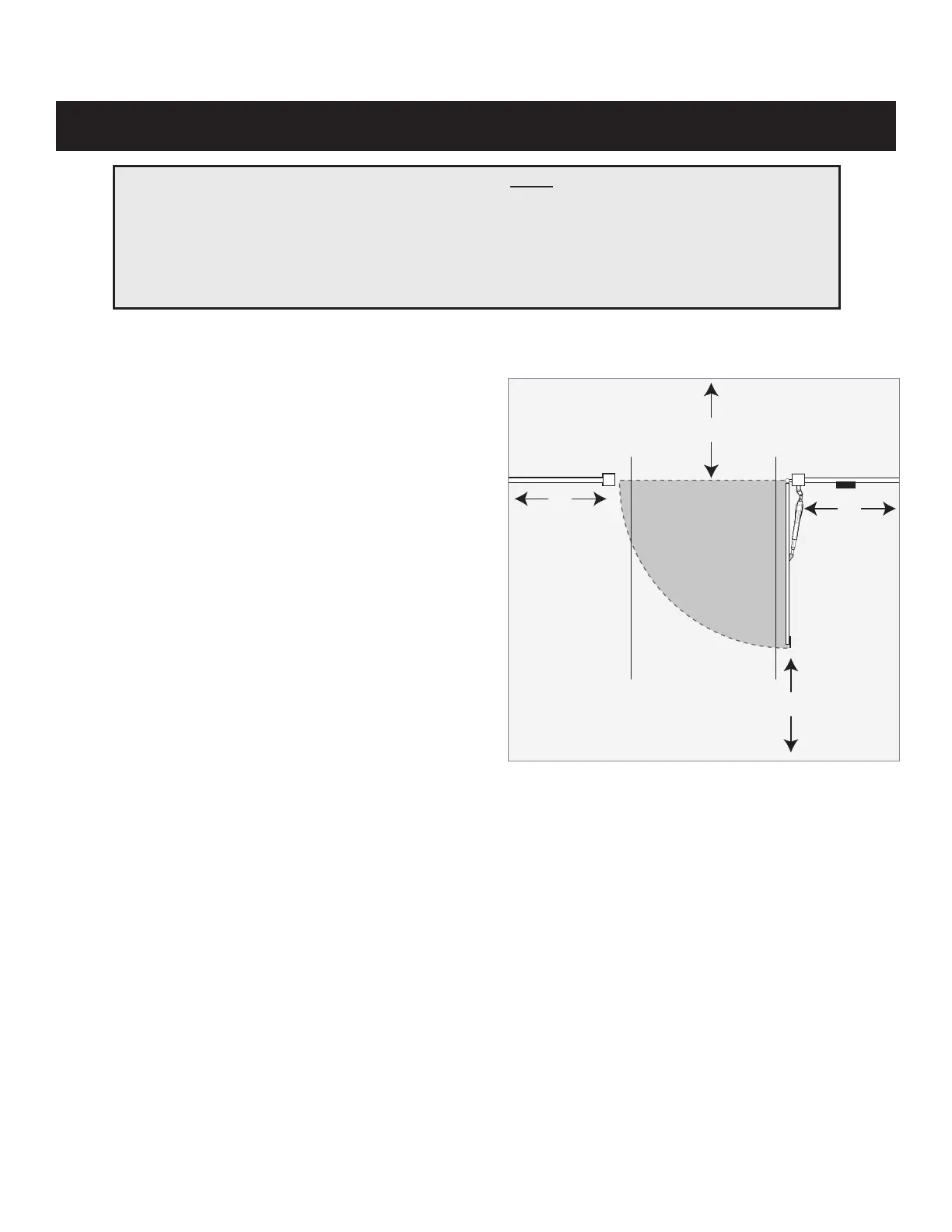
4. If push buttons or key switches are installed, they should
be within sight of the gate, located at least 10 feet from
any moving part of the gate (see diagram below).
Never install any control device where a user will
be tempted to reach through the gate to activate the
gate operator.
5. Secure outdoor or easily accessed gate operator controls
in order to prohibit unauthorized use of the gate.
FOR THE INSTALLER AND END USER
Typical Entrapment Zones are shown in the diagrams on page 5:
Zone 1 – leading edge of the gate and the fence post.
Zone 2 – between the gate and the gate post.
Zone 3 – the path of the gate.
Zone 4 – the space between the gate in the open position and any object such as a wall, fence, tree, etc.
Zone 5 – pinch points between the operator and gate.
Moving Gate
Area
Driveway
10'
10'
10'
10'
NEVER install any control device
within the indicated area
TS571W
Pull-To-Open Application
Important Safety Information














 To Next Page