OM-277115 Page 47
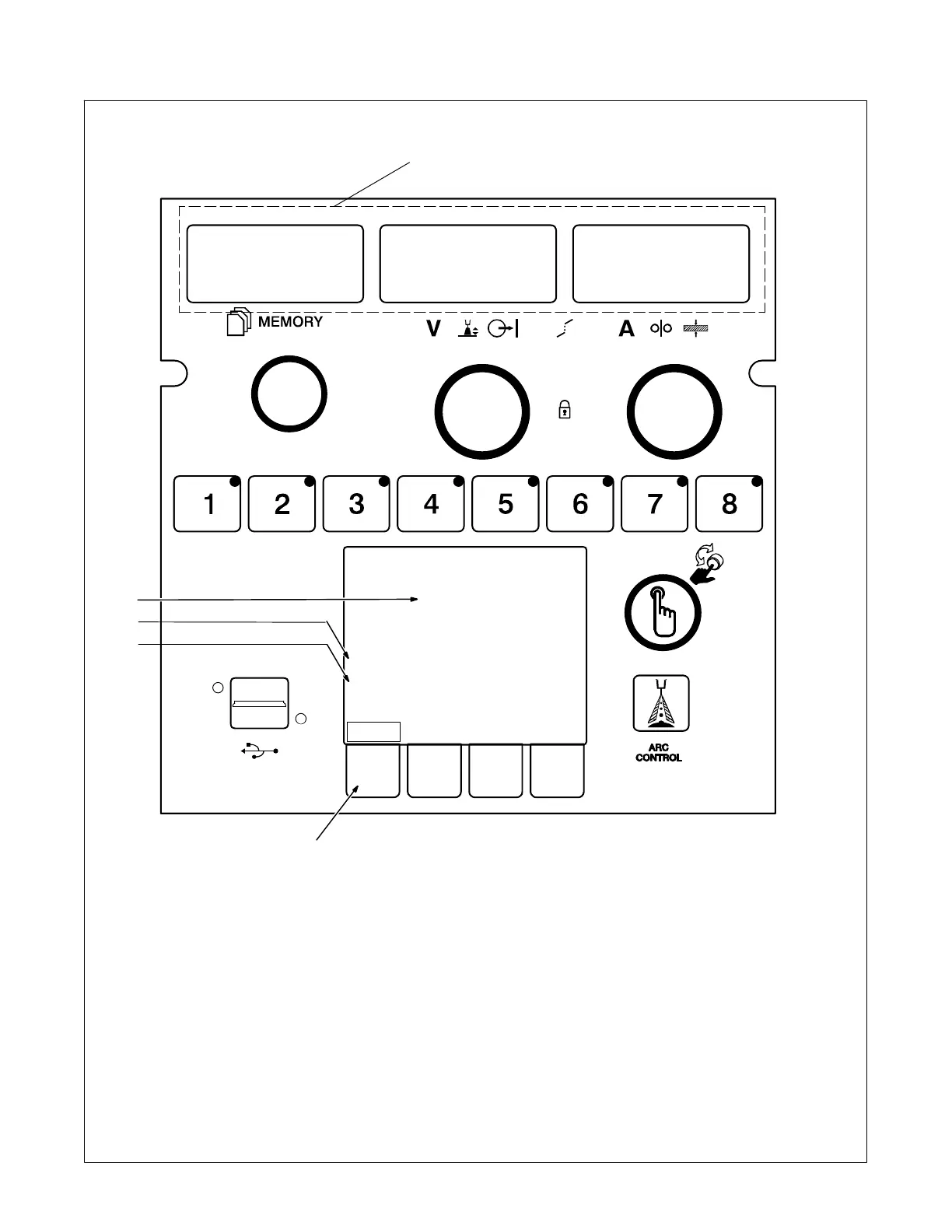
9-3. Error Code Troubleshooting Description And Tables
Ref. 266061-B
2
3
Logs
ERROR
Button on UI stuck
Make sure all buttons are clear
If error persists, please contact support.
1 LED Display Message
Displays a short message describing the
error or where the error is occurring. Some
messages may represent multiple different
errors. For more specific error information
see the LCD Display Message.
2 Message Type
There are three types of messages that will
be displayed.
ERROR- The system has experienced a
fault that must be addressed before contin-
uing use.
MESSAGE- No fault has occurred, but
some action must be taken before resum-
ing use of the welding system. For
instance, input power may need to be
cycled after loading new software.
WARNING- There is something that
should be addressed before continuing.
For instance, the volt sense lead connec-
tion has been lost.
3 LCD Display Message
Provides more information about the mes-
sage being displayed.
4 LCD Solution Message
Describes the action needed to clear the
message or fault being experienced.
5 Logs Soft Key
Pressing the Logs soft key will take the us-
er to the Logs Menu. From the Logs Menu
it is possible to access the Error Log. The
LCD Error Log Messages are stored in the
Error Log.
ERR BTN STUK
1
4
5










 To Next Page