OM-277115 Page 61
10-6. Verifying Network Connection
. It can take up to five minutes for a WiFi network to connect the first time.
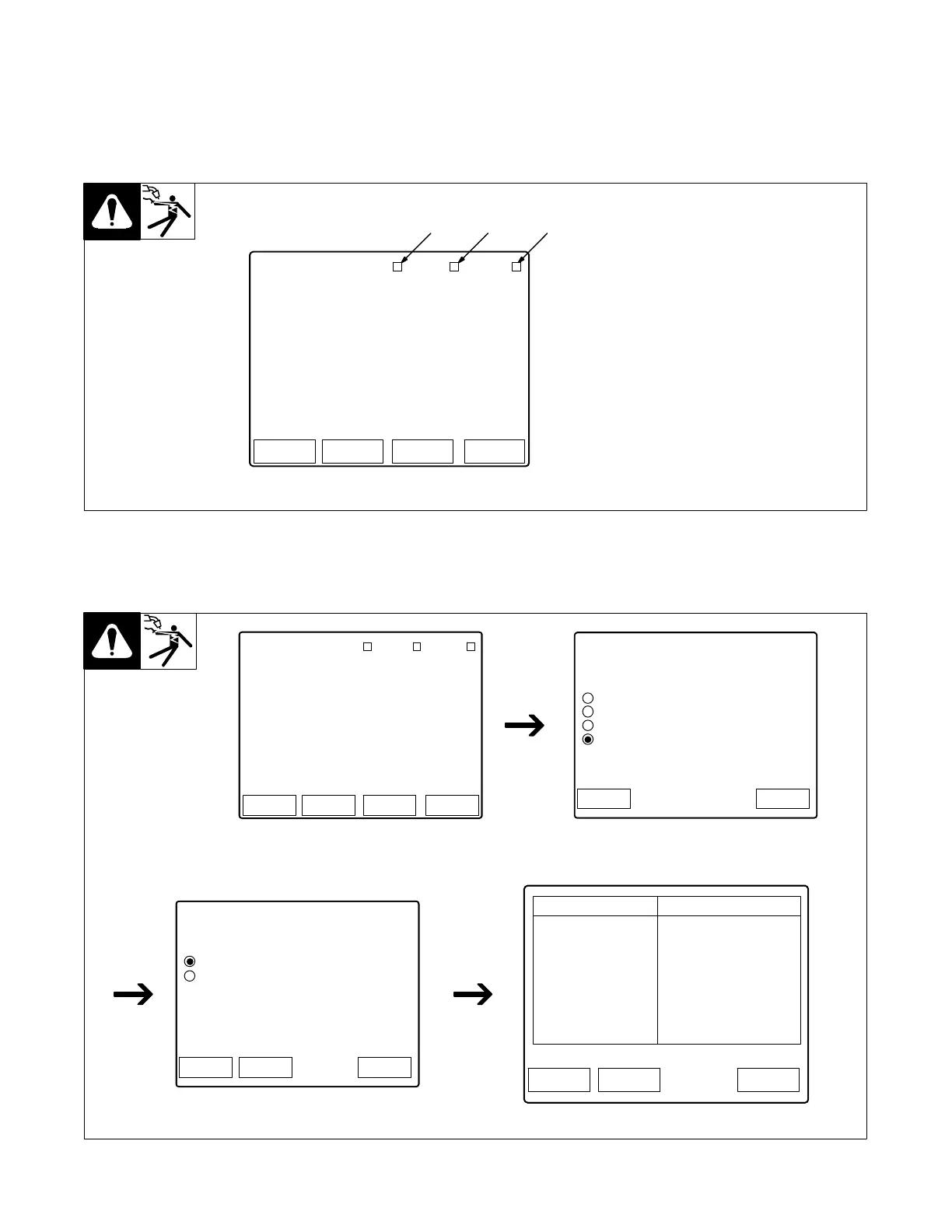
To verify the network connection, reference the feeder (or pendant) display. If a WiFi connection is being used, the box next to WiFi should be yellow. If
an Ethernet connection is being used, the box next to Ethernet should be yellow. Only one (Ethernet or WiFi) is required to establish a network connec-
tion. Once the network is identified, the box next to Internet should be green.
1 Internet Connection
Indicator (Green When
Connected)
2 WiFi Connection Indicator
(Yellow When Connected)
3 Ethernet Connection
Indicator (Yellow When
Connected)
12 3
Logs StatusSetup System
Home
Program # 1
MIG
.035 Steel ER70
Ar 90 CO2 10
Internet WiFi Ethernet
35ST MIG
Figure 10-11. Verifying Network Connection
To review settings from the feeder, go to the Ethernet Settings screen. Using the scroll knob, select System, then Network Settings, then either
Ethernet Settings or WiFi Settings.
Review settings here.
Logs StatusSetup System
Home
Program # 1
MIG
.035 Steel ER70
Ar 90 CO2 10
Internet WiFi Ethernet
35ST MIG
Home
Home > System
System Menu
Factory Reset
USB Functions
System Software Revision
Network Settings
Back
Home
Home > System > Network
Network Menu
Ethernet Settings
WiFi Settings
BackSystem
Home BackSystem
Item
MAC
IP Mode
IP Address
Subnet Mask
Network Gateway
DHCP Server
DNS Server
WiFi Port
Value
7C:66:9D:49:30:F3
static
192.168.1.2
255.255.255.0
192.168.1.2
192.168.1.1
8.8.8.8
80
Figure 10-12. Verifying Network Connection










 To Next Page