EasyManua.ls Logo

Milltronics ACCUMASS BW500 - Start Up; Orientation and Keypad

Milltronics ACCUMASS BW500
141 pages
Print Icon
To Next Page IconTo Next Page
To Previous Page IconTo Previous Page
Loading...
PL-565 Accumass BW500 Page 29
Start Up
Start Up
Note:
For successful start up, insure that all related system components such as belt
scale and speed sensor are properly installed and connected.
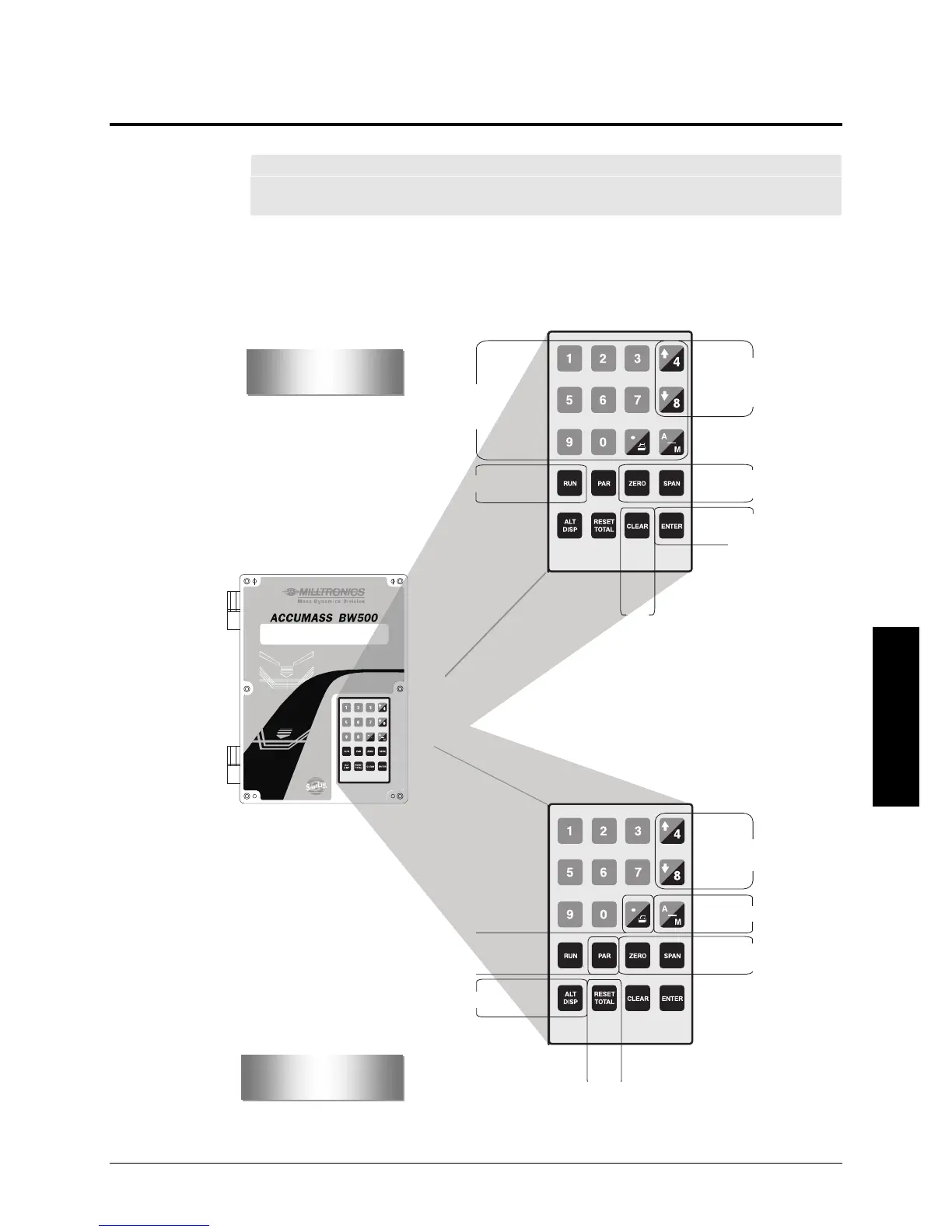
Orientation
Display and Keypad
Edit mode:
numerical and
arithmetical keys
View mode:
press to scroll through
parameter list
Press to initiate
calibration
Press to alternate
between view and
edit modes, and
enter parameter
values
clear
entry
Press to enter RUN mode
Program
Run
PID auto/manual switch
Press to initiate
calibration
press
to reset
totalizer 1
Press to scroll through run displays
Press to enter PROGRAM mode
Print
Press to change PID
local setpoint values

Table of Contents