en-US
|
10
|
User Manual
|
MD-500
1699503426 | REV A | 05.2021
© Mitchell International
power.
• PC connection illuminates when the VCI is connected
to tablet.
• Vehicle connection illuminates when the VCI is
communicating with the tablet and vehicle.
IMPORTANT:
When switching from vehicle to vehicle or switching power sources,
please ensure the VCI Power indicator has been completely turned
o.
Connect the Tablet to the VCI
Pairing
The VCI is paired to the tablet during manufacturing and
should be paired out of the box.
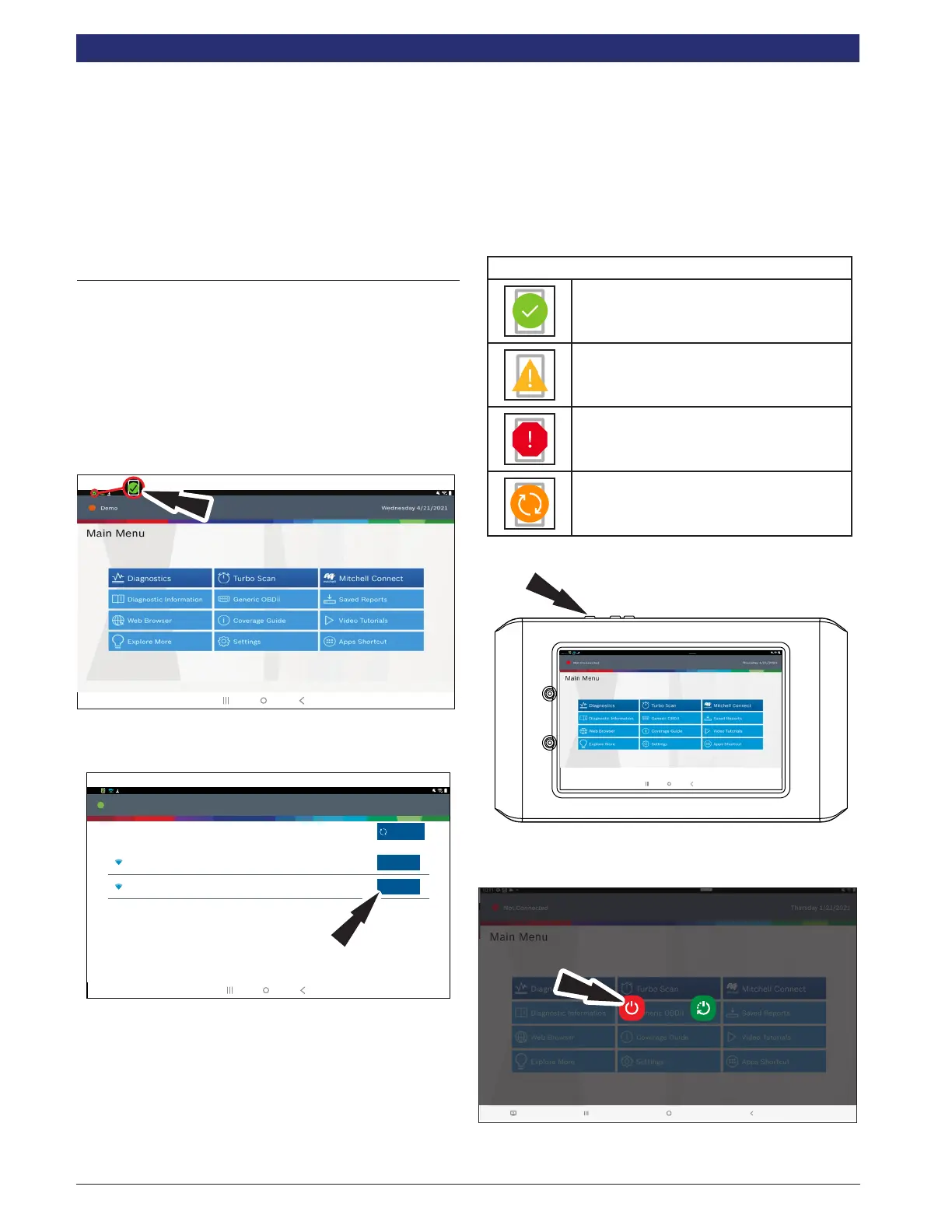
1. Connect the VCI to the vehicle DLC.
2. At this point VCI Connection Manager icon should
display “Connected via Wi-Fi”.
3. If VCI Connection Manager icon shows “No connection,”
select the VCI Connection Manager icon
Connected
Generic OBDII
Repair-Source
10:22
QuickScan
Apps Shortcut
Settings
What’s New
Web Browser Coverage Guide Video Tutorials
Diagnostic Information Wiring Diagrams
i
i
Saved Reports
Main Menu
Diagnostics
rt0011
4. Once VCI Connection Manager icon is selected, VCI
Connection Manager dialog is displayed, listing
discovered VCIs.
VCI Connection Manager
VCIs in range
A0VTOW2000000065GR
In Range
Connect
Connect
In Range
A0VTOW2118004426GR
10:22
Refresh Scan
Connected
10:22
rt03062
5. Select “Connect” next to the VCI in the list to pair it to the
tablet. The VCI Connection Manager icon in the top left
will refresh to show successful VCI to tablet connection.
6. Once VCI Connection Manager icon changes to
“Connected via Wi-Fi”, the tool is ready to use.
7. The tablet is now paired to a VCI. To use a dierent VCI
in the future, repeat the steps for manually pairing the
VCI.
VCI Connection Manager Icon Denitions
Icon that will display when user is
connected to DVCI.
Icon will display when user is connected to
DVCI but signal is degraded.
Icon will display when user is NOT
connected to DVCI.
Icon will display when user is connected
to DVCI, but the version does not match
expected tablet version.
Turning o tablet:
Connected
Generic OBDII
Repair-Source
10:22
QuickScan
Apps Shortcut
Settings
What’s New
Web Browser Coverage Guide Video Tutorials
Diagnostic Information Wiring Diagrams
i
i
Saved Reports
Main Menu
Diagnostics
1. Press and release the power button.
2. Select Power O. The tool will now shutdown.
Connected
Generic OBDII
Repair-Source
10:22
QuickScan
Apps Shortcut
Settings
What’s New
Web Browser Coverage Guide Video Tutorials
Diagnostic Information Wiring Diagrams
i
i
Saved Reports
Main Menu
Diagnostics
Power o Restart
rt0018



 To Next Page