en-US
|
24
|
User Manual
|
MD-500
1699503426 | REV A | 05.2021
© Mitchell International
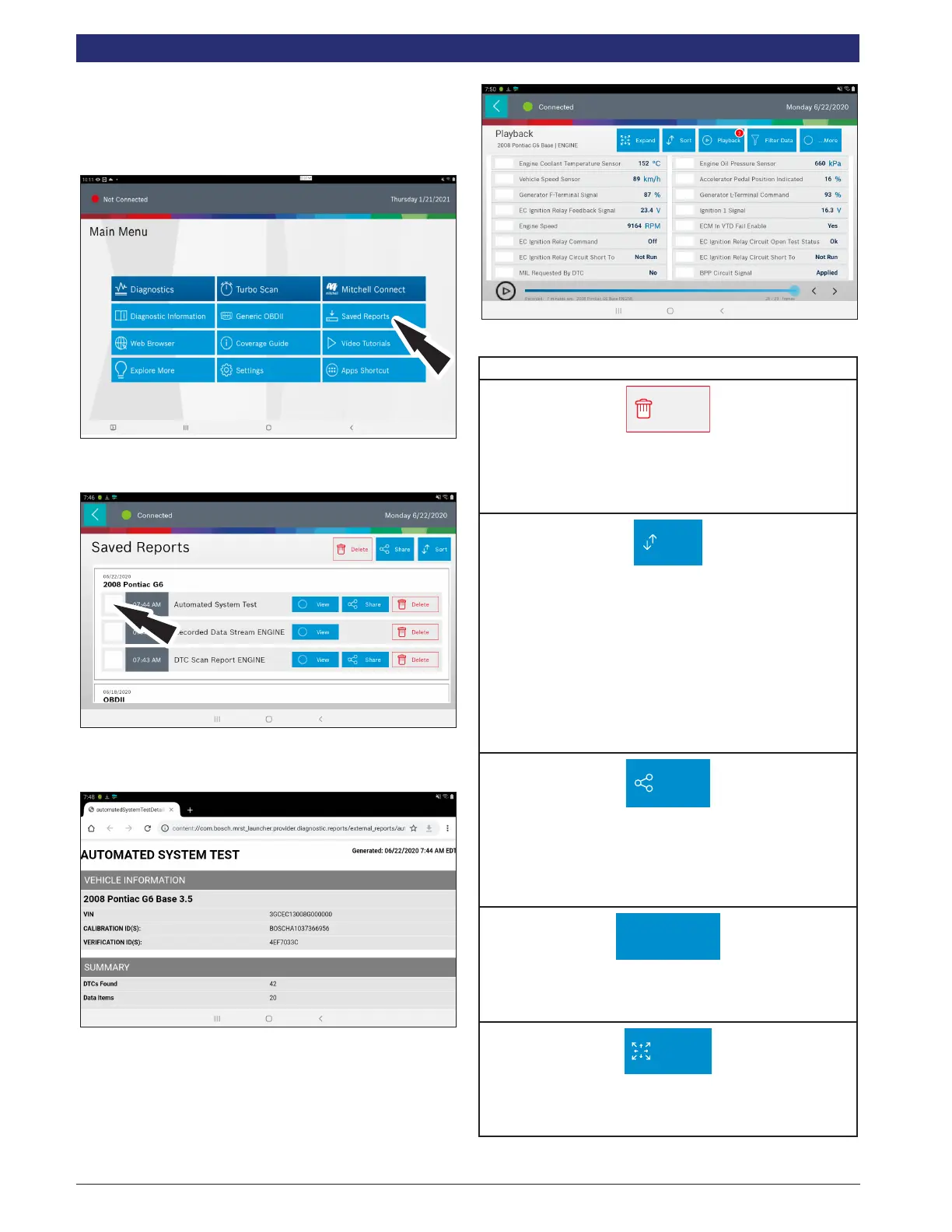
Saved Reports
Overview
The Saved Reports allows the capability to review previously
recorded data.
1. Select Saved Reports from the Main Menu Screen.
2. Navigate down to the desired saved test.
3. Select Specic le.
4. View the report. When nished tap the back button.
5. Navigate down to the desired saved recording.
6. Select Specc le.
7. View recording.
Saved Diagnostic Data Button Denitions
Delete
Delete
Select Delete to clear displayed data stream. This function
will reset the timeline frame counter and clear graphed
data.
Sort
Sort Function:
• Select Sort to sort data items.
• Data may be sorted alphabetically, by graph, or by
selection (checkbox checked).
• Sorting data items will reset the timeline frame
counter, so sort these items before recording data.
If sorting data while recording the recording will
have a period of time where there is no data avail-
able.
Share
Share Button
Tapping the Share button opens the Android share options
that are currently available to the device. Share a report
output by print, email, Bluetooth, USB or other available
options.
Screen Capture
Screen Capture
Selecting Screen Capture will save a copy of the current
open screen.
Expand
Expand button
To view the data in the enlarge view, press the Expand
button.



 To Next Page