1699503426 | REV A | 05.2021
© Mitchell International
MD-500
|
User Manual
|
29
|
en-US
Waveform
Presents reference waveform information to help the
technician understand and x the problem.
TSB Reference
Provides the technician with TSBs associated with the
selected DTC.
Connector
Presents information related to the connector to help the
technician understand and x the problem.
Read DTCs Button Denitions
Self Diag
Ford/Lincoln/Mercury
Self Diagnostics button displays a pop up menu allowing
the user to choose between specic special tests.
Refresh
Refresh DTCs Button
Tapping the Refresh button initiates a fresh scan of DTCs
from the vehicle.
Share
Share Button
Tapping the Share button opens the Android share options
that are currently available to the device. Share a report
output by print, email, Bluetooth, USB or other available
options.
Clear DTCs
Clear DTCs Button
The Clear DTCs button is used to clear codes and remove
all but permanent DTCs on the selected controller. To clear
codes, complete the following:
NOTE:
• Clearing DTCs will erase current Mode 1 Readiness
monitor information and require the user go through
necessary drive cycles over again. So, if Mode 1
information needs to be reviewed, be sure to view it
before clearing codes.
• If a code will not clear, turn the ignition o for at
least 10 seconds; turn it back on to KOEO, then
retry. Some controllers will go to sleep after a period
of inactivity and prevent clearing DTCs. This key
cycle may be needed when attempting to communi-
cate with other controllers after a period of time on a
dierent controller.
Read DTCs Button Denitions
Help
Help
Selecting Help will open an online user manual.
Note: an active internet connection will be required.
Save
Save
Tapping the Save button will save DTC and test data reports
from Automated System test
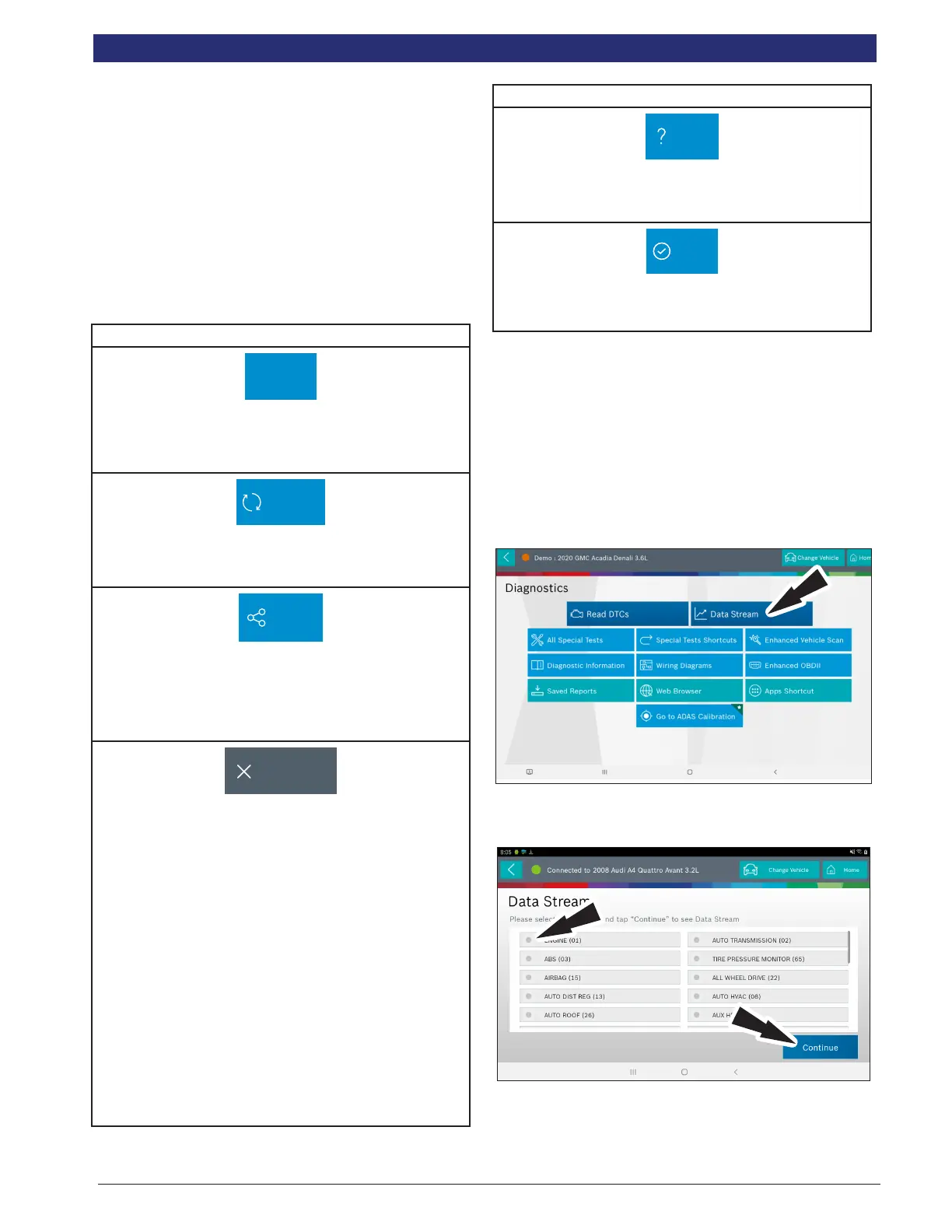
Data Stream
The data stream function shows live sensor and solenoid
data streaming from the vehicle ECU (electronic control unit).
Connect the VCI with the vehicle at key on engine o or key
on engine running to see live dynamic data, instead of static
live data. Each data item has a selection checkbox and a
display format menu.
Basic Data Stream Procedure
1. From the screen, select Data Stream.
2. If the vehicle is NOT a Volkswagen/Audi then go to step
7.
3. Select the desired vehicle controller then select continue.
4. Follow the prompts on the screen.



 To Next Page