1699503426 | REV A | 05.2021
© Mitchell International
MD-500
|
User Manual
|
9
|
en-US
30 Day Trial
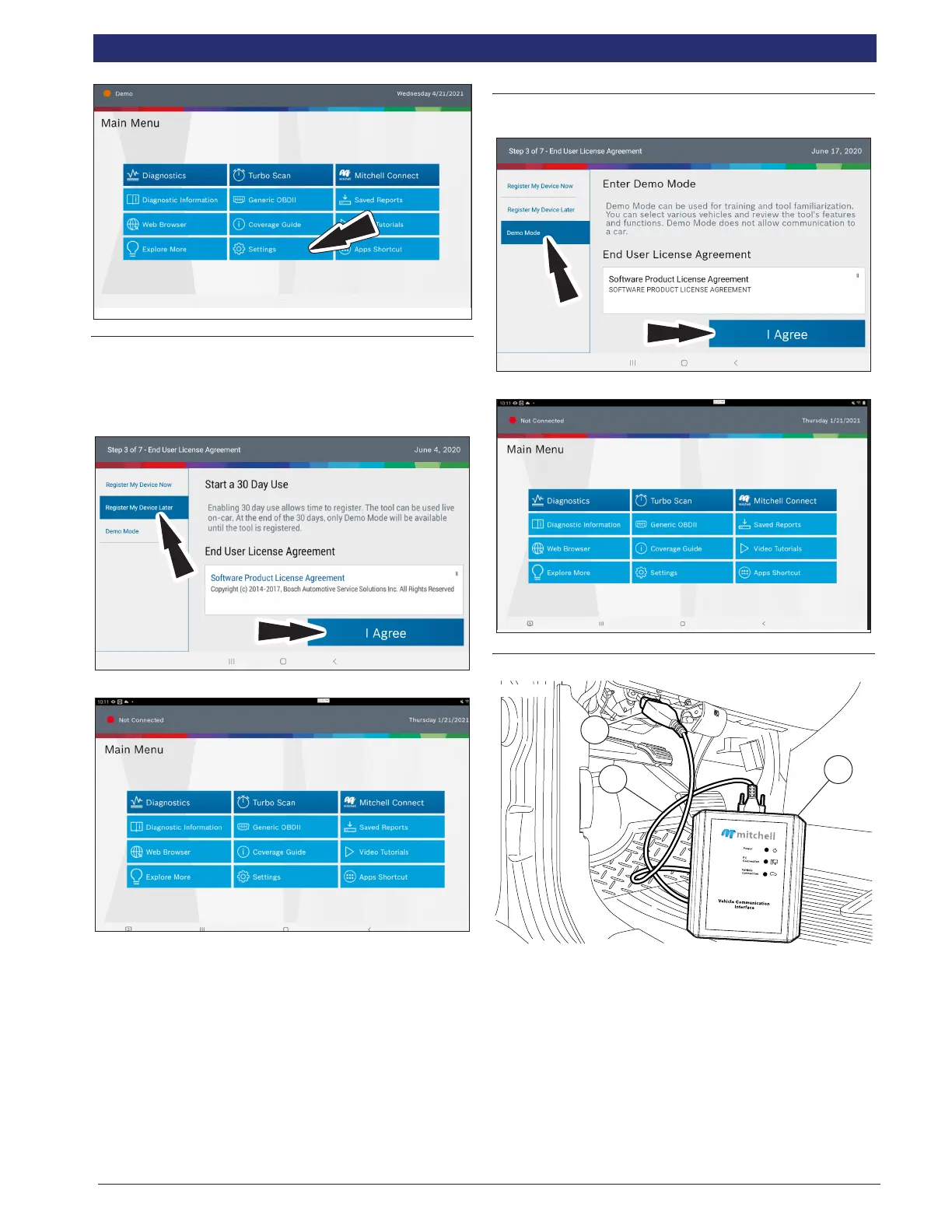
1. Select Register my Device Later for 30 days of full use of
the tool before registration is required. If the tablet is not
registered within the 30 day trial period, after 30 days it
will only function in Demo Mode.
2. MD-500 is ready to use.
Demo
1. Select Demo mode
2. MD-500 is ready to use.
Connect VCI to Vehicle
rt00001
1
2
3
VCI Cable Connections
1. OBDII/DLC Cable
2. DLC
3. VCI
1. Connect the OBDII/DLC cable to the VCI.
2. Connect the OBDII/DLC cable to the DLC on vehicle
(typically located on the driver’s side within 18 inches
(45.7 cm) of the steering wheel).
3. Turn ignition ON.
• Power indicator illuminates when the VCI is receiving



 To Next Page