1699503426 | REV A | 05.2021
© Mitchell International
MD-500
|
User Manual
|
25
|
en-US
Saved Diagnostic Data Button Denitions
Shrink
Shrink Function
To zoom out press the Shrink button.
Customize
Customize:
1. Choose only the data you want to view by checking the
box in front of each desired data item.
2. Select the Sort button.
Playback
Playback:
• Select Playback to view previously recorded data
streams.
• Recordings are listed from newest to oldest. When
the folder is full, the newest recording pushes the
oldest one out of the list. Currently, there is no way
to manually delete recordings.
• To view recordings, select the Recordings button
near the top of the display.
• Select the desired recording.
Browser
Overview
An internet browser window is available for direct internet
access.
1. Select Browser from the Main Menu Screen.
The Tablet will launch the internet browser. Links to common
technical and repair websites are provided. Select the
keyboard icon to input text.
Note: The tablet will need to have a Wi-Fi connection.
CONNECTING TO WI-FI NETWORKS
See Android Settings for more information on setting up and
connecting to a wireless network.
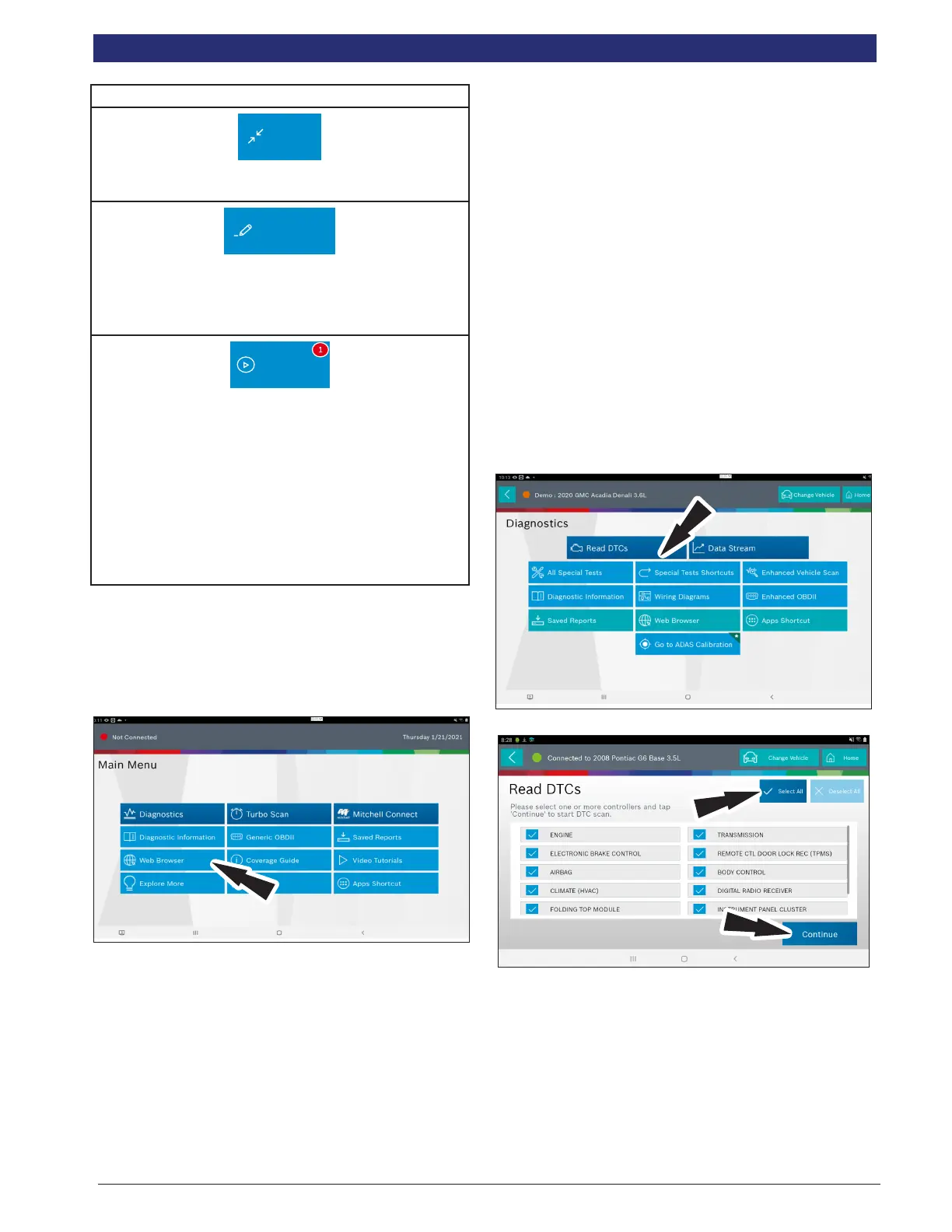
Read DTCs
Overview
There are two ways to read DTCs using MD-500.
Read DTCs by selecting ALL will scan all available controllers
on the selected vehicle.
Read DTCs by selecting individual controllers will scan only
the controllers selected on the vehicle.
Read DTCs on all systems.
Depending on the vehicle, the tablet may ask qualifying
questions concerning particular controller types for the
vehicle being scanned. If unsure what selection to pick nd
the manufacturer’s Regular Production Option (RPO) Code
list sticker on the vehicle, then nd the corresponding code
for the desired controller. Typical locations for the RPO are
the trunk, glove box, or doorjamb area.
These questions may be skipped by selecting Skip Controller.
Scan progress will be indicated by the progress bar near the
top of the screen.
1. Select Read DTCs All Systems from the Screen.



 To Next Page