en-US
|
28
|
User Manual
|
MD-500
1699503426 | REV A | 05.2021
© Mitchell International
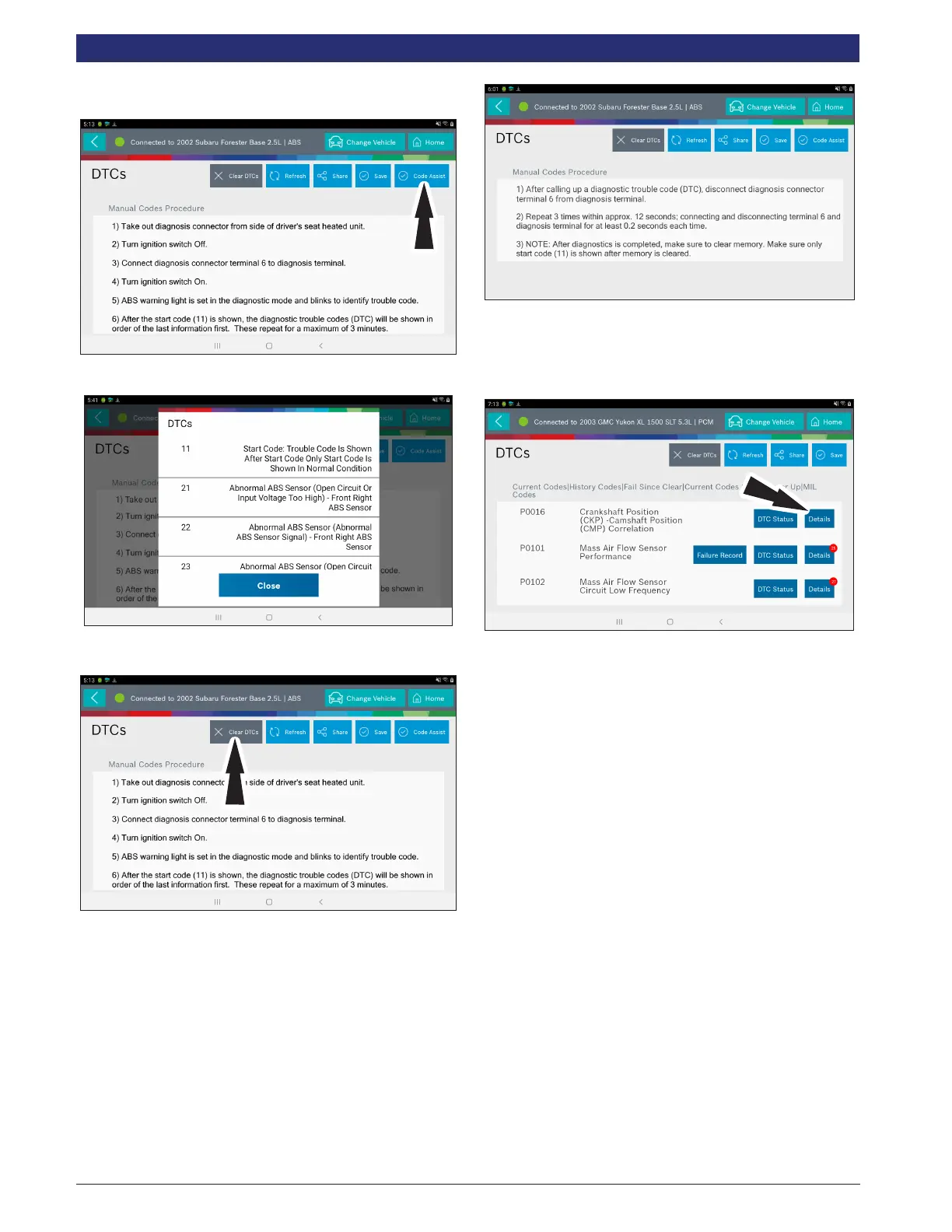
1. Follow the prompts on the screen for retreiving
DTCs.
2. Select Code Assist button.
3. Follow the prompts on the screen.
4. Select Clear DTCs button.
5. Follow the prompts on the screen.
Code Criteria
Codes will be read from the selected controller and displayed
on the screen.
Details
Details allows the technician to nd details related to a given
DTC.
Description
Displays the description associated with the selected DTC.
Code Criteria
Provides information regarding how the DTC is set.
PCM Pin
Provides detailed information related to the actual pins on the
PCM that are associated with the selected DTC.
Location
Aids the technician in determining where on the vehicle their
attention should be directed.
Scan Test
Provides the technician with detailed test steps.
Diagram
Provides a circuit diagram related to the selected DTC.



 To Next Page