en-US
|
30
|
User Manual
|
MD-500
1699503426 | REV A | 05.2021
© Mitchell International
Data Groups
• Data groups may be selected at any time within data
stream.
• Select the data group menu button from the top of the
screen.
• Scroll through the menu until the desired data group is
found, then select it.
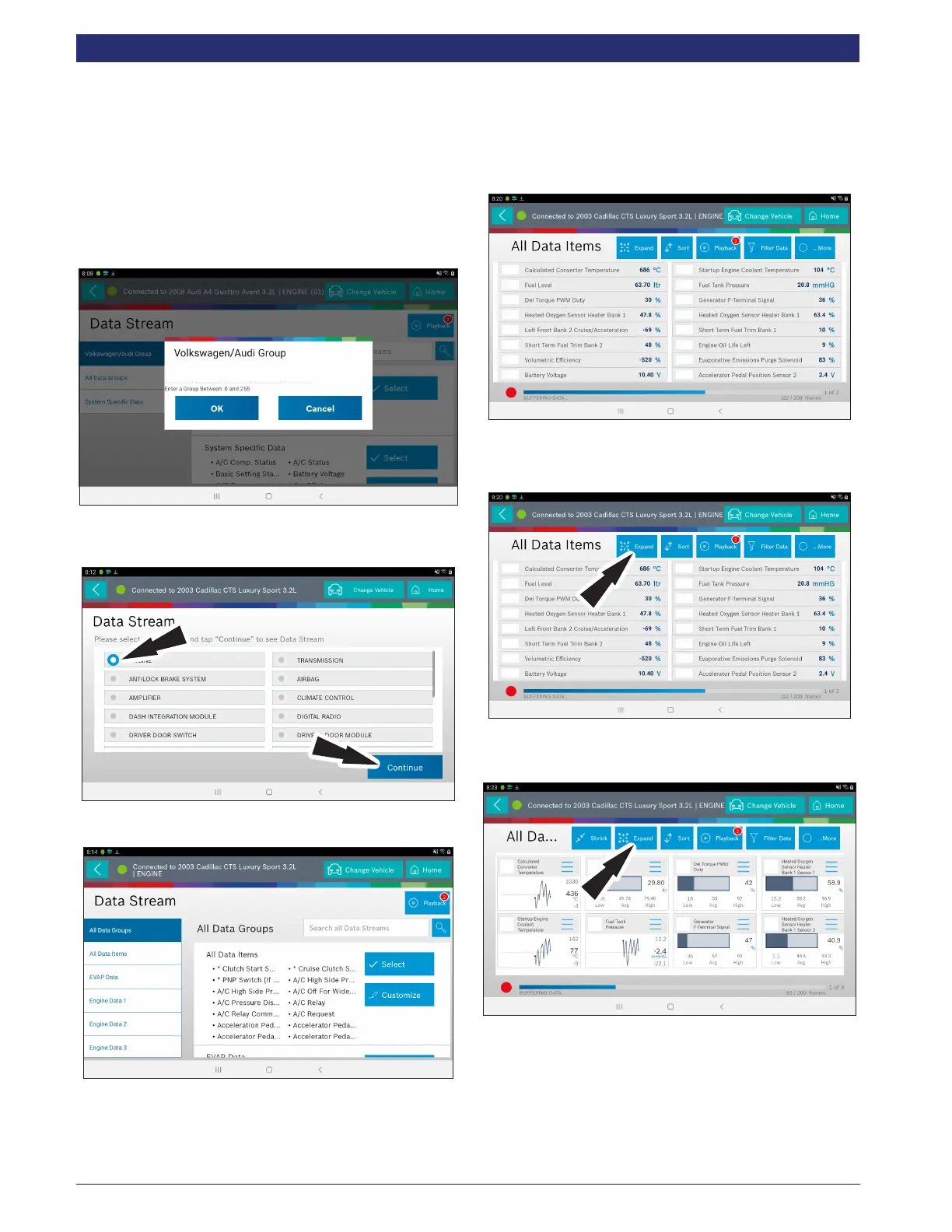
5. Follow the prompts on the screen. Select or customize a
group.
6. Enter the Volkswagen/Audi Group. When nished go to
Step 10.
7. Select the desired vehicle controller then select continue.
8. Follow the prompts on the screen.
Data Groups
• Data groups may be selected at any time within data
stream.
• Select the data group menu button from the top of the
screen.
• Scroll through the menu until the desired data group is
found, then select it.
9. Follow the prompts on the screen. Select, Select or
Customize a group.
10. The selected data will be displayed.
Enlarge Screen View Function
1. To view the data in the Enlarge view, press the Expand
button.
2. Press the Expand button again.



 To Next Page