Hardware Technical Reference Manual
Cabling Guidelines for the Desktop
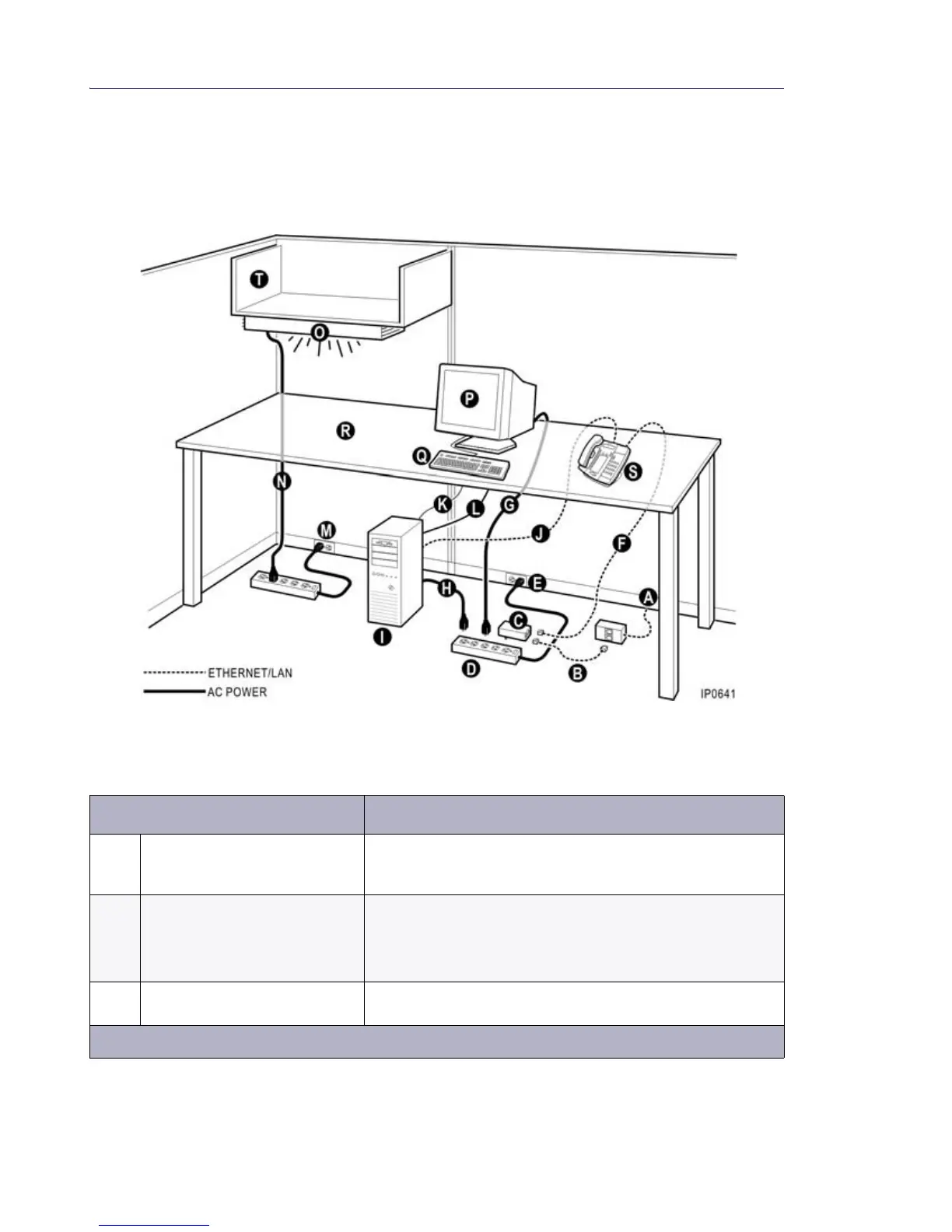
Refer to Figure 34 and the corresponding cabling guidelines to minimize electrical interference
at the desktop.
Figure 34: Desktop Cabling
Table 86: Desktop Environment Cabling Guidelines
Connection Guidelines
A Ethernet connection to network • Use CAT 5 or CAT 5e Ethernet cables and certified network
connection blocks (TIA/EIA 568A). Adhere to the cable lengths
listed on page 141.
B Network to power adapter
Ethernet patch cable (for local
power configuration only)
• Use CAT 5 or CAT 5e cables (certified to TIA/EIA 568A)
• Maximum length 5 ft. (1.5 m)
• Route cable away from sources of interference, such as power
cables
C IP Phone power adapter (for local
power configuration only)
• Plug IP Phone power adapter and the computer into the same
surge-suppressing power bar
Page 1 of 2













 To Next Page