67
A
SSIGNING A STATIC IP ADDRESS MANUALLY
CHAPTER 7 APPENDIX A: ASSIGNING A STATIC IP ADDRESS TO THE EX CONTROLLER DEPLOYMENT TOOL MANUALLY
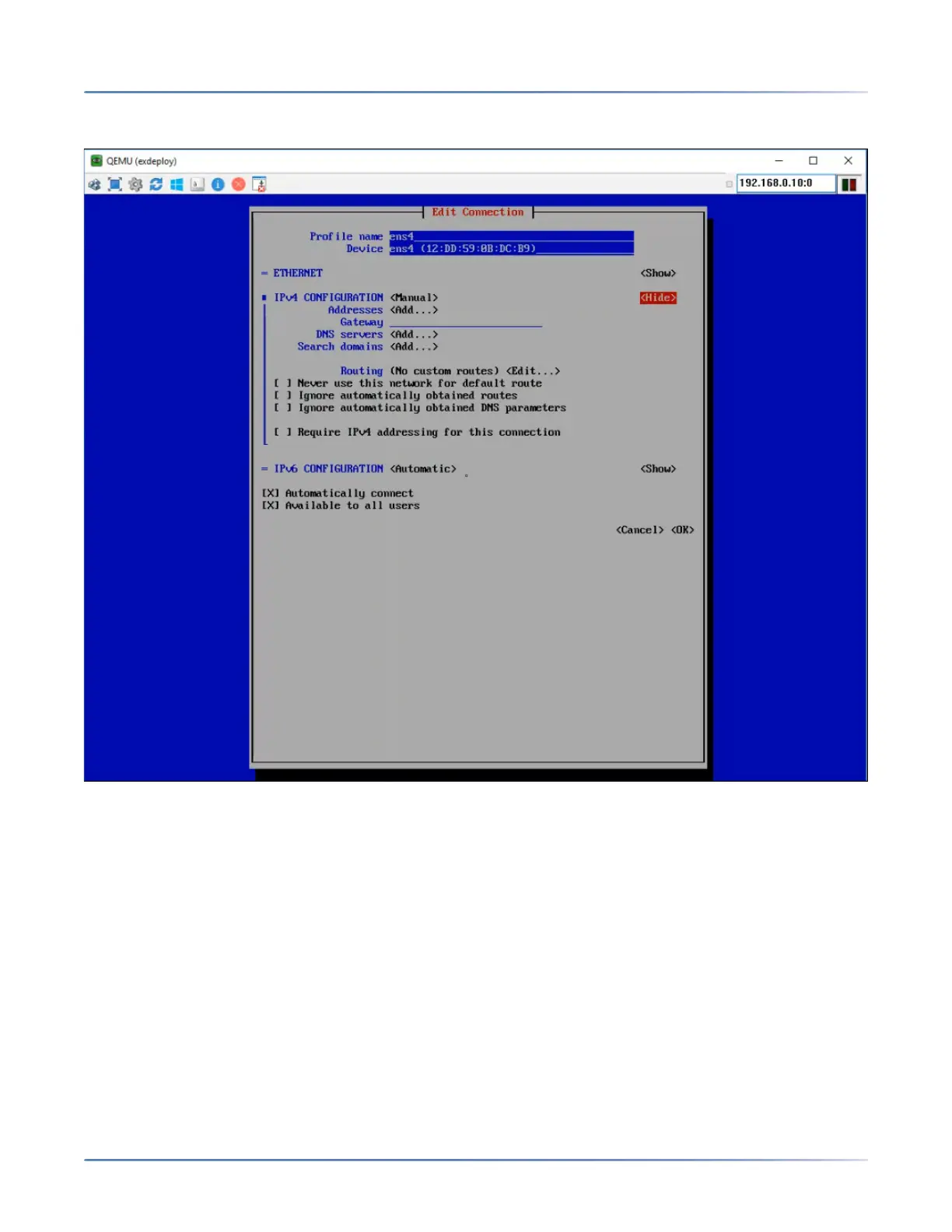
14. Select <Show> next to IPv4 CONFIGURATION, press Enter to expand the IP address configuration
section.
15. Enter the following:
a. Addresses—An available static IP address in the LAN for the Deployment Tool virtual machine.
NOTE: You can also enter a private IP address, such as 192.168.x.x, which can be accessed
by the deployment PC only through 192.168.x.x interface.
b. Gateway—Gateway IP address of the LAN.
16. Select OK and press Enter.
The Network Manager TUI screen is displayed.
17. Click Back to save the configuration.
18. Click Quit to exit the Network Manager TUI screen.
The Deployment Tool virtual machine console is displayed.
19. Restart the network stack by executing the following command at the prompt for the changes to take
effect:
咨询订购:400-010-8885、 Support@mitel.com.cn



 To Next Page