68
A
SSIGNING A STATIC IP ADDRESS MANUALLY
CHAPTER 7 APPENDIX A: ASSIGNING A STATIC IP ADDRESS TO THE EX CONTROLLER DEPLOYMENT TOOL MANUALLY
systemctl restart network
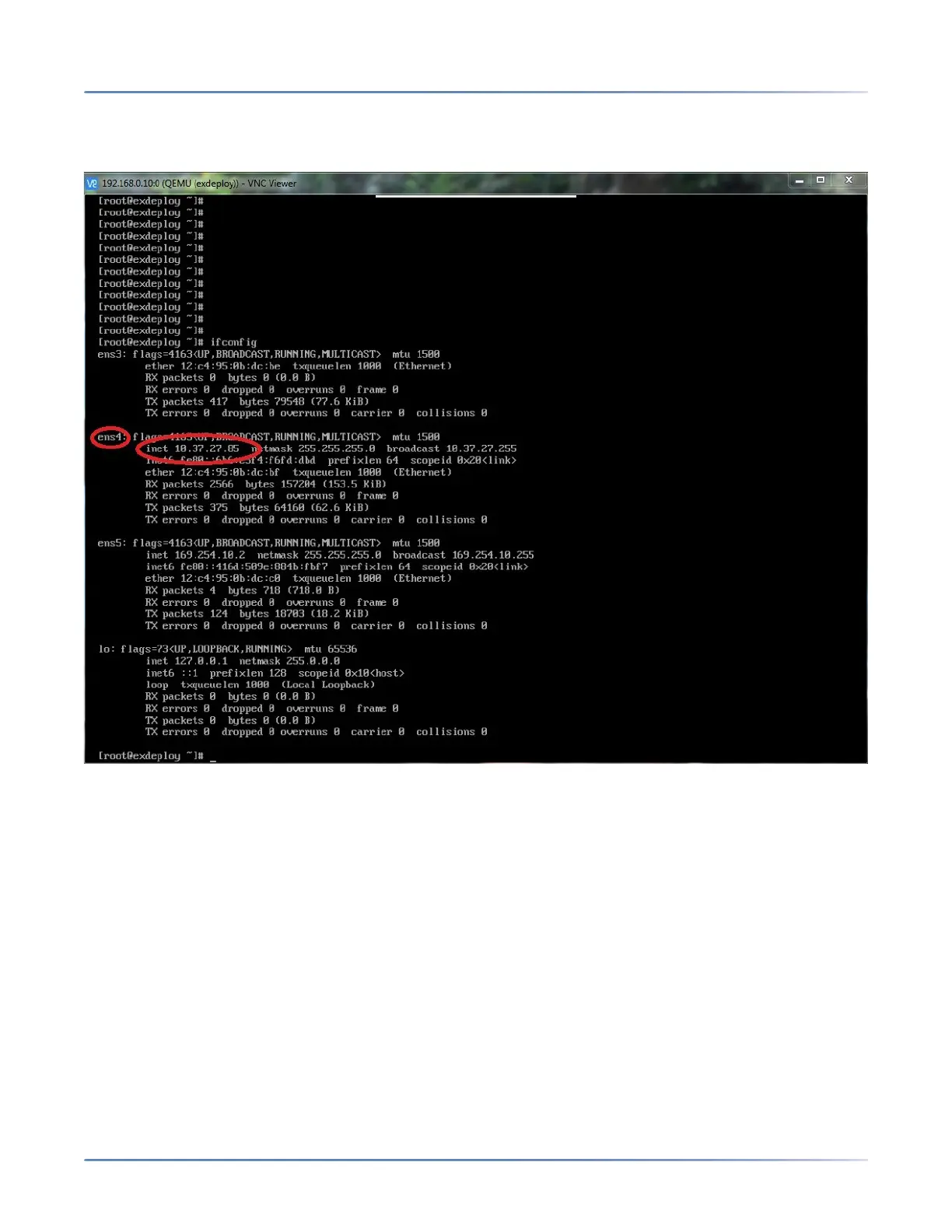
20. Verify that the Deployment Tool virtual machine has the specified static IP address. Run the ifconfig
command and verify whether the correct IP is assigned to ens4.
21. Do one of the following:
– If you have specified a static IP address from the LAN, then do the following
i. Disconnect the Ethernet connection between your deployment PC and the controller.
ii. Connect an RJ45 Ethernet cable from any one of the ETH2 to ETH5 ports of the EX
Controller to the Layer2 switch on the LAN.
iii. Revert your deployment PC’s IP scheme to Obtain an IP address automatically.
iv. Connect an RJ45 Ethernet cable from your deployment PC to the to the Layer2 switch on
the same LAN.
– If you have specified a private network address (192.168.x.x), leave the EX Controller connected to
the deployment PC.
22. Open a web browser (recommended Mozilla Firefox and Google Chrome), and type the IP address
(specified in step 15 (a)) in the address bar, and press Enter.
咨询订购:400-010-8885、 Support@mitel.com.cn



 To Next Page